<feed xmlns="http://www.w3.org/2005/Atom"><title>Morris Jobke</title><link href="https://morrisjobke.de/feed.xml" rel="self"/><link href="https://morrisjobke.de/"/><updated>2021-02-21T11:03:00+00:00</updated><id>https://morrisjobke.de/</id><author><name>Morris Jobke</name></author><generator>Hugo -- gohugo.io</generator><entry><title type="html">My experience with NixOps</title><link href="https://morrisjobke.de/2021/02/21/my-experience-with-nixops/"/><id>https://morrisjobke.de/2021/02/21/my-experience-with-nixops/</id><published>2021-02-21T11:03:00+00:00</published><updated>2021-02-21T11:03:00+00:00</updated><content type="html"><![CDATA[<p>After my <a href="/2021/01/05/first-steps-with-nixops/">initial post about NixOps</a> I gave it an in-depth try by migrating one of my servers that hosts a little private blog, a commenting system and some static website over to NixOps.</p>
<h2 id="nixos-on-scaleway-machine">NixOS on Scaleway machine</h2>
<p>First I needed to get NixOS running on my <a href="https://www.scaleway.com/">Scaleway</a> VPS. It&rsquo;s not supported out of the box but in the NixOps wiki there is a <a href="https://nixos.wiki/wiki/Install_NixOS_on_Scaleway_X86_Virtual_Cloud_Server">handy guide</a> to accomplish this. It basically boils down to place a file <code>/etc/nixos/host.nix</code> with the NixOS configuration and then use the <a href="https://github.com/elitak/nixos-infect">nixos-infext</a> script to transform the Ubuntu VM into an NixOS one by running following command:</p>
<div class="highlight"><pre tabindex="0" style="color:#f8f8f2;background-color:#272822;-moz-tab-size:4;-o-tab-size:4;tab-size:4;"><code class="language-bash" data-lang="bash"><span style="display:flex;"><span>curl https://raw.githubusercontent.com/elitak/nixos-infect/master/nixos-infect |  NIXOS_IMPORT<span style="color:#f92672">=</span>./host.nix NIX_CHANNEL<span style="color:#f92672">=</span>nixos-20.09 bash 2&gt;&amp;<span style="color:#ae81ff">1</span> | tee /tmp/infect.log
</span></span></code></pre></div><p>The machine then reboots and you have a running NixOS system.</p>
<h2 id="bootstrap-nixops">Bootstrap NixOps</h2>
<p>After that I copied the configuration in <code>/etc/nixos</code> over to the machine that runs NixOps, because it overwrites the server completely. That should be three files: <code>hardware-configuration.nix</code>, <code>host.nix</code> and <code>configuration.nix</code>. I transfered them into one file and it looks like this:</p>
<div class="highlight"><pre tabindex="0" style="color:#f8f8f2;background-color:#272822;-moz-tab-size:4;-o-tab-size:4;tab-size:4;"><code class="language-nix" data-lang="nix"><span style="display:flex;"><span>{
</span></span><span style="display:flex;"><span>  network <span style="color:#f92672">=</span> {
</span></span><span style="display:flex;"><span>    description <span style="color:#f92672">=</span> <span style="color:#e6db74">&#34;Blog&#34;</span>;
</span></span><span style="display:flex;"><span>    enableRollback <span style="color:#f92672">=</span> <span style="color:#66d9ef">true</span>;
</span></span><span style="display:flex;"><span>  };
</span></span><span style="display:flex;"><span>
</span></span><span style="display:flex;"><span>  webserver <span style="color:#f92672">=</span>
</span></span><span style="display:flex;"><span>    { config<span style="color:#f92672">,</span> pkgs<span style="color:#f92672">,</span> modulesPath<span style="color:#f92672">,</span> <span style="color:#f92672">...</span> }:
</span></span><span style="display:flex;"><span>    { nixpkgs<span style="color:#f92672">.</span>localSystem<span style="color:#f92672">.</span>system <span style="color:#f92672">=</span> <span style="color:#e6db74">&#34;x86_64-linux&#34;</span>;
</span></span><span style="display:flex;"><span>      deployment<span style="color:#f92672">.</span>targetHost <span style="color:#f92672">=</span> <span style="color:#e6db74">&#34;IP-ADDRESS&#34;</span>;
</span></span><span style="display:flex;"><span>
</span></span><span style="display:flex;"><span>      <span style="color:#75715e"># hardware-configuration.nix</span>
</span></span><span style="display:flex;"><span>      imports <span style="color:#f92672">=</span> [ (modulesPath <span style="color:#f92672">+</span> <span style="color:#e6db74">&#34;/profiles/qemu-guest.nix&#34;</span>) ];
</span></span><span style="display:flex;"><span>      boot<span style="color:#f92672">.</span>loader<span style="color:#f92672">.</span>grub<span style="color:#f92672">.</span>device <span style="color:#f92672">=</span> <span style="color:#e6db74">&#34;/dev/vda&#34;</span>;
</span></span><span style="display:flex;"><span>      fileSystems<span style="color:#f92672">.</span><span style="color:#e6db74">&#34;/&#34;</span> <span style="color:#f92672">=</span> { device <span style="color:#f92672">=</span> <span style="color:#e6db74">&#34;/dev/vda1&#34;</span>; fsType <span style="color:#f92672">=</span> <span style="color:#e6db74">&#34;ext4&#34;</span>; };
</span></span><span style="display:flex;"><span>
</span></span><span style="display:flex;"><span>      <span style="color:#75715e"># configuration.nix</span>
</span></span><span style="display:flex;"><span>      boot<span style="color:#f92672">.</span>cleanTmpDir <span style="color:#f92672">=</span> <span style="color:#66d9ef">true</span>;
</span></span><span style="display:flex;"><span>      networking<span style="color:#f92672">.</span>hostName <span style="color:#f92672">=</span> <span style="color:#e6db74">&#34;scw-practical-euler&#34;</span>;
</span></span><span style="display:flex;"><span>      networking<span style="color:#f92672">.</span>firewall<span style="color:#f92672">.</span>allowPing <span style="color:#f92672">=</span> <span style="color:#66d9ef">true</span>;
</span></span><span style="display:flex;"><span>      services<span style="color:#f92672">.</span>openssh<span style="color:#f92672">.</span>enable <span style="color:#f92672">=</span> <span style="color:#66d9ef">true</span>;
</span></span><span style="display:flex;"><span>      users<span style="color:#f92672">.</span>users<span style="color:#f92672">.</span>root<span style="color:#f92672">.</span>openssh<span style="color:#f92672">.</span>authorizedKeys<span style="color:#f92672">.</span>keys <span style="color:#f92672">=</span> [
</span></span><span style="display:flex;"><span>        <span style="color:#e6db74">&#34;ssh-ed25519 PUBLIC-KEY morris@laptop.local&#34;</span>
</span></span><span style="display:flex;"><span>      ];
</span></span><span style="display:flex;"><span>
</span></span><span style="display:flex;"><span>      <span style="color:#75715e"># host.nix</span>
</span></span><span style="display:flex;"><span>      services<span style="color:#f92672">.</span>caddy <span style="color:#f92672">=</span> {
</span></span><span style="display:flex;"><span>        enable <span style="color:#f92672">=</span> <span style="color:#66d9ef">true</span>;
</span></span><span style="display:flex;"><span>        email <span style="color:#f92672">=</span> <span style="color:#e6db74">&#34;EMAIL-ADDRESS&#34;</span>;
</span></span><span style="display:flex;"><span>        config <span style="color:#f92672">=</span> <span style="color:#e6db74">&#39;&#39;
</span></span></span><span style="display:flex;"><span><span style="color:#e6db74">          (common) {
</span></span></span><span style="display:flex;"><span><span style="color:#e6db74">            encode gzip
</span></span></span><span style="display:flex;"><span><span style="color:#e6db74">            header / -Server
</span></span></span><span style="display:flex;"><span><span style="color:#e6db74">            header / -X-Powered-By
</span></span></span><span style="display:flex;"><span><span style="color:#e6db74">          }
</span></span></span><span style="display:flex;"><span><span style="color:#e6db74">          a.test.morrisjobke.de {
</span></span></span><span style="display:flex;"><span><span style="color:#e6db74">            reverse_proxy 127.0.0.1:2368
</span></span></span><span style="display:flex;"><span><span style="color:#e6db74">          }
</span></span></span><span style="display:flex;"><span><span style="color:#e6db74">          b.test.morrisjobke.de {
</span></span></span><span style="display:flex;"><span><span style="color:#e6db74">            root * /data/http
</span></span></span><span style="display:flex;"><span><span style="color:#e6db74">            import common
</span></span></span><span style="display:flex;"><span><span style="color:#e6db74">            file_server browse
</span></span></span><span style="display:flex;"><span><span style="color:#e6db74">          }
</span></span></span><span style="display:flex;"><span><span style="color:#e6db74">        &#39;&#39;</span>;
</span></span><span style="display:flex;"><span>      };
</span></span><span style="display:flex;"><span>
</span></span><span style="display:flex;"><span>      virtualisation<span style="color:#f92672">.</span>oci-containers <span style="color:#f92672">=</span> {
</span></span><span style="display:flex;"><span>        backend <span style="color:#f92672">=</span> <span style="color:#e6db74">&#34;podman&#34;</span>;
</span></span><span style="display:flex;"><span>        containers <span style="color:#f92672">=</span> {
</span></span><span style="display:flex;"><span>          ghost <span style="color:#f92672">=</span> {
</span></span><span style="display:flex;"><span>            image <span style="color:#f92672">=</span> <span style="color:#e6db74">&#34;ghost:3-alpine&#34;</span>;
</span></span><span style="display:flex;"><span>            ports <span style="color:#f92672">=</span> [<span style="color:#e6db74">&#34;127.0.0.1:2368:2368&#34;</span>];
</span></span><span style="display:flex;"><span>            volumes <span style="color:#f92672">=</span> [
</span></span><span style="display:flex;"><span>              <span style="color:#e6db74">&#34;/data/blog:/var/lib/ghost/content&#34;</span>
</span></span><span style="display:flex;"><span>            ];
</span></span><span style="display:flex;"><span>            environment <span style="color:#f92672">=</span> {
</span></span><span style="display:flex;"><span>              url <span style="color:#f92672">=</span> <span style="color:#e6db74">&#34;https://a.test.morrisjobke.de&#34;</span>;
</span></span><span style="display:flex;"><span>            };
</span></span><span style="display:flex;"><span>          };
</span></span><span style="display:flex;"><span>        };
</span></span><span style="display:flex;"><span>      };
</span></span><span style="display:flex;"><span>
</span></span><span style="display:flex;"><span>      <span style="color:#75715e"># ... further config ...</span>
</span></span><span style="display:flex;"><span>    };
</span></span><span style="display:flex;"><span>}
</span></span></code></pre></div><h2 id="initial-deploy">Initial deploy</h2>
<p>Then one can create the server inside NixOps and deploy it:</p>
<div class="highlight"><pre tabindex="0" style="color:#f8f8f2;background-color:#272822;-moz-tab-size:4;-o-tab-size:4;tab-size:4;"><code class="language-bash" data-lang="bash"><span style="display:flex;"><span>nixops create ./scaleway-setup.nix -d scaleway-staging
</span></span><span style="display:flex;"><span>nixops deploy -d scaleway-staging
</span></span></code></pre></div><h3 id="potential-deployment-problems">Potential deployment problems</h3>
<p>On my initial deployment it had problems to build the system. That is because it does a ssh connection on the server to itself. Usually it places a public ssh key in the server configuration, but in my case it failed with something like this:</p>
<pre tabindex="0"><code>cannot build on &#39;ssh://root@12.34.56.78&#39;: cannot connect to &#39;root@12.34.56.78&#39;: Permission denied, please try again.
Received disconnect from 12.34.56.78 port 22:2: Too many authentication failures
Disconnected from 12.34.56.78 port 22
error: a &#39;x86_64-linux&#39; with features {} is required to build &#39;/nix/store/ir75vkqa6jz7scjgvn1bb7lm1p2z0wl5-kernel-modules.drv&#39;, but I am a &#39;x86_64-darwin&#39; with features {benchmark, big-parallel, nixos-test}
</code></pre><p>I looked on my NixOps host into the SQLite db at <code>~/.nixops/deployments.nixops</code> and extracted the public key (attribute with the name <code>none.sshPublicKey</code> inside the table <code>ResourceAttrs</code>) and placed it as public key for the user root (see <code>users.users.root.openssh.authorizedKeys.keys</code>).</p>
<h2 id="rollbacks">Rollbacks</h2>
<p>The option <code>network.enableRollback = true</code> allows rollbacks from within NixOps.</p>
<pre tabindex="0"><code>$ nixops list-generations -d scaleway-staging
   1   2021-02-19 20:56:40   
   2   2021-02-19 20:58:00   (current)
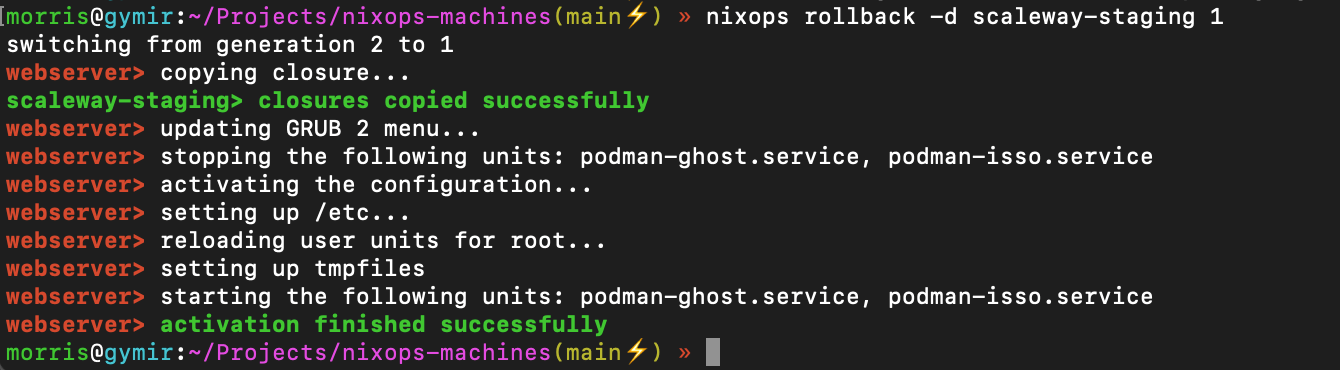
</code></pre><p>Those can be selected via <code>nixops-rollback</code>:</p>
<p><img src="/images/2021-02-21-nixops-rollback.png" alt=""></p>
<h2 id="drawbacks-of-nixops">Drawbacks of Nixops</h2>
<h3 id="secrets">Secrets</h3>
<p>If one places secrets inside the Nix configuration those will result in specific builds of those on the server itself in <code>/nix/store</code> (like <code>/nix/store/7i9f023yvfm3b03kq2khl1djh8wrpb5z-caddy-config.json</code>). All of the files in there are readable on the server by any user.</p>
<p><a href="https://releases.nixos.org/nixops/nixops-1.7/manual/manual.html#idm140737322342384">The NixOps manual also highlights</a> this and provides a way (<code>deployment.keys.&lt;name&gt;</code>) to store secrets inside a temporary file system that has proper access rights and is bundled with systemd services that indicate that those files are there so that the actual service can rely on that properly and allows tracing back why a service fails. Unfortunately that also means that a reboot of the server that is not invoked via <code>nixops</code> will result in the secrets not being available and need to be deployed again via <code>nixops</code>.</p>
<h3 id="nixpkgs-channel">Nixpkgs channel</h3>
<p>NixOps itself deploys the packages based on a channel, but it does not use the channel configured on the server, but the channel configured on the machine where NixOps runs. So you need to be careful what you run there. I configured my laptop to use the latest release, because I noticed that on MacOS by default it uses the unstable channel that then also got deployed to the server, which is most likely not wanted. I changed it from</p>
<pre tabindex="0"><code>nixpkgs https://nixos.org/channels/nixpkgs-unstable
</code></pre><p>to</p>
<pre tabindex="0"><code>nixpkgs https://nixos.org/channels/nixpkgs-20.09-darwin
</code></pre><p>via the <code>nix-channels</code> command.</p>
<p>There is an <a href="https://github.com/NixOS/nixops/issues/736">open issue on GitHub</a> about this to properly distinguish between the channels on the server and the nixops machine.</p>
<h3 id="automaticunattended-upgrades">Automatic/unattended upgrades</h3>
<p>The configuration of the system is not copied over to the server itself and therefore one cannot run <code>nixos-rebuild switch --upgrade</code> on the server. Also the <code>system.autoUpgrade.enable</code> option does not work, because it uses this command. There is an <a href="https://github.com/NixOS/nixops/issues/842">open issue on GitHub</a> about this as well.</p>
<h2 id="conclusion">Conclusion</h2>
<p>I really like to be able to quickly bootstrap a system. It allows to easily setup a staging environment that is really the same as the production one (or vice versa). Due to the drawbacks of NixOps I will look into an easier approach of managing remote machines as I barely need the majority of the features of NixOps and an <code>rsync</code> of the configuration to the server combined with an <code>nixos-rebuild</code> via <code>ssh</code> should solve 2 of the 3 drawbacks I ran into.</p>
<h2 id="useful-resources">Useful resources</h2>
<ul>
<li><a href="https://search.nixos.org/options?channel=20.09&amp;from=0&amp;size=50&amp;sort=relevance&amp;query=systemd.services.%3Cname%3E">NixOS options search</a></li>
<li><a href="https://noqqe.de/sammelsurium/nixos/">NixOS Sammelsurium by noqqe</a></li>
<li><a href="https://noqqe.de/blog/2021/02/06/nextcloud-mit-nixos-containers/">Example of using Podman (as Docker runtime alternative) by noqqe</a></li>
</ul>
]]></content></entry><entry><title type="html">Collection #2</title><link href="https://morrisjobke.de/2021/01/10/collection-2/"/><id>https://morrisjobke.de/2021/01/10/collection-2/</id><published>2021-01-10T13:01:00+00:00</published><updated>2021-01-10T13:01:00+00:00</updated><content type="html"><![CDATA[<h1 id="apple-tv-screensavers">Apple TV screensavers</h1>
<p>As the Apple TV screensavers are really beautiful I hecked how to get them to have them also on other devices. The website below provides all of them with options to download them.</p>
<p><a href="https://bzamayo.com/watch-all-the-apple-tv-aerial-video-screensavers">https://bzamayo.com/watch-all-the-apple-tv-aerial-video-screensavers</a></p>
<h1 id="undoing-a-git-bisect-mistake">Undoing a git bisect mistake</h1>
<p>If one does a long git bisect it could happen that a commit is wrongly marked as bad/good. There is a nice way to fix this and not need to manually do the already done bisecting steps again.</p>
<p>Basically this boils down to dumping the history of the bisect with <code>git bisect log</code>, then edit the wrong bisect marking, reset it with <code>git bisect reset</code> and finally replay the log via <code>git bisect replay FILE</code>.</p>
<p><a href="https://stackoverflow.com/questions/8594758/undoing-a-git-bisect-mistake#8594800">https://stackoverflow.com/questions/8594758/undoing-a-git-bisect-mistake#8594800</a></p>
<p>The log itself looks like this:</p>
<div class="highlight"><pre tabindex="0" style="color:#f8f8f2;background-color:#272822;-moz-tab-size:4;-o-tab-size:4;tab-size:4;"><code class="language-bash" data-lang="bash"><span style="display:flex;"><span>$ git bisect log
</span></span><span style="display:flex;"><span>git bisect start
</span></span><span style="display:flex;"><span><span style="color:#75715e"># good: [73c2ad293bc2ad12126fe42e8c3f3dd137bab2ab] Merge pull request #23998 from nextcloud/backport/23937/stable20</span>
</span></span><span style="display:flex;"><span>git bisect good 73c2ad293bc2ad12126fe42e8c3f3dd137bab2ab
</span></span><span style="display:flex;"><span><span style="color:#75715e"># bad: [785029d69332d83773a19c75077f25779fabd55a] Merge pull request #24424 from nextcloud/dependabot/npm_and_yarn/css-vars-ponyfill-2.4.2</span>
</span></span><span style="display:flex;"><span>git bisect bad 785029d69332d83773a19c75077f25779fabd55a
</span></span><span style="display:flex;"><span><span style="color:#75715e"># good: [e14ba58b6d2fec3702e4ad1f8445ccc74d922beb] Merge pull request #22794 from nextcloud/version/20.0.0/rc1</span>
</span></span><span style="display:flex;"><span>git bisect good e14ba58b6d2fec3702e4ad1f8445ccc74d922beb
</span></span><span style="display:flex;"><span><span style="color:#75715e"># bad: [3076eb4e9bb4006a5670aa08a2b35d2cfa42cd6c] Merge pull request #23767 from nextcloud/techdebt/noid/add-deprecated-tag-to-all-methods</span>
</span></span><span style="display:flex;"><span>git bisect bad 3076eb4e9bb4006a5670aa08a2b35d2cfa42cd6c
</span></span><span style="display:flex;"><span><span style="color:#75715e"># bad: [d51da5714b20544673aec6be3ff7fec1f67cb20b] Merge pull request #23371 from nextcloud/enhancement/psalm-typed-bootstrap-registration-context</span>
</span></span><span style="display:flex;"><span>git bisect bad d51da5714b20544673aec6be3ff7fec1f67cb20b
</span></span><span style="display:flex;"><span><span style="color:#75715e"># good: [020ba0847ba4fd8af39e9a730e3d8460cc56c9e3] Bump moment from 2.27.0 to 2.29.0</span>
</span></span><span style="display:flex;"><span>git bisect good 020ba0847ba4fd8af39e9a730e3d8460cc56c9e3
</span></span></code></pre></div><h1 id="sql-for-csvexcel-files">SQL for CSV/Excel files</h1>
<p><code>q</code> is a handy tool to run SQL-like queries on CSV or TSV files. (via <a href="https://twitter.com/danimo/status/1337363460280217604">@danimo</a>)</p>
<p><a href="https://harelba.github.io/q/">https://harelba.github.io/q/</a></p>
<h1 id="minimal-viable-search-using-postgres">Minimal Viable Search using Postgres</h1>
<p>This blog post describes how to build some quick and easy way to implement search within Postgres.</p>
<p><a href="http://www.sheshbabu.com/posts/minimal-viable-search-using-postgres/">http://www.sheshbabu.com/posts/minimal-viable-search-using-postgres/</a></p>
<p>Feedback by <a href="https://twitter.com/brainafk/status/1290897820711620608">@brainafk</a> is to maybe use a stored generated column instead of the trigger.</p>
]]></content></entry><entry><title type="html">First steps with NixOps</title><link href="https://morrisjobke.de/2021/01/05/first-steps-with-nixops/"/><id>https://morrisjobke.de/2021/01/05/first-steps-with-nixops/</id><published>2021-01-05T22:15:00+00:00</published><updated>2021-01-05T22:15:00+00:00</updated><content type="html"><![CDATA[<p>I wanted to play around a bit with <a href="https://nixos.org">NixOS</a> and <a href="https://nixos.org/nixops">NixOps</a>. Those are the notes on how I got started with it on macOS and an VM inside VirtualBox.</p>
<h2 id="requirements">Requirements</h2>
<p>You need to have <code>nixops</code> installed locally. I installed <a href="https://nixos.org">nix</a> on macOS Big Sur via <a href="https://www.philipp.haussleiter.de/2020/04/fixing-nix-setup-on-macos-catalina/">the tutorial on Philipps blog post</a> and then ran <code>nix-env -i nixops</code>.</p>
<h2 id="configuration-files">Configuration files</h2>
<p>The following two configuration files are needed for a first simple <a href="https://nixos.org/nixops">NixOps</a> setup.</p>
<p><code>trivial.nix</code></p>
<pre tabindex="0"><code>{
  network.description = &#34;Web server&#34;;

  webserver =
    { config, pkgs, ... }:
    { services.httpd.enable = true;
      services.httpd.adminAddr = &#34;alice@example.org&#34;;
      networking.firewall.allowedTCPPorts = [ 80 ];

      services.httpd.logFormat = &#34;combined&#34;;
      services.httpd.virtualHosts = {
        &#34;main&#34; = {
          documentRoot = &#34;/tmp&#34;;
        };
      };
    };
}
</code></pre><p><code>trivial-vbox.nix</code></p>
<pre tabindex="0"><code>{
  webserver =
    { config, pkgs, ... }:
    { deployment.targetEnv = &#34;virtualbox&#34;;
      deployment.virtualbox.memorySize = 1024; # megabytes
      deployment.virtualbox.vcpu = 2; # number of cpus
      deployment.virtualbox.headless = true;
    };
}
</code></pre><h2 id="deploying-it">Deploying it</h2>
<p>Create deployment:</p>
<pre tabindex="0"><code>$ nixops create ./trivial.nix ./trivial-vbox.nix -d trivial
</code></pre><p>Show deployment state:</p>
<pre tabindex="0"><code>$ nixops info -d trivial
Network name: trivial
Network UUID: 89dbba3d-4f9c-11eb-b54e-acbc32a44755
Network description: Web server
Nix expressions: /Users/morris/Projects/nixops-machines/trivial.nix /Users/morris/Projects/nixops-machines/trivial-vbox.nix

+-----------+---------+------------+-------------+------------+
| Name      |  Status | Type       | Resource Id | IP address |
+-----------+---------+------------+-------------+------------+
| webserver | Missing | virtualbox |             |            |
+-----------+---------+------------+-------------+------------+
</code></pre><p>Deploy machine (that creates the VM and deploys the NixOS configuration):</p>
<pre tabindex="0"><code>$ nixops deploy -d trivial
webserver&gt; creating VirtualBox VM...
webserver&gt; Virtual machine &#39;nixops-89dbba3d-4f9c-11eb-b54e-acbc32a44755-webserver&#39; is created and registered.
webserver&gt; UUID: db550623-f02f-4e8c-a0c8-e79ec7dee325
webserver&gt; Settings file: &#39;/Users/morris/VirtualBox VMs/nixops-89dbba3d-4f9c-11eb-b54e-acbc32a44755-webserver/nixops-89dbba3d-4f9c-11eb-b54e-acbc32a44755-webserver.vbox&#39;
webserver&gt; creating disk ‘disk1’...
webserver&gt; these derivations will be built:
webserver&gt;   /nix/store/rr7p21npwab33dyf0aph8vlkqqhvkxlk-virtualbox-nixops-19.03.172205.ea497998e4b.vmdk.xz.drv
webserver&gt;   /nix/store/sw3bp8vnc3m2cp0lfv1pfjm2kk9p9pvj-virtualbox-nixops-21.03.vmdk.drv
webserver&gt; these paths will be fetched (2.87 MiB download, 9.22 MiB unpacked):
webserver&gt;   /nix/store/01pkcbbpl13rrvgxlhcbxyfbsi88g56s-curl-7.74.0
webserver&gt;   /nix/store/1cvgyzi5hz4ni0cz5pv09frgq6lln9i4-stdenv-darwin
webserver&gt;   /nix/store/301q4qwn3rvl9b8l0c5296bgrf9hb914-curl-7.74.0-bin
webserver&gt;   /nix/store/48mk2wkwhrhpcfzsr23kbh25lkirhwih-openssl-1.1.1i-bin
...
</code></pre><p>Check the machine state:</p>
<pre tabindex="0"><code>$ nixops check -d trivial
Machines state:
+-----------+--------+-----+-----------+----------+----------------+------------------------------------------+-------+
| Name      | Exists | Up  | Reachable | Disks OK | Load avg.      | Units                                    | Notes |
+-----------+--------+-----+-----------+----------+----------------+------------------------------------------+-------+
| webserver | Yes    | Yes | Yes       | N/A      | 0.02 0.16 0.14 | ● home.mount [failed]                    |       |
|           |        |     |           |          |                |   sys-fs-fuse-connections.mount [failed] |       |
|           |        |     |           |          |                |   sys-kernel-config.mount [failed]       |       |
|           |        |     |           |          |                | ● tmp.mount [failed]                     |       |
+-----------+--------+-----+-----------+----------+----------------+------------------------------------------+-------+
Non machines resources state:
+------+--------+
| Name | Exists |
+------+--------+
+------+--------+
</code></pre><h2 id="links">Links</h2>
<ul>
<li><a href="https://releases.nixos.org/nixops/nixops-1.7/manual/manual.html">NixOps 1.7 manual</a></li>
<li><a href="https://noqqe.de/blog/2020/06/24/nixos-httpd/">Was NixOS kann - Ein Webserver-Beispiel (noqqe.de)</a></li>
<li><a href="https://www.philipp.haussleiter.de/2020/04/fixing-nix-setup-on-macos-catalina/">Fixing nix Setup on MacOS Catalina</a></li>
</ul>
]]></content></entry><entry><title type="html">Collection #1</title><link href="https://morrisjobke.de/2021/01/03/collection-1/"/><id>https://morrisjobke.de/2021/01/03/collection-1/</id><published>2021-01-03T21:12:00+00:00</published><updated>2021-01-03T21:12:00+00:00</updated><content type="html"><![CDATA[<p>From time to time I have some blog posts, tools, extensions, guides or just little code snippets I want to keep listed somewhere and share it. So this is the first of those collections and was inspired by the <a href="https://blog.kovah.de/en/collection">collections of kovah</a>.</p>
<h1 id="scriptable-ios">Scriptable (iOS)</h1>
<p>Scriptable is an iOS app that allows to run JavaScript code snippets on your iOS device. Those can be used as short cuts, siri answers or widgets.</p>
<p><a href="https://scriptable.app">https://scriptable.app</a></p>
<h1 id="dozer---hiding-macos-menu-bar-entries">Dozer - Hiding macOS menu bar entries</h1>
<p>The tool Dozer allows to hide specific macOS menu bar elements behind a little dot icon.</p>
<p><a href="https://github.com/Mortennn/Dozer/">https://github.com/Mortennn/Dozer/</a></p>
<h1 id="pxe-boot-via-edgerouter-and-freenas">PXE boot via EdgeRouter and FreeNAS</h1>
<p>Using the TFTP server in FreeNAS and the config settings from the reddit post below in an Ubiquity EdgeRouter makes booting via PXE possible.</p>
<p><a href="https://www.reddit.com/r/Ubiquiti/comments/fu71b0/edgerouter_dhcp_configuration_for_pxe_booting/fmbf0yq/">https://www.reddit.com/r/Ubiquiti/comments/fu71b0/edgerouter_dhcp_configuration_for_pxe_booting/fmbf0yq/</a></p>
<h1 id="beginners-guide-to-error-handling-in-rust">Beginner&rsquo;s guide to Error Handling in Rust</h1>
<p><a href="http://www.sheshbabu.com/posts/rust-error-handling/">http://www.sheshbabu.com/posts/rust-error-handling/</a></p>
<h1 id="php-memprof-php">php-memprof #php</h1>
<blockquote>
<p>php-memprof is a fast and accurate memory profiling extension for PHP that can be used to find the cause of memory leaks.</p>
</blockquote>
<p><a href="https://github.com/arnaud-lb/php-memory-profiler">https://github.com/arnaud-lb/php-memory-profiler</a></p>
<div class="highlight"><pre tabindex="0" style="color:#f8f8f2;background-color:#272822;-moz-tab-size:4;-o-tab-size:4;tab-size:4;"><code class="language-bash" data-lang="bash"><span style="display:flex;"><span>brew install traildb/judy/judy
</span></span><span style="display:flex;"><span>pecl install memprof
</span></span></code></pre></div><div class="highlight"><pre tabindex="0" style="color:#f8f8f2;background-color:#272822;-moz-tab-size:4;-o-tab-size:4;tab-size:4;"><code class="language-php" data-lang="php"><span style="display:flex;"><span><span style="color:#f92672">&lt;?</span><span style="color:#a6e22e">php</span>
</span></span><span style="display:flex;"><span>
</span></span><span style="display:flex;"><span><span style="color:#66d9ef">if</span> (<span style="color:#a6e22e">function_exists</span>(<span style="color:#e6db74">&#39;memprof_enabled&#39;</span>) <span style="color:#f92672">&amp;&amp;</span> <span style="color:#a6e22e">memprof_enabled</span>()) {
</span></span><span style="display:flex;"><span>	<span style="color:#a6e22e">memprof_dump_callgrind</span>(<span style="color:#a6e22e">fopen</span>(<span style="color:#e6db74">&#34;/tmp/callgrind.out&#34;</span>, <span style="color:#e6db74">&#34;w&#34;</span>));
</span></span><span style="display:flex;"><span>}
</span></span></code></pre></div><div class="highlight"><pre tabindex="0" style="color:#f8f8f2;background-color:#272822;-moz-tab-size:4;-o-tab-size:4;tab-size:4;"><code class="language-bash" data-lang="bash"><span style="display:flex;"><span>MEMPROF_PROFILE<span style="color:#f92672">=</span><span style="color:#ae81ff">1</span> php script.php
</span></span></code></pre></div>]]></content></entry><entry><title type="html">Mini PV-Anlage - Balkonkraftwerk - Steckerfertige PV-Anlage</title><link href="https://morrisjobke.de/2020/08/25/mini-photovoltaik-anlage/"/><id>https://morrisjobke.de/2020/08/25/mini-photovoltaik-anlage/</id><published>2020-08-25T19:37:00+00:00</published><updated>2020-08-25T19:37:00+00:00</updated><content type="html"><![CDATA[<p><strong>Update Juli 2022:</strong> Andreas Schmitz hat ein <a href="https://www.youtube.com/watch?v=KmGLv12huHA">19-minütiges Video</a> wie man an dieses Projekt ran geht, inklusive grober Kosten.</p>
<p><strong>Update Juni 2021:</strong> Mittlerweile gibt es auch eine Seite der <a href="https://www.verbraucherzentrale.de/wissen/energie/erneuerbare-energien/steckersolar-solarstrom-vom-balkon-direkt-in-die-steckdose-44715">Verbraucherzentrale zu dem Thema</a>.</p>
<p>Eine kleine Notizsammlung hinsichtlich Mini PV-Anlage:</p>
<h3 id="idee">Idee</h3>
<ul>
<li>Mietern die Möglichkeit bieten ihre Grundlast über Solarmodule zu reduzieren</li>
<li>Wikipedia: <a href="https://de.wikipedia.org/wiki/Solarmodul#Stecker-fertige_Solarmodule">https://de.wikipedia.org/wiki/Solarmodul#Stecker-fertige_Solarmodule</a></li>
</ul>
<h3 id="randbedingung">Randbedingung</h3>
<ul>
<li>Anlage mit maximal 600 W Leistung kann direkt vom Mieter (und nicht wie normalerweise vom Solarteur) beim Netzbetreiber angemeldet werden.</li>
<li><a href="https://www.inetz.de/startseite/erzeugungsanlagen/anschluss-und-parallelbetrieb/">Anmeldung in Chemnitz bei inetz</a>
<ul>
<li>Punkt „Zur Anmeldung von Photovoltaikanlagen“</li>
</ul>
</li>
<li><a href="https://www.inetz.de/fileadmin/dokumente/03_Erzeugeranlagen/01_Anschluss_und_Parallelbetrieb/Anmeldung_steckerfertige_PVA_022022.pdf">Formular zur Anmeldung</a></li>
<li><a href="https://www.inetz.de/fileadmin/dokumente/04_Service/Installateure/Elektro/20181128_S_BDEW_AWH_Plug_in_PV_Anlagen.pdf">inetz Verlinkt auf die BDEW Anwendungshilfe</a></li>
</ul>
<h3 id="steckverbindung">Steckverbindung</h3>
<ul>
<li>
<p>Vorraussetzung: Dichtigkeit von mindestens IP44</p>
</li>
<li>
<p>über die Steckverbindung zwischen PV-Anlage und Hausstromkreis besteht noch etwas Unklarheit, da zwei Optionen vorhanden und am Markt sind:</p>
<ul>
<li>Schutzkontaktsteckdose:
<ul>
<li>die Außensteckdose muss nicht getauscht werden bzw ist meist vorhanden</li>
<li>erfüllt typischerweise IP44</li>
<li>freiliegende Pins - jedoch muss der normkonforme Mikrowechselrichter der Solaranlage sowieso innerhalb von Millisekunden der Netztrennung abschalten, weshalb dies oft als nicht praxisrelevantes Problem gesehen wird</li>
</ul>
</li>
<li>Wieland Einspeisesteckdose (siehe <a href="https://www.wieland-electric.com/sites/default/files/2015-04-104-gesis-rst-classic-steckdose.jpg">https://www.wieland-electric.com/sites/default/files/2015-04-104-gesis-rst-classic-steckdose.jpg</a>)
<ul>
<li>Stecker sind dafür ausgelegt, dass die Pins nicht berührt werden können</li>
<li>die Außensteckdose muss durch eine Wielandsteckdose ersetzt werden</li>
</ul>
</li>
</ul>
</li>
<li>
<p>Aus <a href="https://www.pv-magazine.de/2019/11/21/legal-oder-illegal-stecker-solar-geraete-im-labyrinth-der-normung/">https://www.pv-magazine.de/2019/11/21/legal-oder-illegal-stecker-solar-geraete-im-labyrinth-der-normung/</a>:</p>
<blockquote>
<p>Ob man nicht auch die vorhandene Schukosteckdose („Typ F“) benutzen kann, wie das beispielsweise in Österreich unbestritten zulässig ist, auch darüber wird noch gestritten. Allerdings erklärte dazu kürzlich ein öffentlich bestellter und vereidigter Sachverständiger für Photovoltaik-Anlagen:
„Die VDE-AR-N 4105:2018-11 sieht unter Abschnitt 5.5.3 ‚spezielle Energiesteckdosen‘ (zum Beispiel nach VDE V 0628-1) vor. Falls ein Balkonmodul als steckbares Stromerzeugungsgerät mit Typ F Stecker (Schuko) die Anforderungen der EN 60335-1:2012 Abschnitt 22.5 und der DIN EN 60204-1 (VDE 0113-1):2007-06 Abschnitt 18.5 Schutz gegen Restspannung erfüllt, dann ist das hinter VDE-AR-N 4105:2018-11 Abschnitt 5.5.3 stehende Schutzziel als erfüllt zu betrachten.</p>
<p>Wenn ein steckbares Stromerzeugungsgerät einen integrierten NA-Schutz nach VDE-AR-N 4105 aufweist, so schaltet es ab, sobald keine Netzspannung (mehr) anliegt. Zieht man den Netzstecker des Balkonmoduls, so liegt an dessen Stecker keine Netzspannung mehr an, der NA-Schutz des Wechselrichters schaltet den Stecker spannungsfrei. Die Berührung der Steckerstifte bleibt ungefährlich.“</p>
<p>Kurz gesagt: Wenn der verwendete Wechselrichter die Anforderungen der Wechselrichternorm erfüllt, dann ist der Schukostecker genauso sicher wie der in der Norm empfohlene Spezialstecker der Firma Wieland.</p>
</blockquote>
</li>
</ul>
<h3 id="zähler">Zähler</h3>
<ul>
<li>theoretisch sollte ein Zähler mit Rücklaufsperre verbaut sein, um ein Rückwärtsdrehen zu vermeiden. Diese sind mit einem der zwei Symbole im Bild 12 auf <a href="https://www.heise.de/ct/ausgabe/2013-19-Praxiserfahrungen-mit-einer-Mini-Solaranlage-2315372.html">https://www.heise.de/ct/ausgabe/2013-19-Praxiserfahrungen-mit-einer-Mini-Solaranlage-2315372.html</a> zu sehen.</li>
<li>Auch hierzu  <a href="https://www.pv-magazine.de/2019/11/21/legal-oder-illegal-stecker-solar-geraete-im-labyrinth-der-normung/">https://www.pv-magazine.de/2019/11/21/legal-oder-illegal-stecker-solar-geraete-im-labyrinth-der-normung/</a>  - (Absatz „Aufreger Zählertausch“), die Menge des produzierten und nicht verbrauchten Stroms dürfte praktisch unterhalb der Messtoleranz eines klassischen Zählers liegen.</li>
<li>Ich werde diesbezüglich auch nochmals bei inetz anfragen, ob nicht sowieso ein Zählertausch ansteht (da bis spätestens 2032 alle Zähler auf digitale umgerüstet sein müssen und in den nächsten Jahren die letzte Phase der Haushaltsumrüstungen beginnt)</li>
</ul>
<h3 id="kosten">Kosten</h3>
<ul>
<li>Mini-PV-Anlagen inkl. Mikrowechselrichter und Anschlusskabel kosten ca. 1€ pro Watt Peakleistung (Wp). Typischerweise sind die Module um die 300 Wp ausgelegt. Das heißt eine 1 Modul-Anlage hat ~300 Wp bei einem Preis ab 300€ und eine 2 Modul-Anlage hat bei etwas unter 600 Wp (damit es in die vereinfachte Anmeldung fällt) und hat einen Preis ab 600€.</li>
</ul>
<h3 id="ertrag">Ertrag</h3>
<ul>
<li>bei senkrechter Anbringung Richtung Süden liegt der Ertrag bei 70% (siehe Tabelle in <a href="https://www.rechnerphotovoltaik.de/photovoltaik/voraussetzungen/dachausrichtung">https://www.rechnerphotovoltaik.de/photovoltaik/voraussetzungen/dachausrichtung</a>)</li>
<li>für Chemnitz liegt der durchschnittliche Ertrag pro Jahr und pro installierter kW Peak-Leistung bei 954 kWh (siehe <a href="https://photovoltaiksolarstrom.com/photovoltaiklexikon/solarertrag-staedte/">https://photovoltaiksolarstrom.com/photovoltaiklexikon/solarertrag-staedte/</a>)</li>
<li>bei 300 Wp: <code>0,3 kWp * 0,7 * 954 kWh/kWp</code> = 200 kWh, bei 600 Wp: 400 kWh</li>
</ul>
<h3 id="amortisation">Amortisation</h3>
<ul>
<li>angenommener Strompreis: 0,29 ct/kWh</li>
<li>gesparte Stromkosten, wenn 90% der erzeugten Energie direkt genutzt wird: 52 € pro Jahr</li>
<li>Mini-PV-Anlage 300 Wp mit Balkonmontagekit: ~350 € (+~50 € Versand)</li>
<li>eventuelle Zusatzkosten: Tausch der Steckdose durch Elektriker (80-150€), erhöhte Miete der Zählerstelle (Ferrariszähler liegen bei ~6-13 €, digitale Zähler mit Rücklaufsperre bei ~20€ im Jahr - siehe <a href="https://machdeinenstrom.de/welchen-stromzaehler-braucht-mein-balkonkraftwerk/">https://machdeinenstrom.de/welchen-stromzaehler-braucht-mein-balkonkraftwerk/</a>)</li>
<li>Amortisation nach rund 8 Jahren (bzw. im Fall von Zusatzkosten bei 13 Jahren)</li>
<li>Garantie auf die PV-Module und Wechselrichter: 15-25 Jahre</li>
</ul>
<h3 id="beispiele">Beispiele</h3>
<ul>
<li>dienen nur zu Anschauungszwecken und sind keine Shop-Empfehlungen:</li>
<li>von fast komplett schwarz über quadrattisch karriert bis hin zum üblichen Erscheinungsbild der größeren Rechtecke mit feinen Linien ist alles auf dem Markt zu finden</li>
<li>reine Module:
<ul>
<li><a href="https://www.photovoltaik4all.de/solarmodule-?p=1">https://www.photovoltaik4all.de/solarmodule-?p=1</a></li>
</ul>
</li>
<li>Beispiel mit Wechselrichter und Aufsteller:
<ul>
<li><a href="https://www.alpha-solar.info/Balkonkraftwerk-Canadian-Solar-325w-Befestigungsarten-versand.html">https://www.alpha-solar.info/Balkonkraftwerk-Canadian-Solar-325w-Befestigungsarten-versand.html</a></li>
<li><a href="https://volxpower.de/Stecker-PV-Anlagen">https://volxpower.de/Stecker-PV-Anlagen</a></li>
</ul>
</li>
</ul>
]]></content></entry><entry><title type="html">Word Clock - Software</title><link href="https://morrisjobke.de/2020/03/20/word-clock-software/"/><id>https://morrisjobke.de/2020/03/20/word-clock-software/</id><published>2020-03-20T18:19:00+00:00</published><updated>2020-03-20T18:19:00+00:00</updated><content type="html"><![CDATA[<p>Dies ist die Fortsetzung der Anleitung für die Word Clock. Den Hardwareteil habe ich <a href="/2020/03/19/word-clock-hardware/">hier</a> beschrieben.</p>
<p>In diesem Beitrag möchte ich auf die Software-Komponente eingehen. Der komplette Quellcode lässt sich auf <a href="https://github.com/morrisJobke/clock">Github</a> finden und ist unter MIT lizensiert.</p>
<h2 id="features">Features</h2>
<p>Ich habe einige Features im Kopf, die ich gerne in der Uhr umgesetzt haben möchte und deshalb hier beschreibe.</p>
<ul>
<li>Anzeige der Uhrzeit (Captain Obvious lässt grüßen)</li>
<li>automatisches Stellen der Uhrzeit via <a href="https://de.wikipedia.org/wiki/Network_Time_Protocol">NTP</a> (ein Protokoll für die Synchronisation der Uhrzeit) über WLAN</li>
<li>Zugriff auf das Erscheinungsbild der Uhr über eine API (z.B. Umstellen des Farbmusters, Helligkeit, &hellip;) - damit die Uhr auf äußere Einflüsse reagieren kann und sich in die Wohnung integriert</li>
<li>den aktuellen CO2 Wert meiner Netatmo Wetterstation als Farbe auf der Uhr darstellen (grün -&gt; gelb -&gt; rot)</li>
<li>die Helligkeit automatisch einstellen - hier benutze ich einen Helligkeitssensor, der in einem anderen Gerät verbaut ist. Das Gerät ist eine <a href="https://awtrixdocs.blueforcer.de/#/de-de/hardware?id=lichtsensor-zur-helligkeitsregelung-optional">AWTRIX</a>, die diesen Wert über eine MQTT-API (siehe &ldquo;Bibliotheken&rdquo;, für die Erklärung, was das ist) übermittelt.</li>
</ul>
<h2 id="open-source-sei-dank">Open Source sei Dank</h2>
<p>Da es eine große Open Source Community rund um den Mikrocontroller gibt, wollte ich so wenig wie möglich selbst bauen und auf bestehende Komponenten zurückgreifen. Folgende Bibliotheken und Werkzeuge habe ich genutzt:</p>
<h3 id="ide">IDE</h3>
<p><a href="https://www.arduino.cc/en/Main/Software">Arduino IDE</a> - dies ist die Entwicklungsumgebung, in der programmiert wird und anschließend das Programm auf den Mikrocontroller übertragen wird. Einsteigerfreundlich und recht einfach gehalten. Wer mehr möchte, sei auf <a href="https://platformio.org">PlatformIO</a> verwiesen. Sämtliche unten genannten Bibliotheken habe ich über die Arduino IDE installiert und aktualisiert. Dazu auf &ldquo;Werkzeuge&rdquo; &gt; &ldquo;Bibliotheken verwalten&rdquo; gehen, nach der Bibliothek suchen und auf &ldquo;Installieren&rdquo; klicken. Schon kann diese genutzt werden.</p>
<h3 id="unterstützung-für-den-esp8266-nachrüsten">Unterstützung für den ESP8266 nachrüsten</h3>
<p>Von Haus aus kann die Arduino IDE nicht mit dem ESP8266 umgehen. Dazu müssen Informationen zum Mikrocontroller nachgeladen werden. Dies erledigt man, indem man unter &ldquo;Einstellungen&rdquo; &gt; &ldquo;Zusätzliche Boardverwalter-URL&rdquo; <code>http://arduino.esp8266.com/stable/package_esp8266com_index.json</code> einträgt. Nun kann man unter &ldquo;Werkzeuge&rdquo; &gt; &ldquo;Board&rdquo; &gt; &ldquo;Boardverwalter&rdquo; nach &ldquo;NodeMCU&rdquo; suchen. Hier muss man nun das gefundene Paket &ldquo;esp8266&rdquo; installieren. Ist dies geschehen, kann man unter &ldquo;Werkzeuge&rdquo; &gt; &ldquo;Board&rdquo; &gt; &ldquo;NodeMCU 1.0&rdquo; auswählen und die Arduino IDE ist bereit das Programm an den Mikrocontroller zu übertragen. Der Bequemlichkeit halber würde ich noch empfehlen den &ldquo;Upload Speed&rdquo; unter &ldquo;Werkzeuge&rdquo; höher zu setzen, um bei der Übertragung nicht zu lange warten zu müssen. <code>921.600</code> hat bei mir super funktioniert.</p>
<h3 id="bibliotheken">Bibliotheken</h3>
<p>Für die einzelnen Funktionen habe ich auf einige Bibliotheken zurück gegriffen, die ich einmal kurz vorstellen möchte.</p>
<ul>
<li>
<p><a href="http://fastled.io">FastLED</a> - dies ist die wichtigste. Sie übernimmt die komfortable Steuerung der LEDs. Man kann damit angeben, was genau eingesetzt wird - unter anderen zum Beispiel der LED-Controller, die Anzahl an LEDs, die Anordnung dieser (Streifen, Matrix, &hellip;) oder die allgemeine Helligkeit. Anschließend hat man ein definiertes Interface, um die LEDs anzusteuern und gewisse Farben, Muster, Farbverläufe in einer gewissen Taktung zu erzeugen. Unter &ldquo;Datei&rdquo; &gt; &ldquo;Beispiele&rdquo; &gt; &ldquo;FastLED&rdquo; findet man auch zahlreiche fertige Code-Stückchen, die man direkt ausprobieren kann. ColorPalette ist ein schönes Beispiel und nutze ich gerne. Hier muss man nur <code>LED_PIN</code> auf &ldquo;2&rdquo; ändern, wenn man die Schaltung aus meinem Hardware-Beitrag genommen hat und gibt die Anzahl angeschlossener LEDs unter <code>NUM_LEDS</code> an und schon leuchten die LEDs nach der erfolgreichen Übertragung auf den Mikrocontroller (das wird über den Pfeil nach rechts in der Titelleiste angestoßen - vorher natürlich den Mikrocontroller per USB anstecken - alles weitere findet die Arduino IDE eigentlich selbstständig).</p>
</li>
<li>
<p><a href="https://github.com/plapointe6/EspMQTTClient">EspMQTTClient</a> - diese Bibliothek verbindet zwei meiner Ansprüche - das Verbinden zu einem WLAN und eine API. Die API sollte etwas leichtgewichtiges sein und deshalb setze ich hier auf <a href="https://de.wikipedia.org/wiki/MQTT">MQTT</a>. Dies ist ein Protokoll für das Publish-Subscribe-Pattern. Man kann Nachrichten an einen gewissen Kanal schicken und man kann Nachrichten auf einem gewissen Kanal empfangen. Dazu verbinden sich Sender und Empfänger gegen einen gemeinsamen MQTT-Server und dann können diese Nachrichten untereinander austauschen. Die Bibliothek bietet mir an WLAN Zugangsdaten und einen MQTT-Server zu hinterlegen und dann kümmert sie sich darum, dass die Verbindung bestehen bleibt. Anschließend kann ich auf Kanälen (Topics werden diese in MQTT genannt) hören, ob Nachrichten eintreffen und bei jeder eingehenden Nachricht eine Funktion ausführen, die darauf reagiert. Zum Beispiel auf einem Kanal, denn ich &ldquo;clock/brightness&rdquo; genannt habe, kann man einen Zahlenwert von 0 bis 255 schicken und die Uhr reagiert darauf, indem es via FastLED <code>FastLED.setBrightness(...);</code> diesen einstellt. Konkret sieht das <a href="https://github.com/MorrisJobke/clock/blob/c442c6784fcef633e06d05363c3c581aa10995c9/clock.ino#L106-L113">so aus</a>. Zusätzlich nutzt diese Bibliothek noch <a href="https://pubsubclient.knolleary.net">PubSubClient</a>, der auch über &ldquo;Bibliotheken installieren&rdquo; installiert werden muss.</p>
</li>
<li>
<p><a href="https://github.com/arduino-libraries/NTPClient">NTPClient</a> - wie der Name schon verrät ist dies die Bibliothek, die darauf achtet, dass die im Mikrocontroller eingebaute Uhr mit der eigentlich Uhrzeit synchronisiert ist. Dazu benötigt es ausschließlich Internetzugang (das macht ja EspMQTTClient für mich) und dann war es das auch schon.</p>
</li>
<li>
<p><a href="https://arduinojson.org">ArduinoJSON</a> - diese Bibliothek brauche ich, um <a href="https://de.wikipedia.org/wiki/JavaScript_Object_Notation">JSON</a> - ein Datenformat - zu lesen. Das Datenformat wird von AWTRIX benutzt, um Daten in MQTT zu übermitteln. Diese Daten enthalten den Helligkeitswert, den der Sensor in der AWTRIX misst. Damit konnte ich mir sparen einen Helligkeitssensor in die Uhr einzubauen. Natürlich kann man den auch direkt einbauen und dann auslesen und spart sich den Umweg über MQTT und hat das ganze autark. Falls dies gewünscht ist, kann man den Sensor genau wie in der <a href="https://awtrixdocs.blueforcer.de/#/de-de/hardware?id=lichtsensor-zur-helligkeitsregelung-optional">AWTRIX-Anleitung</a> einbauen, da ich die exakt gleiche Schaltung verwende.</p>
</li>
</ul>
<h3 id="fallstricke">Fallstricke</h3>
<p>Es gibt noch zwei Fallstricke, die es zu beachten gibt. Einerseits bin ich anfangs über folgenden Fehler in FastLED gestolpert:</p>
<pre tabindex="0"><code>error: &#39;boolean&#39; has a previous declaration as &#39;typedef bool boolean&#39;
 typedef bool boolean;
              ^
</code></pre><p>Diesen habe ich behoben, indem in die FastLED Bibliothek entsprechend angepasst habe. Die heruntergeladenen Bibliotheken finden sich normalerweise im &ldquo;Dokumente/Arduino/libraries&rdquo; Ordner des aktuellen Nutzers. Dort musste ich die Zeile 15 in <code>FastLED/platforms/esp/8266/led_sysdefs_esp8266.h</code> auskommentieren. Diese Zeile enthält <code>typedef uint8_t boolean;</code>. Danach war der Fehler gelöst. Das ganze habe ich <a href="https://github.com/FastLED/FastLED/issues/733#issuecomment-491634606">hier</a> gefunden.</p>
<p>Ein zweiter Fallstrick ist, dass &ldquo;EspMQTTClient&rdquo; standardmäßig nur Nachrichten bis zu einer Länge von 128 Bytes empfängt. Die Nachrichten von der AWTRIX sind jedoch meistens um die 200 Bytes lang. Um das zu lösen muss der Wert von 128 auf 250 gesetzt werden. Man findet das unter <code>PubSubClient/src/PubSubClient.h</code> als <code>MQTT_MAX_PACKET_SIZE</code>. Sobald der Wert geändert ist, kommen Nachrichten bis zu einer Länge von 250 Bytes an.</p>
<h2 id="aktuelle-limitierungen">Aktuelle Limitierungen</h2>
<p>Aktuell gibt es noch 2 Limitierungen des Programms. Die Sommerzeitumstellung ist noch nicht implementiert. Das heißt, man muss die Uhr via API umstellen. Die zweite ist, dass der AWTRIX Teil noch fest eingebaut ist. Man kann diesen aus dem Quellcode löschen, indem man nach <code>// TODO only include if AWTRIX is enabled</code> sucht und die folgenden Zeilen löscht.</p>
<h2 id="konfiguration">Konfiguration</h2>
<p>Um Einstellungen vorzunehmen, gibt es eine Datei, die persönliche Einstellungen enthält und damit die Uhr an die eigenen Bedürfnisse anpasst. Hierzu einfach die Datei <code>config.h.dist</code> nach <code>config.h</code> kopieren und die entsprechenden Werte ändern. Dies sind unter anderen WLAN-Name und Passwort oder die IP des MQTT-Servers. Ebenso können die MQTT-Topic-Namen geändert werden.</p>
<h2 id="api">API</h2>
<p>Die Uhr hat eine auf MQTT basierende API. Das heißt, sie verbindet sich zu einem konfigurierten MQTT-Server und lauscht dort auf gewissen Kanälen (Topics). Vom eigenen Rechner aus, kann man sich ebenfalls mit diesem Server verbinden und dann mit der Uhr interagieren. Dazu nach MQTT Client suchen - ich nutze unter macOS <a href="http://workswithweb.com/mqttbox.html">MQTT Box</a>, der auf allen Platformen läuft. Aber es gibt auch andere Clients. Der MQTT-Server selbst läuft bei mir hier auf einem Server zuhause - das ist die Software mosqitto, aber es gibt viele verschiedene <a href="https://github.com/mqtt/mqtt.github.io/wiki/brokers">MQTT-Server</a>, die alle das gleiche Protokoll sprechen.</p>
<p>Die genauen Namen der MQTT-Topics können über die Variablen in <code>config.h</code> angegeben werden.</p>
<h3 id="farbschema">Farbschema</h3>
<ul>
<li><code>MQTT_SUBSCRIBE_COLOR_PPM_TOPIC</code>: hier kann eine Ganzzahl hingeschickt werden und die Uhr wird ihr Farbschema je nach Wert anpassen. Diese entsprechen den Grenzwerten für gute, mittlere, mäßige und schlechte Luftqualität und sind bei 800, 1000 und 1400. Dafür nutzt es dann entweder lila, blau, grün-gelb oder rote Farben für die Uhr. Falls irgendwann etwas hier hin geschickt wird, bleibt die Uhr auf diesem Farbschema, bis ein neuer Wert geschickt wird, die Uhr neu gestartet wird oder etwas zu <code>MQTT_SUBSCRIBE_COLOR_RAINBOW_TOPIC</code> geschickt wird.</li>
<li><code>MQTT_SUBSCRIBE_COLOR_RAINBOW_TOPIC</code>: hier kann etwas beliebiges hingeschickt werden und die Uhr wird sich auf das Regenbogen-Farbschema zurück stellen.</li>
</ul>
<h3 id="uhrmodus-und-alle-leds-aktivieren">Uhrmodus und Alle LEDs aktivieren</h3>
<ul>
<li><code>MQTT_SUBSCRIBE_VIEW_FULL_TOPIC</code>: wenn etwas hier hin geschickt wird, werden alle LEDs der Uhr angesteuert und nicht nur die, der aktuellen Uhrzeit</li>
<li><code>MQTT_SUBSCRIBE_VIEW_TIME_TOPIC</code>: wenn etwas hier hin geschickt wird, werden wieder nur die LEDs angesteuert, die die aktuelle Uhrzeit repräsentieren</li>
</ul>
<h3 id="helligkeit">Helligkeit</h3>
<ul>
<li><code>MQTT_SUBSCRIBE_BRIGHTNESS_TOPIC</code>: hier kann ein Wert zwischen 0 (LEDs aus) und 255 (volle Helligkeit) geschickt werden und die Uhr setzt das um</li>
</ul>
<h3 id="zeitverschiebung">Zeitverschiebung</h3>
<ul>
<li><code>MQTT_SUBSCRIBE_OFFSET_TOPIC</code>: hier kann eine Zeitverschiebung in Sekunden geschickt werden, die die Verschiebung zur UTC-Zeit (das ist GMT in der Normalzeit) angibt. Für Deutschland müsste man im Winter 3600 und im Sommer 7200 setzen. (siehe Limitierungen oben - die Uhr kann noch nicht automatisch zwischen Sommer- und Winterzeit wechseln)</li>
</ul>
<p>Das wäre es dann. Viel Spaß beim Ausprobieren und lasst mich wissen, falls ihr Fragen habt. :)</p>
]]></content></entry><entry><title type="html">Word Clock - Hardware</title><link href="https://morrisjobke.de/2020/03/19/word-clock-hardware/"/><id>https://morrisjobke.de/2020/03/19/word-clock-hardware/</id><published>2020-03-19T19:33:00+00:00</published><updated>2020-03-19T19:33:00+00:00</updated><content type="html"><![CDATA[<p>Ein kleiner Spoiler am Anfang - so wird es einmal aussehen:</p>
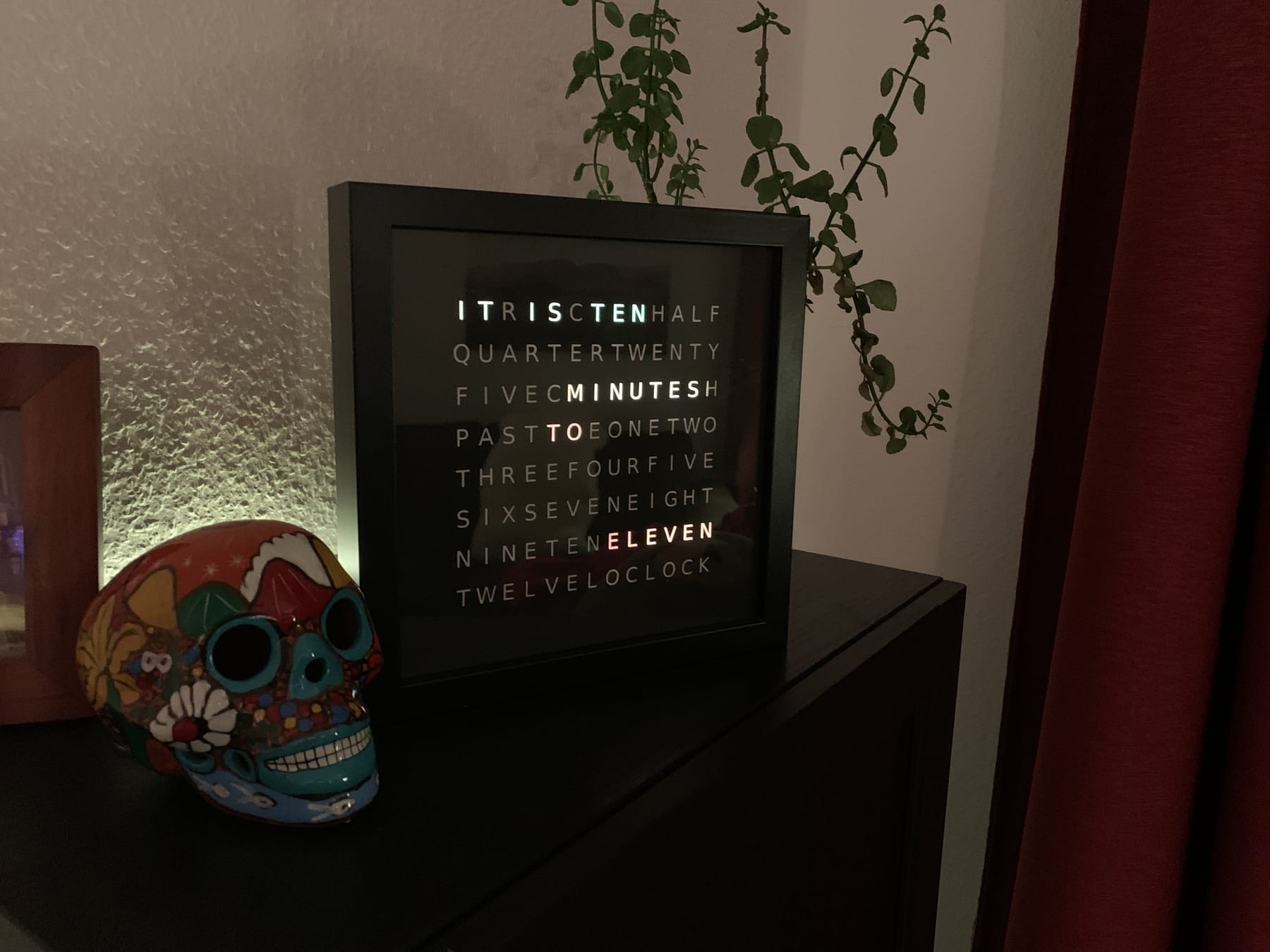
<p><img src="/images/2020-03-19-word-clock.jpg" alt="Fertige Word Clock"></p>
<p>Ich wollte schon immer eine Word Clock mein eigen nennen. Dazu dachte ich mir, dass man sich das einfach kauft und gut ist. Leider haben mich damals™ (es war Mitte 2015) die Preise im oberen dreistelligen Preisbereich abgeschreckt. Ich habe also nach Selbstbaulösungen gesucht und einige auf Instructables.com gefunden. Hauptsächlich inspiriert hat mich die Anleitung <a href="https://www.instructables.com/id/Sleek-word-clock/">Sleek Word Clock</a> und ich kaufte also einige handvoll LEDs, Widerstände und ICs (z.B. Schieberegister-ICs).</p>
<h2 id="der-rahmen-und-die-buchstabenblende">Der Rahmen und die Buchstabenblende</h2>
<p>Als Grundgerüst diente ein schwarzer <a href="https://www.ikea.com/de/de/p/ribba-rahmen-schwarz-40378401/">IKEA Rahmen Ribba</a>. Dieser ist quadratisch, recht tief und bietet damit auch Platz für die Elektronik.</p>
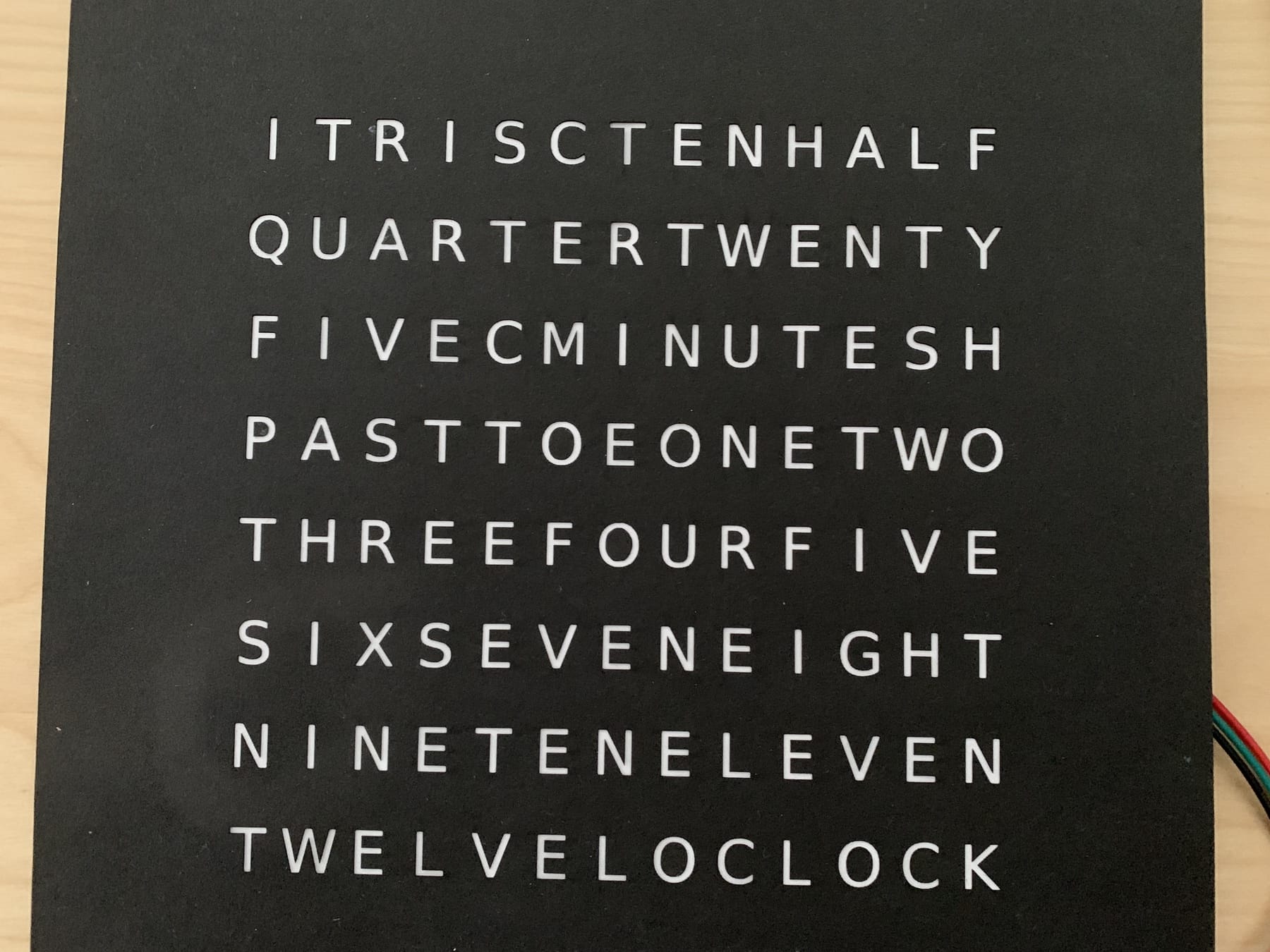
<p>Als nächstes musste die Blende für die Buchstaben entstehen. Ich habe dazu viel gelesen und hatte bereits Bedenken, dass ich Stunden damit verbringen werde diese irgendwie mit einem Messer aus Pappe auszuschneiden. Dann suchte ich jedoch noch einmal nach Lasercuttern in meiner Umgebung und wurde tatsächlich fündig. Es gibt ein <a href="https://fablabchemnitz.de">Fablab in Chemnitz</a>, welches auch einen Lasercutter hat. Also setzte ich mich daran die Buchstaben für die Uhr zusammen zustellen. Dies habe ich einmal als [SVG](/f/Word Clock English.svg) (für den Lasercutter) und als [PDF](/f/Word Clock English A4.pdf) (zum Ausdrucken bei 100% um eine Orientierungshilfe zu haben). Im Bastelladen des Vertrauens findet man recht leicht schwarzes, dickeres Papier in A3. A3 wird hier benötigt, da der Bilderrahmen 23x23 cm groß ist und somit 2 cm zu breit für die schmale Seite von A4 ist.</p>
<p><img src="/images/2020-03-19-words.jpg" alt="Papierblende"></p>
<p>Die Buchstabenblende habe ich dann von hinten mit einem weißen Blatt Papier beklebt und damit ist dieser Teil fertig.</p>
<h2 id="die-leds-und-deren-steuerung">Die LEDs und deren Steuerung</h2>
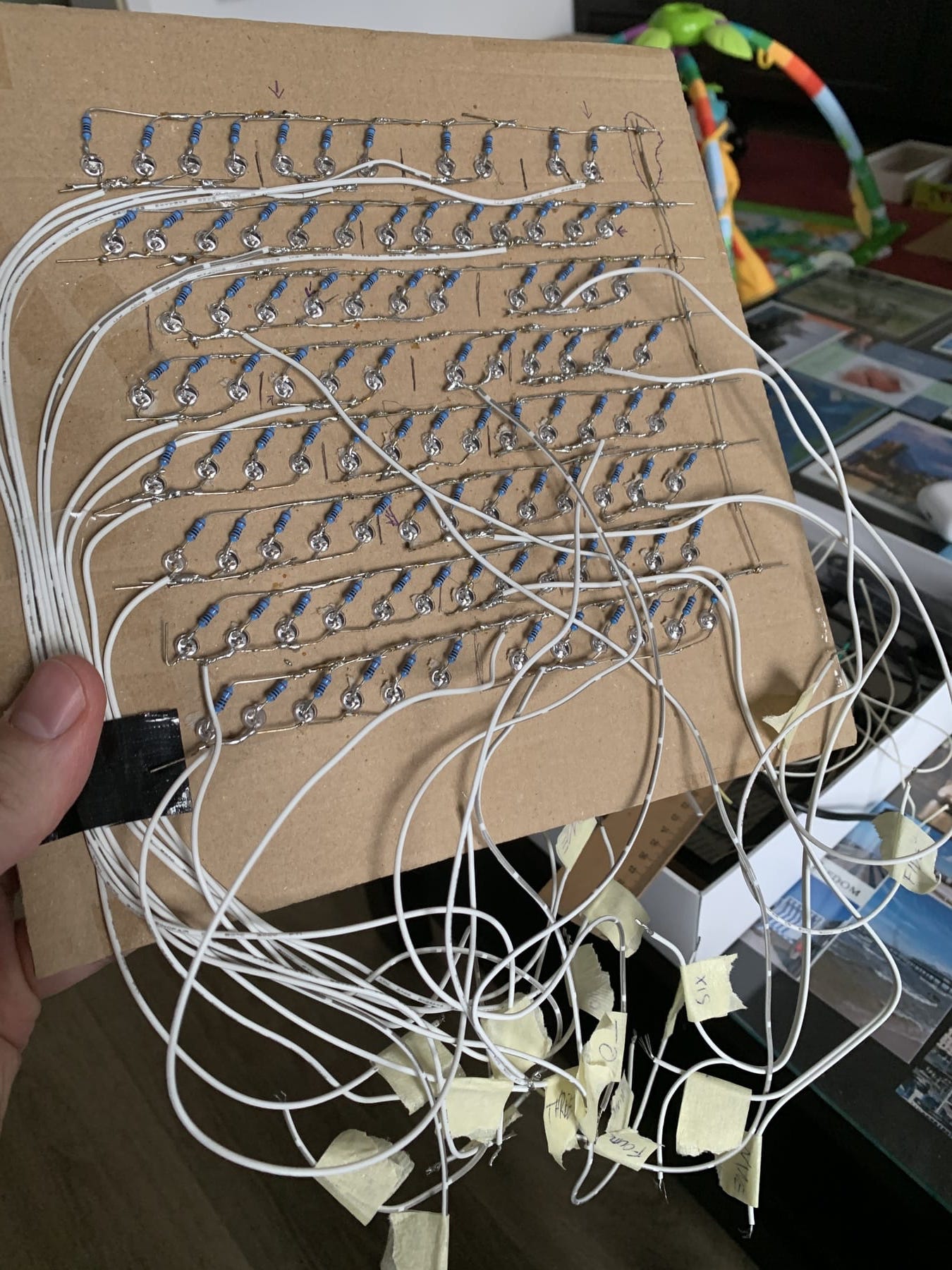
<p>Dann ging es an die LEDs. Ich habe also ganz viele LEDs mit Widerständen versehen und lange gelötet. Anschließend alles getestet dieser Teil funktionierte soweit. Nun ging es daran aus den ICs den Digital-zu-Analog-Wandler für die einzelnen LED-Segmente zu bauen und es war zum Haare raufen. Nichts funktionierte, wie es sollte und meine Frustgrenze war erreicht. Das Projekt landete in der Ecke und blieb dort erst einmal.</p>
<p><img src="/images/2020-03-19-old-way.jpg" alt="Einzelne LEDs"></p>
<h2 id="die-rettung-led-stripes-mit-ws2812b">Die Rettung: LED-Stripes mit WS2812B</h2>
<p>Nachdem das Projekt Jahre in der Ecke lag, stolperte ich über ein Projekt namens <a href="https://awtrixdocs.blueforcer.de/">AWTRIX</a>, welches eine LED-Matrix über einen ESP8266 ansteuert. Das mag jetzt erstmal unverständlich klingen, aber lasst es mich erklären.</p>
<p>Mittlerweile gibt es auf diversen Online-Kaufportalen eine Vielzahl an LED-Beleuchtungsmitteln. Wenn man jetzt nach WS2812B und LED sucht, dann findet man hauptsächlich Streifen mit RGB-LEDs. Es gibt jedoch auch andere Formen wie eine Matrix (in der Tat nur ein Streifen im Zig-Zag-Muster gelegt) oder Ringe. Diese zeichnen sich alle dadurch aus, dass man sie mittels 5V betreiben und mit einem einzigen Daten-Kanal steuern kann. Das ganze kann man dann über einen Mikrocontroller steuern, da eben nur ein Daten-Kanal gebraucht wird.</p>
<p>Als Mikrocontroller bietet sich hier ein <a href="https://de.wikipedia.org/wiki/ESP8266">ESP8266</a> an. Dieser ist recht klein und hat ein eingebautes WLAN-Modul, womit man das ganze Projekt auch etwas dynamischer einbinden kann.</p>
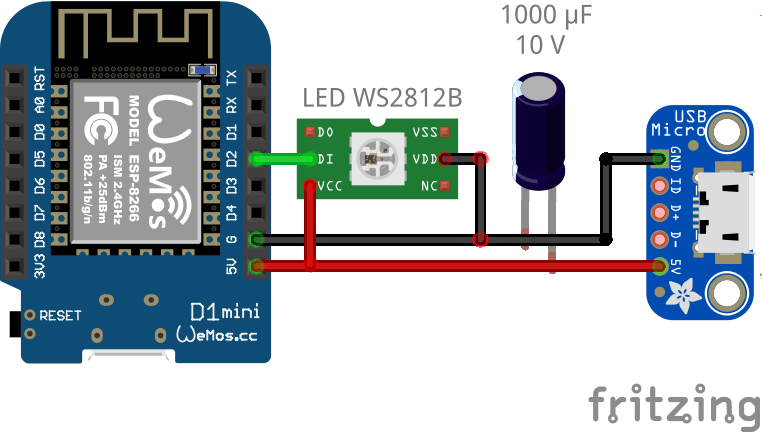
<p>Oben erwähntes AWTRIX-Projekt nutzte genau <a href="https://awtrixdocs.blueforcer.de/#/de-de/hardware?id=basis-variante">diese Komponenten</a> zusammen mit einem Mikro-USB-Breakout-Board und einem Kondensator. Das reduziert die Lötarbeit auf ein Minimum und sieht dann als Schaltung so aus:</p>
<p><img src="/images/2020-03-19-layout.png" alt="Schaltung"></p>
<h2 id="layout-der-leds">Layout der LEDs</h2>
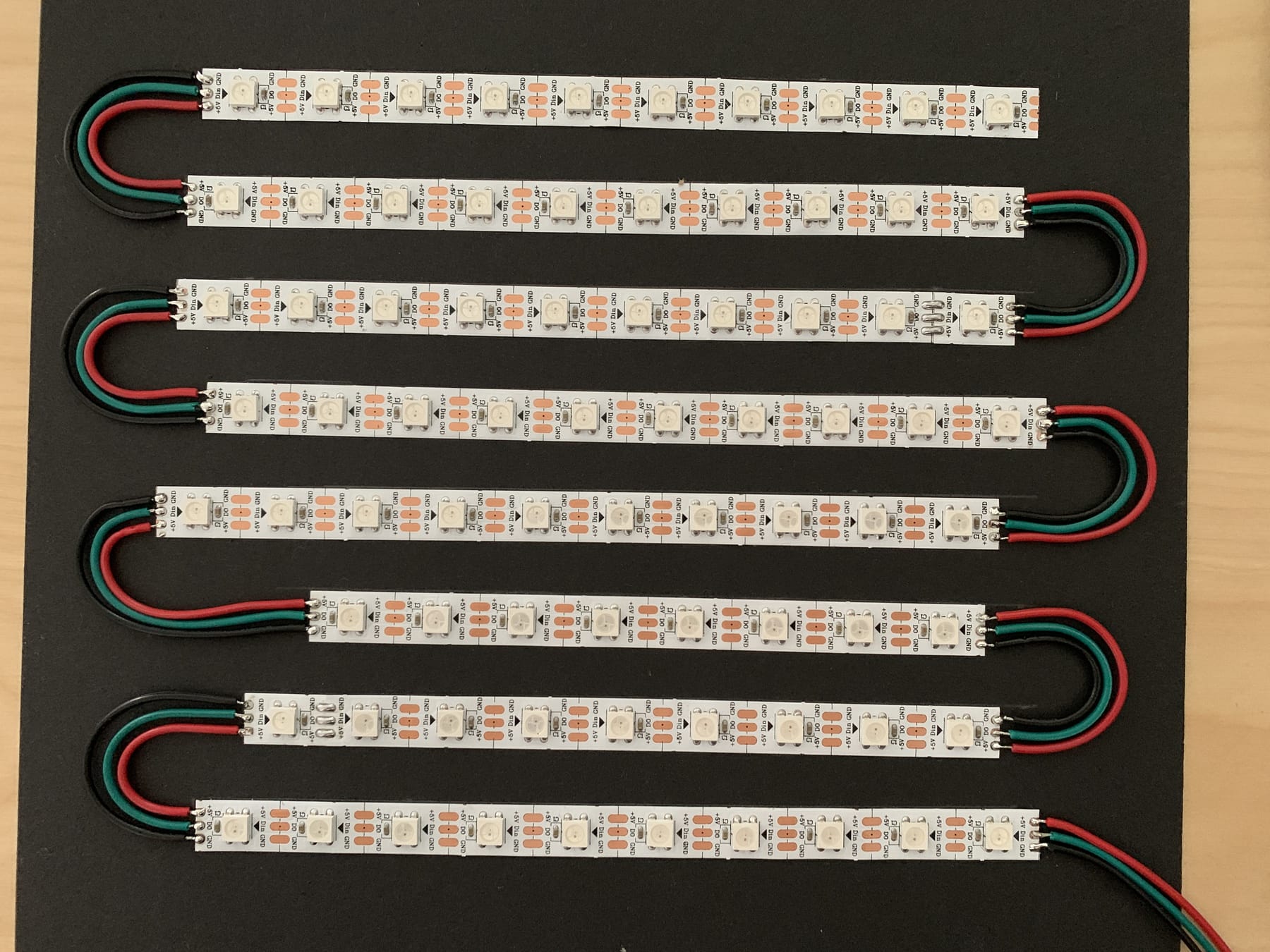
<p>Da die LED-Streifen leider nicht exakt so ausgelegt sind, dass sie den bisherigen Buchstabenabstand genau treffen, habe ich mich für die Variante entschieden, die 60 LEDs pro Meter besitzt. Dies war für mich ein recht passender Kompromiss. Ich habe dann versucht die LEDs so anzuordnen, dass die Trennung der Wörter nicht auf eine LED fällt und bin am Ende auf 9 bis 10 LEDs pro Reihe gekommen. Jede Reihe besitzt 13 Buchstaben, womit ich nicht jeden Buchstaben einzeln ansteuern kann, aber ich brauche ja nur Wörter einzeln ansteuern zu können.</p>
<p><img src="/images/2020-03-19-led-stripes.jpg" alt="LED Reihen"></p>
<p>In dem Bild ist die dritte Reihe von unten noch unvollständig. Ich habe mich da irgendwie vertan und schlussendlich noch links eine weitere LED eingefügt.</p>
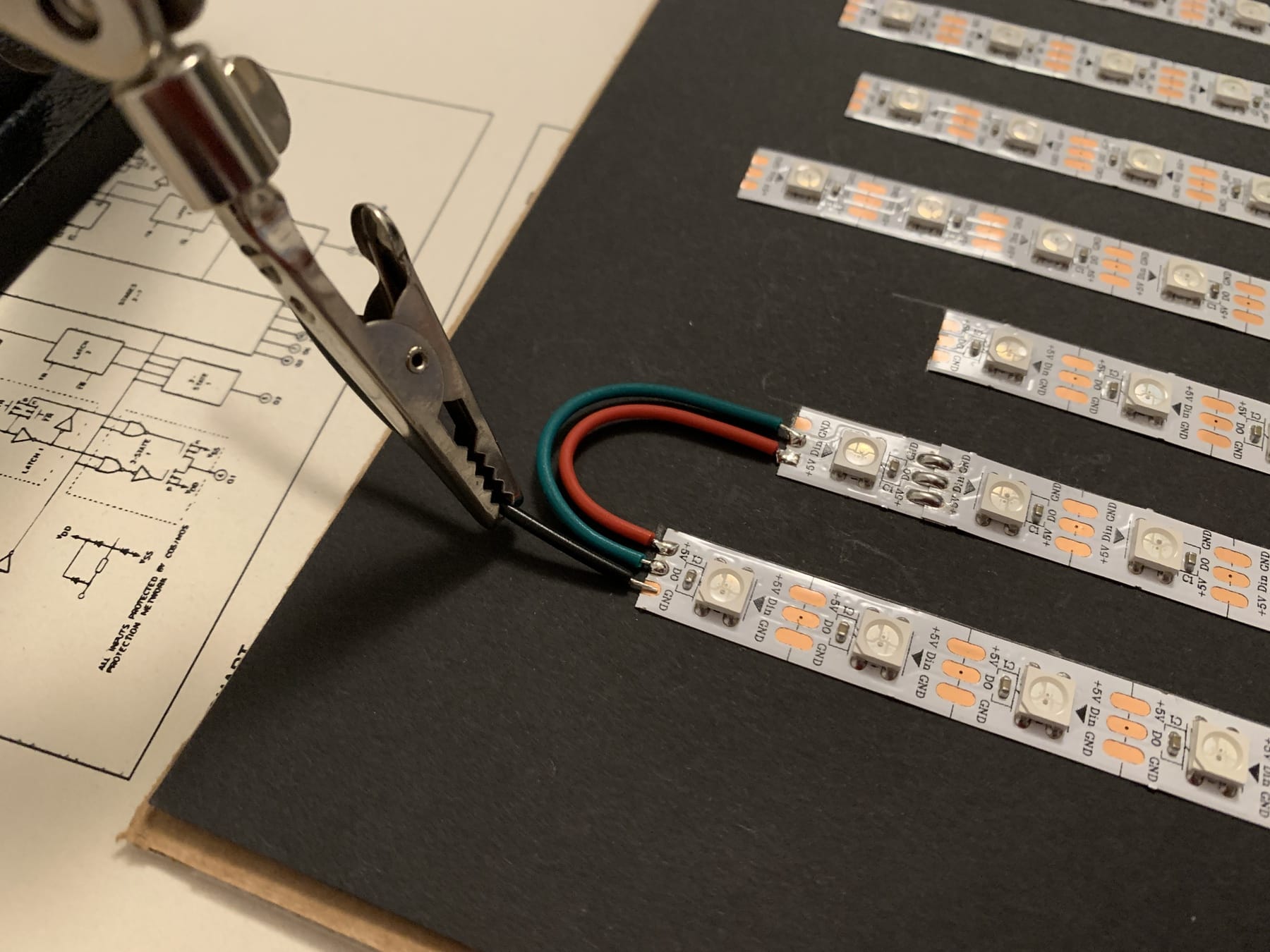
<p>Die LED-Streifen lassen sich leicht handhaben, da man sie zwischen jeder LED trennen kann und dann lediglich die drei Kontakte wieder verbinden muss.</p>
<p><img src="/images/2020-03-19-connecting-stripes.jpg" alt="LED Reihen verbinden"></p>
<p>Es bietet sich hierbei an einige verschiedenfarbige Kabel zu haben, damit man ein einheitliches Farbschema hat, um sich Fehler bei der Verkabelung zu ersparen. Ebenso kann ich eine Abisolierzange nur empfehlen.</p>
<h2 id="worttrennungen">Worttrennungen</h2>
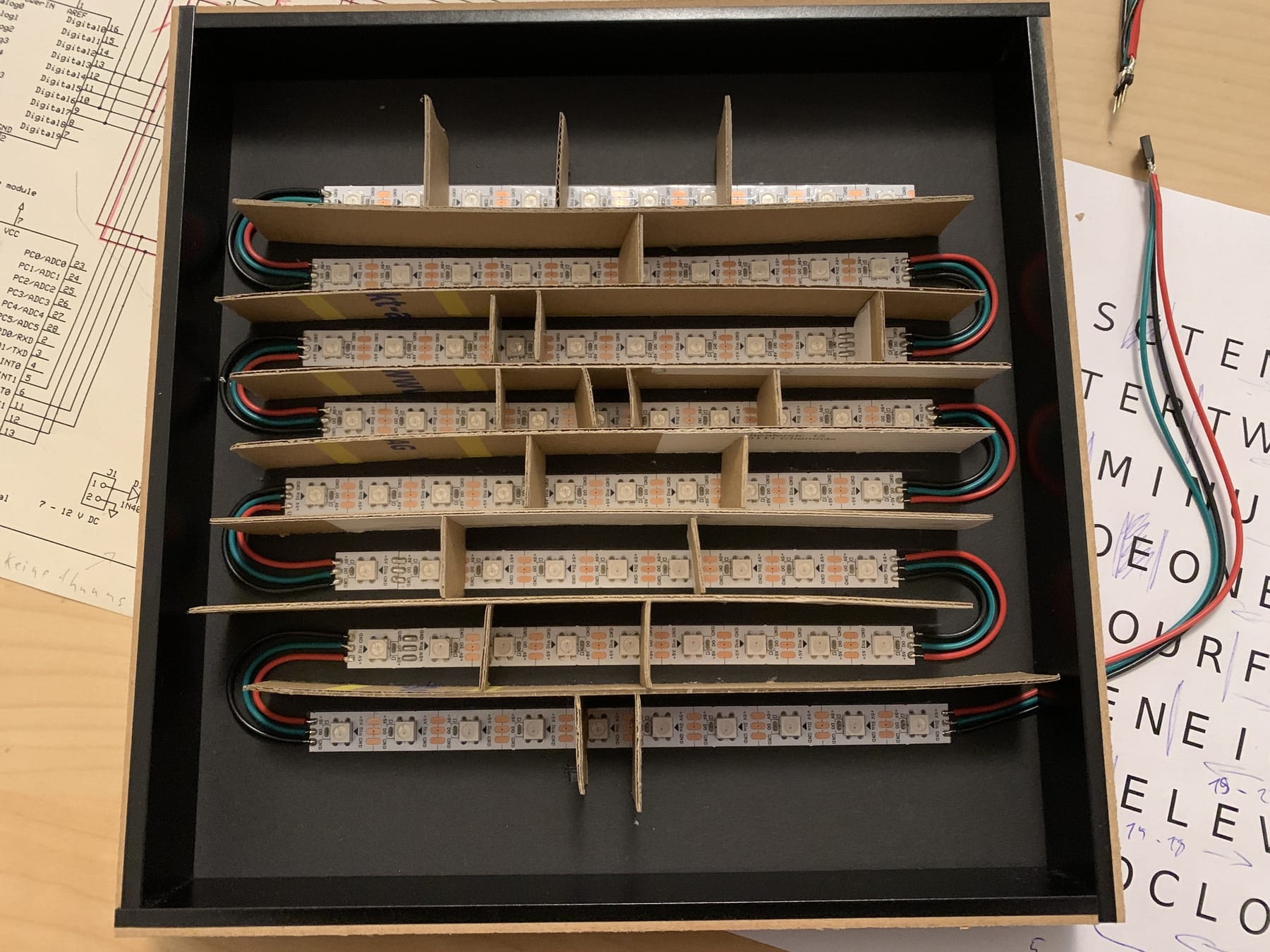
<p>Im Anschluss habe ich noch Trennwände gebastelt. Dazu habe ich Pappe in 25 mm breite Streifen geschnitten und von unten nach oben zwischen die LED-Reihen geklebt. Dabei habe ich die Worttrennungen noch auf jeder Reihe hinzugefügt. Einzelne Füllbuchstaben, die zu keinem Wort gehören, habe ich auch abgetrennt und kann diese ebenfalls einzeln ansteuern.</p>
<p><img src="/images/2020-03-19-separate-words.jpg" alt="Trennwände"></p>
<p>Leider funktionierte das aufgrund der LED-Dichte für die oberste Reihe nicht. Dort musste ich das R und das C von hinten zukleben.</p>
<p><img src="/images/2020-03-19-hide-them.jpg" alt="Zugeklebte Buchstaben"></p>
<h2 id="ab-in-den-rahmen">Ab in den Rahmen</h2>
<p>Zum Schluss habe ich noch ein Loch in die Rückwand des Bilderrahmens geschnitten, damit ich das Anschlusskabel heraus führen konnte.</p>
<p><img src="/images/2020-03-19-way-out.jpg" alt="Anschlusskabel"></p>
<p>Zwischen LED-Streifen und der Schaltung habe ich einen kleinen Steckverbinder eingebaut, damit ich beides einfach trennen kann. Dies erleichtert vor allem während des Testens vieles.</p>
<p><img src="/images/2020-03-19-connector.jpg" alt="Steckverbinder"></p>
<p>Den Mikrocontroller sowie das USB-Breakout-Board habe ich auf die Rückseite des Rahmens geschraubt, da dieser nicht an der Wand hängt, sondern frei steht. Bei Bedarf kann man diese Teile jedoch auch ins Innere verlegen und nur das USB-Kabel heraus führen.</p>
<p><img src="/images/2020-03-19-electronics.jpg" alt="Mikrocontroller und USB-Breakout-Board"></p>
<p>Für den Stromanschluss kann man nun ein Micro-USB-Kabel sowie ein herkömmliches USB-Netzteil verwenden. Achtet hier bitte darauf, dass das Netzteil ausreichend dimensioniert ist. Wenn alle LEDs auf voller Helligkeit leuchten könnten sie sonst das Netzteil überlasten. Die genauen Werte könnt ihr dem Datenblatt des LED-Streifens entnehmen.</p>
<p>Ein Blog-Post zur Software wird noch folgen. <strong>Edit:</strong> <a href="/2020/03/20/word-clock-software/">hier ist er</a></p>
<p>Viel Spaß beim Basteln :)</p>
]]></content></entry><entry><title type="html">Wurmfarm</title><link href="https://morrisjobke.de/2020/02/13/wurmfarm/"/><id>https://morrisjobke.de/2020/02/13/wurmfarm/</id><published>2020-02-13T20:26:00+00:00</published><updated>2020-02-13T20:26:00+00:00</updated><content type="html"><![CDATA[<p>In den letzten Tagen habe ich mich etwas mit dem Thema <a href="https://de.wikipedia.org/wiki/Wurmkompostierung">Wurmfarm</a> auseinander gesetzt. Ich bin auf viele Interessante Seiten gestoßen, die ich hier kurz zusammenfassen und verlinken möchte.</p>
<ul>
<li><a href="https://www.wurmwelten.de/wurmkisten/">kurze Übersicht und Beschreibung des Aufbaus einer Wurmkiste</a></li>
<li><a href="https://www.selbst.de/wurmkiste-39572.html">Bauanleitung für eine Zweiteilige Wurmkiste aus IKEA Boxen</a> - hier ist auch noch ein schönes Schema aufgezeichnet und jeder Schritt ist bebildert</li>
<li><a href="http://www.kompostherstellung.de/wurmbox-wurmfarm-fuer-unter-20e-selbst-bauen/">Schritt für Schritt Anleitung für eine sehr günstige Version aus 3 Plastik-Boxen</a> - diese werde ich im ersten Versuch bauen und meine Erfahrungen sammeln</li>
<li><a href="http://www.kompostherstellung.de/anleitung-zum-betreiben-einer-wurmfarm/">Anleitung zum Betreiben der Wurmkiste</a> - schöne Übersicht über die Rahmenbedingungen sowie die gesamte Handhabung inklusive einigen Daumenregeln für die Dimensionierung der Kiste, Futtermenge und Ernte</li>
<li><a href="https://www1.wdr.de/radio/wdr4/wort/drinnen-und-draussen/wurmkiste-114.pdf">Anleitung für je eine Plastik-, Blumentopf- sowie Holzkiste vom WDR</a> - die Plastikversion nutzt ebenfalls Boxen von IKEA</li>
<li><a href="http://www.kompostherstellung.de/wurmbox-vorbereiten-und-kompostwuermer-einsetzten/">Anleitung zur ersten Befüllung der Wurmkiste</a></li>
</ul>
<h3 id="meine-wurmkiste">Meine Wurmkiste</h3>
<p>Ich werde mir eine Kiste aus 3 IKEA <a href="https://www.ikea.com/de/de/p/gles-box-schwarz-60429287/">Gles</a> Boxen mit einem Samla Deckel bauen. Eventuell hole ich noch einen Regentonnen-Hahn zum einfachen Ablassen des Wurmtees.</p>
<p>Die Würmer habe ich bei <a href="https://wurmwelten.de/shop/eisenia-dendros-wuermer.html">wurmwelten.de</a> bestellt. Da es verschiedene Angaben zur Menge der Würmer (von 150  Würmern pro 10 l Wurmkiste bis hin zu 1000 Würmern pro m<!-- raw HTML omitted -->3<!-- raw HTML omitted -->) habe ich mich für die Angabe von <a href="http://www.kompostherstellung.de/wurmbox-vorbereiten-und-kompostwuermer-einsetzten/">kompostherstellung.de</a>, gehalten. Das heißt ich habe mir 500 Würmer bestellt.</p>
<p>Und jetzt heißt es ausprobieren und lernen, wie das Ganze sich im Alltag bewährt.</p>
]]></content></entry><entry><title type="html">CouchDB - filtered replication by example</title><link href="https://morrisjobke.de/2018/10/31/couchdb-replication/"/><id>https://morrisjobke.de/2018/10/31/couchdb-replication/</id><published>2018-10-31T21:53:00+00:00</published><updated>2018-10-31T21:53:00+00:00</updated><content type="html"><![CDATA[<p>I just want to document what is needed to get a filtered replication between two databases inside CouchDB 2.2.0 up and running. I spend quite some time figuring it out and couldn&rsquo;t find any useful resource that sums it up.</p>
<p>I used capital cased names where specific names need to be placed - if there is the same placeholder it needs to be the same name.</p>
<p>The goal is to replicate <code>SOURCE_DATABASE</code> to <code>TARGET_DATABASE</code> while applying a filter function that is named <code>DESIGNDOCUMENT/NAME</code>. The filter function in the example checks if the attribute <code>_id</code> starts with <code>abc</code>.</p>
<p>First we create a document that describes the filter. This document is a design document and needs to be placed in the source database under <code>/SOURCE_DATABASE/_design/DESIGNDOCUMENT</code>:</p>
<div class="highlight"><pre tabindex="0" style="color:#f8f8f2;background-color:#272822;-moz-tab-size:4;-o-tab-size:4;tab-size:4;"><code class="language-json" data-lang="json"><span style="display:flex;"><span>{
</span></span><span style="display:flex;"><span>  <span style="color:#f92672">&#34;_id&#34;</span>: <span style="color:#e6db74">&#34;_design/DESIGNDOCUMENT&#34;</span>,
</span></span><span style="display:flex;"><span>  <span style="color:#f92672">&#34;filters&#34;</span>: {
</span></span><span style="display:flex;"><span>    <span style="color:#f92672">&#34;NAME&#34;</span>: <span style="color:#e6db74">&#34;function(doc, req) { if (doc._id.substr(0, 3) === &#39;abc&#39;) { return true; } return false; }&#34;</span>
</span></span><span style="display:flex;"><span>  }
</span></span><span style="display:flex;"><span>}
</span></span></code></pre></div><p>To actually test the filter I used a query against the <code>/_changes</code> endpoint of the database:</p>
<div class="highlight"><pre tabindex="0" style="color:#f8f8f2;background-color:#272822;-moz-tab-size:4;-o-tab-size:4;tab-size:4;"><code class="language-bash" data-lang="bash"><span style="display:flex;"><span>$ curl <span style="color:#e6db74">&#34;http://DOMAIN:5984/SOURCE_DATABASE/_changes?filter=DESIGNDOCUMENT%2FNAME&amp;feed=normal&amp;style=all_docs&amp;since=0&amp;timeout=10000&#34;</span>
</span></span></code></pre></div><p>This shows the output and potential errors in the JavaScript code of the filter.</p>
<p>For the actual replication you need to create following documents in the <code>_replicator</code> database for the one time replication of existing documents:</p>
<div class="highlight"><pre tabindex="0" style="color:#f8f8f2;background-color:#272822;-moz-tab-size:4;-o-tab-size:4;tab-size:4;"><code class="language-json" data-lang="json"><span style="display:flex;"><span>{
</span></span><span style="display:flex;"><span>  <span style="color:#f92672">&#34;_id&#34;</span>: <span style="color:#e6db74">&#34;ID&#34;</span>,
</span></span><span style="display:flex;"><span>  <span style="color:#f92672">&#34;source&#34;</span>: <span style="color:#e6db74">&#34;http://DOMAIN:5984/SOURCE_DATABASE&#34;</span>,
</span></span><span style="display:flex;"><span>  <span style="color:#f92672">&#34;target&#34;</span>: <span style="color:#e6db74">&#34;http://DOMAIN:5984/TARGET_DATABASE&#34;</span>,
</span></span><span style="display:flex;"><span>  <span style="color:#f92672">&#34;filter&#34;</span>: <span style="color:#e6db74">&#34;DESIGNDOCUMENT/NAME&#34;</span>
</span></span><span style="display:flex;"><span>}
</span></span></code></pre></div><p>And I created a continuous replication document as well:</p>
<div class="highlight"><pre tabindex="0" style="color:#f8f8f2;background-color:#272822;-moz-tab-size:4;-o-tab-size:4;tab-size:4;"><code class="language-json" data-lang="json"><span style="display:flex;"><span>{
</span></span><span style="display:flex;"><span>  <span style="color:#f92672">&#34;_id&#34;</span>: <span style="color:#e6db74">&#34;ID-continuous&#34;</span>,
</span></span><span style="display:flex;"><span>  <span style="color:#f92672">&#34;source&#34;</span>: <span style="color:#e6db74">&#34;http://DOMAIN:5984/SOURCE_DATABASE&#34;</span>,
</span></span><span style="display:flex;"><span>  <span style="color:#f92672">&#34;target&#34;</span>: <span style="color:#e6db74">&#34;http://DOMAIN:5984/TARGET_DATABASE&#34;</span>,
</span></span><span style="display:flex;"><span>  <span style="color:#f92672">&#34;filter&#34;</span>: <span style="color:#e6db74">&#34;DESIGNDOCUMENT/NAME&#34;</span>,
</span></span><span style="display:flex;"><span>  <span style="color:#f92672">&#34;continuous&#34;</span>: <span style="color:#66d9ef">true</span>
</span></span><span style="display:flex;"><span>}
</span></span></code></pre></div><p>Following documentation pages helped me to understand how the replication works in general:</p>
<ul>
<li><a href="http://docs.couchdb.org/en/stable/replication/intro.html">Introduction to Replication</a></li>
<li><a href="http://docs.couchdb.org/en/stable/replication/replicator.html">Replicator Database</a></li>
<li><a href="http://docs.couchdb.org/en/stable/ddocs/ddocs.html#filterfun">Filter function documents</a></li>
</ul>
<p>Quite interesting in this regard could also be the blog post <a href="https://pouchdb.com/2015/04/05/filtered-replication.html">&ldquo;Filtered replication: from Couch to Pouch and back</a> at the PouchDB blog.</p>
]]></content></entry><entry><title type="html">macOS tools</title><link href="https://morrisjobke.de/2018/05/09/macos-tools/"/><id>https://morrisjobke.de/2018/05/09/macos-tools/</id><published>2018-05-09T11:47:00+00:00</published><updated>2018-05-09T11:47:00+00:00</updated><content type="html"><![CDATA[<p>As I had the <a href="https://twitter.com/MorrisJobke/status/968878528660955137">unique opportunity</a> to completely reinstall my MacBook I took notes while doing so to know what I actually installed and need on my system. May it help my future self (and maybe others) to get an idea what apps/tools make your life easier.</p>
<p>I will extend this list regularly once I notice missing pieces.</p>
<p>First I installed <a href="https://brew.sh">Homebrew</a> - package manager for macOS. It keeps all your installed stuff up to date and easy to (un)install.</p>
<h2 id="brew-installs">brew installs</h2>
<p>The following is installed via <code>brew install NAME</code>.</p>
<ul>
<li><code>ack</code> - <a href="https://beyondgrep.com">ack!</a> - nicer looking version of a recursive search on the command line - <code>grep -Rni TERM</code></li>
<li><code>diff-so-fancy</code> - <a href="https://github.com/so-fancy/diff-so-fancy">diff-so-fancy</a> - nicer to read diffs on the command line - I use it as the default pager for git: <code>git config --global core.pager &quot;diff-so-fancy | less --tabs=4 -RFX&quot;</code></li>
<li><code>ffmpeg</code> - <a href="https://ffmpeg.org">ffmpeg</a> - convert multimedia</li>
<li><code>fzf</code> - <a href="https://github.com/junegunn/fzf">fzf</a> - command-line fuzzy finder</li>
<li><code>gpg</code> - <a href="https://gnupg.org">GnuPG</a> - mostly for signing git commits</li>
<li><code>hub</code> - <a href="https://hub.github.com">hub</a> - command line wrapper around git to integrate GitHub (like <code>git checkout URL-TO-PULL-REQUEST</code>)</li>
<li><code>hugo</code> - <a href="https://gohugo.io">hugo</a> - static website generator</li>
<li><code>iperf</code> - <a href="https://iperf.fr">iPerf</a> - measuring network bandwidth</li>
<li><code>jhead</code> - <a href="http://www.sentex.net/~mwandel/jhead/">jhead</a> - tool to manipulate images based on their EXIF data
<ul>
<li>shift &ldquo;picture taken&rdquo; date by a given amount of time - <code>jhead -ta+3:14:03</code> to shift by 3h 14m and 3s</li>
<li>rename images to something like <code>2018-03-04.13-45-34.jpg</code> with <code>jhead -n%Y-%m-%d.%H-%M-%S *.jpg</code></li>
</ul>
</li>
<li><code>jsonpp</code> - <a href="https://github.com/jmhodges/jsonpp">jsonpp</a> - JSON pretty print for the command line</li>
<li><code>jq</code> - <a href="https://stedolan.github.io/jq/">jq</a> - an easy to use command line JSON processor
<ul>
<li><code>curl -s https://example.org/api/info/queue | jq .stats</code> to retrieve only the element <code>stats</code></li>
</ul>
</li>
<li><code>python3</code> - <a href="https://www.python.org">Python</a> - programming language</li>
<li><code>pwgen</code>- <a href="https://sourceforge.net/projects/pwgen/">pwgen</a> - CLI tool to easily generate secrets locally</li>
<li><code>nmap</code> - <a href="https://nmap.org">NMAP</a> - looking around on the network</li>
<li><code>tmate</code> - <a href="https://tmate.io">tmate</a> - sharing a terminal with someone else - nice for remote debugging and &ldquo;screen&rdquo; sharing (at least if &ldquo;screen&rdquo; basically refers to the terminal ;))</li>
<li><code>tmux</code> - <a href="http://tmux.github.io/">tmux</a> - a terminal multiplexer - <a href="http://www.hamvocke.com/blog/a-quick-and-easy-guide-to-tmux/">an introduction how to use it</a></li>
<li><code>tree</code> - <a href="http://mama.indstate.edu/users/ice/tree/">tree</a> - a directory listing command to show a folder and its subfolders in a tree</li>
<li><code>watch</code> - <a href="https://linux.die.net/man/1/watch">watch</a> - a tool to periodically execute a command and show the output - I often use it together with ls, tree, etc to check the filesystem content - <code>watch -n 1 -d COMMAND</code> to execute <code>COMMAND</code> every second and highlight the changed content</li>
<li><code>wget</code> - <a href="https://www.gnu.org/software/wget/">Wget</a> - for fetching stuff from the internet</li>
<li><code>youtube-dl</code> - <a href="http://rg3.github.io/youtube-dl/">youtube-dl</a> - download videos from YouTube (and many other sites) - used also to archive my YouTube favorites ;)</li>
</ul>
<h3 id="php">PHP</h3>
<p><a href="https://secure.php.net">PHP</a> - the programming language I use most of the time:</p>
<ul>
<li><code>brew tap homebrew/homebrew-php</code></li>
<li><code>brew install php71 php71-imagick composer</code> - installs PHP 7.1, the <a href="https://secure.php.net/manual/en/book.imagick.php">Imagick</a> extension and <a href="https://getcomposer.org">Composer</a> - remaining stuff is usually executed within docker containers to not clutter my main system</li>
</ul>
<h2 id="brew-casks">brew casks</h2>
<p>Following apps can be installed via <code>brew install --cask NAME</code>:</p>
<ul>
<li><code>bitwarden</code> - <a href="https://bitwarden.com">bitwarden</a> - oepn-source password manager</li>
<li><code>caffeine</code> - <a href="http://lightheadsw.com/caffeine/">Caffeine</a> - don&rsquo;t let your mac fall asleep</li>
<li><code>dash</code> - <a href="https://kapeli.com/dash">Dash</a> - offline documentation for programming languages, libraries, APIs and RFCs that is easily searchable</li>
<li><code>docker</code> - <a href="https://www.docker.com">Docker</a> - container management</li>
<li><code>dozer</code> - <a href="https://github.com/Mortennn/Dozer">Dozer</a> - hide menu bar items</li>
<li><code>foldingtext</code> - <a href="http://www.foldingtext.com">FoldingText</a> - simple text editor with outline features</li>
<li><code>little-snitch</code> - <a href="https://obdev.at/products/littlesnitch/index.html">Little Snitch</a> - firewall and network monitor</li>
<li><code>imageoptim</code> - <a href="https://imageoptim.com/mac">ImageOptim</a> - image optimizer (compression, metadata removal)</li>
<li><code>insomnia</code> - <a href="https://insomnia.rest">Insomnia</a> - tool to organize HTTP API requests (mainly for testing/debugging)</li>
<li><code>jetbrains-toolbox</code> - <a href="https://www.jetbrains.com/toolbox-app/">Jetbrains Toolbox</a> - Toolbox to install and update Jetbrains IDEs</li>
<li><code>moneymoney</code> - <a href="https://moneymoney-app.com">MoneyMoney</a> - awesome banking tool</li>
<li><code>phpstorm</code> - <a href="https://www.jetbrains.com/phpstorm/">PhpStorm</a> - awesome PHP IDE</li>
<li><code>raycast</code> - <a href="https://www.raycast.com">Raycast</a> - alternative to Spotlight</li>
<li><code>slack</code> - <a href="https://slack.com">Slack</a> - communication tool</li>
<li><code>sublime-text</code> - <a href="https://www.sublimetext.com">Sublime Text</a> - a fast and reliable editor with nice features (keeps all unsafed documents, multi cursor editing, &hellip;) for everything where I don&rsquo;t use PhpStorm
<ul>
<li><a href="https://packagecontrol.io">Package Control</a> - to easily install following packages</li>
<li><a href="https://github.com/farcaller/DashDoc">DashDoc</a> - dash integration</li>
<li><a href="https://github.com/ThomasKliszowski/json_reindent">JSON Reindent</a></li>
<li><a href="https://github.com/jrnewell/predawn-twilight-theme">Predawn Twilight Theme</a></li>
</ul>
</li>
<li><code>timeular</code> - <a href="https://timeular.com">Timeular</a> - time tracking with a physical device</li>
<li><code>tunnelblick</code> - <a href="https://tunnelblick.net">Tunnelblick</a> - easy to use OpenVPN client</li>
<li><code>tuxera-ntfs</code> <a href="https://www.tuxera.com/products/tuxera-ntfs-for-mac/">Tuxera NTFS</a> - driver to write to NTFS disks</li>
<li><code>virtualbox</code> - <a href="https://www.virtualbox.org">Virtual Box</a> - for running virtual machines (like the ones from <a href="http://modern.ie">modern.ie</a> to test Internet Explorer and Edge)</li>
<li><code>vlc</code> - <a href="https://www.videolan.org/vlc/">VLC media player</a> - video player for many, many video formats</li>
</ul>
<h2 id="appstore-installs">AppStore installs</h2>
<p>Following apps are installed from the Mac App Store.</p>
<ul>
<li><a href="http://magnet.crowdcafe.com">Magnet</a> - window manager</li>
<li><a href="https://pasteapp.me">Paste</a> - clipboard manager - <code>Cmd</code> + <code>Shift</code> + <code>V</code> to search through the recent copied elements (bought in app store and thus need to install from app store, also available via brew cask)</li>
<li><a href="http://mizage.com/shush/">Shush</a> - microphone manager to mute your mic with a specified keyboard key</li>
<li><a href="https://tapbots.com/tweetbot/mac/">Tweetbot</a> - Twitter client for macOS and iOS</li>
</ul>
<h2 id="other-apps">Other apps</h2>
<ul>
<li><a href="https://www.google.de/intl/de/chrome/browser/">Chrome</a> - mostly for testing stuff</li>
<li><a href="https://firefox.com">Firefox</a> - mostly for testing stuff</li>
<li><a href="http://irvue.tumblr.com">Irvue</a> - changes the wallpaper based on <a href="https://unsplash.com">unsplash.com</a> images on a configured interval</li>
<li><a href="https://nextcloud.com">Nextcloud</a> desktop client - I use this to sync most of my local data to a Nextcloud server (documents, photos, desktop, &hellip;)</li>
<li><a href="http://www.pixelmator.com/">Pixelmator</a> - to manipulate pixel based images</li>
<li><a href="https://virtualenvwrapper.readthedocs.io/en/latest/">virtualenvwrapper</a> - a small tool to make managing virtual python environment even easier (<code>pip install virtualenvwrapper</code>)</li>
</ul>
<h2 id="configuration-to-backup">Configuration to backup</h2>
<p>Locations of crucial configurations and state of apps/tool I use:</p>
<ul>
<li>git config - <code>~/.gitconfig</code> - see my <a href="http://morrisjobke.de/2018/03/03/git-config/">blog post</a> for details</li>
<li>gpg config - <code>~/.gnupg</code></li>
<li>ssh keys &amp; config - <code>~/.ssh</code></li>
<li>Insomnia database - <code>~/Library/Application Support/Insomnia</code></li>
<li>MoneyMoney database -  <code>~/Library/Containers/com.moneymoney-app.retail/Data/Library/Application Support/MoneyMoney/</code></li>
<li>Tunnelblick config - <code>~/Library/Application\ Support/Tunnelblick/Users/</code></li>
</ul>
]]></content></entry><entry><title type="html">My git config</title><link href="https://morrisjobke.de/2018/03/03/git-config/"/><id>https://morrisjobke.de/2018/03/03/git-config/</id><published>2018-03-03T12:30:00+00:00</published><updated>2018-03-03T12:30:00+00:00</updated><content type="html"><![CDATA[<p>Because I get quite often asked about my git config I will post it here and leave some notes.</p>
<pre tabindex="0"><code>[core]
	whitespace = cr-at-eol
	pager = diff-so-fancy | less --tabs=4 -RFX
	excludesfile = ~/.gitignore
[user]
	name = Morris Jobke
	email = ...
	signingkey = FE03C3A163FEDE68
[alias]
	lg = log --color --graph --pretty=format:&#39;%Cred%h%Creset -%C(yellow)%d%Creset %s %Cgreen(%cr) %C(bold blue)&lt;%an&gt;%Creset&#39; --abbrev-commit
	cu = &#34;!git branch --merged | grep -v &#39;\\*&#39; | grep -v master | xargs -n 1 git branch -d&#34;
	recent = branch --sort=-committerdate --format=\&#34;%(committerdate:relative)%09%(refname:short)\&#34;
[color]
	ui = true
	branch = auto
	diff = auto
	interactive = auto
	status = auto
	pager = true
	ui = true
[push]
	default = simple
[color &#34;status&#34;]
	added = green
	changed = yellow
	untracked = red
[color &#34;branch&#34;]
	current = green reverse
	local = green
	remote = red
[commit]
	gpgsign = true
[receive]
	fsckObjects = true
[gpg]
	program = gpg
[pull]
	ff = only
[init]
	defaultBranch = main
[branch]
	sort = -committerdate
</code></pre><p>In the <code>core</code> section there is one config to use <a href="https://en.wikipedia.org/wiki/Carriage_return">Carriage return</a> for all line endings, the <code>diff-so-fancy</code> diff highlighter (see brew install section) and a global ignore list for git.</p>
<p>The <code>user</code> section holds the information that all my commits should contain.</p>
<p>I have two aliases - <code>git lg</code> gives a nice and simple overview of the git history:</p>
<p><img src="/images/2018-03-03-git-lg.png" alt="git lg"></p>
<p>The second alias - <code>git cu</code> - cleans up the git repository from branches that are fully merged in the current branch. Usually you call this on your master and stable branches to cleanup merged feature or backport branches.</p>
<p>The third alias - <code>git recent</code> - shows the local branches sorted by commit date. (Thx to <a href="https://twitter.com/tenderlove/status/1392957802163802112">Aaron Patterson</a>)</p>
<p><img src="/images/2021-07-08-git-recent.png" alt="git recent"></p>
<p>The default colors in git are quite boring so I use basically green (staged), yellow (changed) and red (untracked) as indicator for different sections in the git status and git branch outputs.</p>
<p><img src="/images/2018-03-03-git-status.png" alt="git status"></p>
<p>The remaining sections are just for push behaviour, that commits should be signed by default, the default branch name is <code>main</code> and that <code>git branch</code> command sorts descending by commit date.</p>
]]></content></entry><entry><title type="html">Thanks for the journey, ownCloud Inc.</title><link href="https://morrisjobke.de/2016/05/31/Thanks-for-the-journey/"/><id>https://morrisjobke.de/2016/05/31/Thanks-for-the-journey/</id><published>2016-05-31T12:35:00+00:00</published><updated>2016-05-31T12:35:00+00:00</updated><content type="html"><![CDATA[<p>Some days ago was my last work day at ownCloud Inc. and I want to share my story with you. :)</p>
<p>It was in early 2013 when I planned to apply for Google Summer of Code. I send a formal email to the mailing list. I got a nice answer that this isn&rsquo;t needed in such a formal way and that I simply should join the developers on GitHub. It was a warm welcome and I was fascinated by it. :) This was also shortly after the move from Gitorious to GitHub as hosting platform and every time GitHub shows Unicorns someone said &ldquo;That wouldn&rsquo;t have happened on Gitorious&rdquo;. ;)</p>
<p>I got more and more involved into all the stuff that happens during the development of software. First I often worked on my own app (the music app) but started to look into the core bug tracker. I read a lot - did some first help on new issues - looked for duplicate issues - triaged issues (aka added labels for the subsystems to an issue) - stayed in contact with all the people that did the hard work. It was awesome - a really nice feeling about being part of it and being able to change how the software works. We had a lot of technical discussions about the underlying architecture but also about the user experience and how things should work. And I was really impressed about the forum folks that connected GitHub and the forums by posting &ldquo;Yes, was reported multiple times in the forums already&rdquo; or &ldquo;We found a workaround - see forums&rdquo;.</p>
<p>Then end of 2014 I started as an employee of the ownCloud Inc. to fill in the gap between support and engineering. I was one of the main contacts when it came to debugging critical issues at customers and learned a lot about how to run ownCloud in bigger scale and debug issues there. I also had the opportunity to know more about the bottlenecks of ownCloud when it is run in a setup that is (a bit) bigger than the personal server/Raspberry Pi. I really enjoyed to work with the support team as well as the engineering team. There are so many awesome people! This position of being in between those two teams showed me how both worlds think, work and act. It was a pleasure to learn a lot there. Thanks to everybody!</p>
<p>All of this was an incredible experience to me and I now know more about why something needs to be done in which way and what are the issues once you want to run a software in a more professional way! I really look forward to shape engineering and support efforts in the future (especially for bigger instances).</p>
<p>And of course I will stay part of this awesome community \o/</p>
]]></content></entry><entry><title type="html">ownCloud 9.0 - calendar migration analysis</title><link href="https://morrisjobke.de/2016/03/07/ownCloud-9.0-calendar-migration-analysis/"/><id>https://morrisjobke.de/2016/03/07/ownCloud-9.0-calendar-migration-analysis/</id><published>2016-03-07T15:11:00+00:00</published><updated>2016-03-07T15:11:00+00:00</updated><content type="html"><![CDATA[<p>Soon the release of ownCloud 9 is coming. With this release the ownCloud core will provide the CalDAV and CardDAV endpoints that are previously provided by the calendar and contacts app. Therefore a migration was needed. This migration is done automatically during the upgrade and you usually shouldn&rsquo;t need to dig into this. As always: We aim for the best user experience but sometimes things go wrong - so I will here describe how to debug migration issues.</p>
<p><strong>Warning:</strong> This should not be executed if you don&rsquo;t know what is done here - don&rsquo;t blindly execute this, because it could lead to data loss if you already changed calendar events after the upgrade to 9.0. The best is to execute this only on a test system.</p>
<p>This post should cover how one could debug the calendar migration that has failed or was aborted. If your migration worked fine then you don&rsquo;t need to read this. ;)</p>
<h2 id="checking-if-migration-went-well">Checking if migration went well</h2>
<div class="highlight"><pre tabindex="0" style="color:#f8f8f2;background-color:#272822;-moz-tab-size:4;-o-tab-size:4;tab-size:4;"><code class="language-sql" data-lang="sql"><span style="display:flex;"><span><span style="color:#75715e">/* show old calendars and count */</span>
</span></span><span style="display:flex;"><span><span style="color:#66d9ef">SELECT</span> o.calendarid, <span style="color:#66d9ef">c</span>.userid, <span style="color:#66d9ef">c</span>.displayname, <span style="color:#66d9ef">c</span>.uri, <span style="color:#66d9ef">COUNT</span>(o.calendarid)
</span></span><span style="display:flex;"><span><span style="color:#66d9ef">FROM</span> oc_clndr_objects o
</span></span><span style="display:flex;"><span><span style="color:#66d9ef">JOIN</span> oc_clndr_calendars <span style="color:#66d9ef">c</span> <span style="color:#66d9ef">ON</span> o.calendarid <span style="color:#f92672">=</span> <span style="color:#66d9ef">c</span>.id
</span></span><span style="display:flex;"><span><span style="color:#66d9ef">GROUP</span> <span style="color:#66d9ef">BY</span> calendarid
</span></span><span style="display:flex;"><span><span style="color:#66d9ef">ORDER</span> <span style="color:#66d9ef">BY</span> <span style="color:#66d9ef">c</span>.userid, <span style="color:#66d9ef">c</span>.displayname;
</span></span><span style="display:flex;"><span>
</span></span><span style="display:flex;"><span><span style="color:#75715e">/* show new calendars and count */</span>
</span></span><span style="display:flex;"><span><span style="color:#66d9ef">SELECT</span> o.calendarid, <span style="color:#66d9ef">c</span>.principaluri, <span style="color:#66d9ef">c</span>.displayname, <span style="color:#66d9ef">c</span>.uri, <span style="color:#66d9ef">COUNT</span>(o.calendarid)
</span></span><span style="display:flex;"><span><span style="color:#66d9ef">FROM</span> oc_calendarobjects o
</span></span><span style="display:flex;"><span><span style="color:#66d9ef">JOIN</span> oc_calendars <span style="color:#66d9ef">c</span> <span style="color:#66d9ef">ON</span> o.calendarid <span style="color:#f92672">=</span> <span style="color:#66d9ef">c</span>.id
</span></span><span style="display:flex;"><span><span style="color:#66d9ef">GROUP</span> <span style="color:#66d9ef">BY</span> calendarid
</span></span><span style="display:flex;"><span><span style="color:#66d9ef">ORDER</span> <span style="color:#66d9ef">BY</span> <span style="color:#66d9ef">c</span>.principaluri, <span style="color:#66d9ef">c</span>.displayname;</span></span></code></pre></div>
<p>The above two statements will show the old calendars with a count of events in the calendars and the same for the new calendar.</p>
<p>Ideally this should look like this - the count of the old calendars should be the same as the new ones:</p>
<div class="highlight"><pre tabindex="0" style="color:#f8f8f2;background-color:#272822;-moz-tab-size:4;-o-tab-size:4;tab-size:4;"><code class="language-sql" data-lang="sql"><span style="display:flex;"><span>MariaDB [owncloud_stable]<span style="color:#f92672">&gt;</span> <span style="color:#66d9ef">SELECT</span> o.calendarid, <span style="color:#66d9ef">c</span>.userid, <span style="color:#66d9ef">c</span>.displayname, <span style="color:#66d9ef">c</span>.uri, <span style="color:#66d9ef">COUNT</span>(o.calendarid)
</span></span><span style="display:flex;"><span>    <span style="color:#f92672">-&gt;</span> <span style="color:#66d9ef">FROM</span> oc_clndr_objects o
</span></span><span style="display:flex;"><span>    <span style="color:#f92672">-&gt;</span> <span style="color:#66d9ef">JOIN</span> oc_clndr_calendars <span style="color:#66d9ef">c</span> <span style="color:#66d9ef">ON</span> o.calendarid <span style="color:#f92672">=</span> <span style="color:#66d9ef">c</span>.id
</span></span><span style="display:flex;"><span>    <span style="color:#f92672">-&gt;</span> <span style="color:#66d9ef">GROUP</span> <span style="color:#66d9ef">BY</span> calendarid
</span></span><span style="display:flex;"><span>    <span style="color:#f92672">-&gt;</span> <span style="color:#66d9ef">ORDER</span> <span style="color:#66d9ef">BY</span> <span style="color:#66d9ef">c</span>.userid, <span style="color:#66d9ef">c</span>.displayname;
</span></span><span style="display:flex;"><span><span style="color:#f92672">+</span><span style="color:#75715e">------------+--------+------------------+-----------------+---------------------+
</span></span></span><span style="display:flex;"><span><span style="color:#75715e"></span><span style="color:#f92672">|</span> calendarid <span style="color:#f92672">|</span> userid <span style="color:#f92672">|</span> displayname      <span style="color:#f92672">|</span> uri             <span style="color:#f92672">|</span> <span style="color:#66d9ef">COUNT</span>(o.calendarid) <span style="color:#f92672">|</span>
</span></span><span style="display:flex;"><span><span style="color:#f92672">+</span><span style="color:#75715e">------------+--------+------------------+-----------------+---------------------+
</span></span></span><span style="display:flex;"><span><span style="color:#75715e"></span><span style="color:#f92672">|</span>          <span style="color:#ae81ff">8</span> <span style="color:#f92672">|</span> mjob   <span style="color:#f92672">|</span> Example <span style="color:#ae81ff">1</span>        <span style="color:#f92672">|</span> example1        <span style="color:#f92672">|</span>                 <span style="color:#ae81ff">143</span> <span style="color:#f92672">|</span>
</span></span><span style="display:flex;"><span><span style="color:#f92672">|</span>          <span style="color:#ae81ff">7</span> <span style="color:#f92672">|</span> mjob   <span style="color:#f92672">|</span> Feiertage        <span style="color:#f92672">|</span> feiertage       <span style="color:#f92672">|</span>                 <span style="color:#ae81ff">140</span> <span style="color:#f92672">|</span>
</span></span><span style="display:flex;"><span><span style="color:#f92672">|</span>          <span style="color:#ae81ff">1</span> <span style="color:#f92672">|</span> mjob   <span style="color:#f92672">|</span> Morris           <span style="color:#f92672">|</span> defaultcalendar <span style="color:#f92672">|</span>                <span style="color:#ae81ff">1019</span> <span style="color:#f92672">|</span>
</span></span><span style="display:flex;"><span><span style="color:#f92672">|</span>          <span style="color:#ae81ff">9</span> <span style="color:#f92672">|</span> mjob   <span style="color:#f92672">|</span> Projekte         <span style="color:#f92672">|</span> projekte        <span style="color:#f92672">|</span>                   <span style="color:#ae81ff">3</span> <span style="color:#f92672">|</span>
</span></span><span style="display:flex;"><span><span style="color:#f92672">+</span><span style="color:#75715e">------------+--------+------------------+-----------------+---------------------+
</span></span></span><span style="display:flex;"><span><span style="color:#75715e"></span><span style="color:#ae81ff">4</span> <span style="color:#66d9ef">rows</span> <span style="color:#66d9ef">in</span> <span style="color:#66d9ef">set</span> (<span style="color:#ae81ff">0</span>.<span style="color:#ae81ff">00</span> sec)
</span></span><span style="display:flex;"><span>
</span></span><span style="display:flex;"><span>MariaDB [owncloud_stable]<span style="color:#f92672">&gt;</span> <span style="color:#66d9ef">SELECT</span> o.calendarid, <span style="color:#66d9ef">c</span>.principaluri, <span style="color:#66d9ef">c</span>.displayname, <span style="color:#66d9ef">c</span>.uri, <span style="color:#66d9ef">COUNT</span>(o.calendarid)
</span></span><span style="display:flex;"><span>    <span style="color:#f92672">-&gt;</span> <span style="color:#66d9ef">FROM</span> oc_calendarobjects o
</span></span><span style="display:flex;"><span>    <span style="color:#f92672">-&gt;</span> <span style="color:#66d9ef">JOIN</span> oc_calendars <span style="color:#66d9ef">c</span> <span style="color:#66d9ef">ON</span> o.calendarid <span style="color:#f92672">=</span> <span style="color:#66d9ef">c</span>.id
</span></span><span style="display:flex;"><span>    <span style="color:#f92672">-&gt;</span> <span style="color:#66d9ef">GROUP</span> <span style="color:#66d9ef">BY</span> calendarid
</span></span><span style="display:flex;"><span>    <span style="color:#f92672">-&gt;</span> <span style="color:#66d9ef">ORDER</span> <span style="color:#66d9ef">BY</span> <span style="color:#66d9ef">c</span>.principaluri, <span style="color:#66d9ef">c</span>.displayname;
</span></span><span style="display:flex;"><span><span style="color:#f92672">+</span><span style="color:#75715e">------------+-----------------------+------------------+-----------------+---------------------+
</span></span></span><span style="display:flex;"><span><span style="color:#75715e"></span><span style="color:#f92672">|</span> calendarid <span style="color:#f92672">|</span> principaluri          <span style="color:#f92672">|</span> displayname      <span style="color:#f92672">|</span> uri             <span style="color:#f92672">|</span> <span style="color:#66d9ef">COUNT</span>(o.calendarid) <span style="color:#f92672">|</span>
</span></span><span style="display:flex;"><span><span style="color:#f92672">+</span><span style="color:#75715e">------------+-----------------------+------------------+-----------------+---------------------+
</span></span></span><span style="display:flex;"><span><span style="color:#75715e"></span><span style="color:#f92672">|</span>          <span style="color:#ae81ff">7</span> <span style="color:#f92672">|</span> principals<span style="color:#f92672">/</span>users<span style="color:#f92672">/</span>mjob <span style="color:#f92672">|</span> Example <span style="color:#ae81ff">1</span>        <span style="color:#f92672">|</span> example1        <span style="color:#f92672">|</span>                 <span style="color:#ae81ff">143</span> <span style="color:#f92672">|</span>
</span></span><span style="display:flex;"><span><span style="color:#f92672">|</span>          <span style="color:#ae81ff">6</span> <span style="color:#f92672">|</span> principals<span style="color:#f92672">/</span>users<span style="color:#f92672">/</span>mjob <span style="color:#f92672">|</span> Feiertage        <span style="color:#f92672">|</span> feiertage       <span style="color:#f92672">|</span>                 <span style="color:#ae81ff">140</span> <span style="color:#f92672">|</span>
</span></span><span style="display:flex;"><span><span style="color:#f92672">|</span>         <span style="color:#ae81ff">13</span> <span style="color:#f92672">|</span> principals<span style="color:#f92672">/</span>users<span style="color:#f92672">/</span>mjob <span style="color:#f92672">|</span> Morris           <span style="color:#f92672">|</span> defaultcalendar <span style="color:#f92672">|</span>                <span style="color:#ae81ff">1019</span> <span style="color:#f92672">|</span>
</span></span><span style="display:flex;"><span><span style="color:#f92672">|</span>          <span style="color:#ae81ff">8</span> <span style="color:#f92672">|</span> principals<span style="color:#f92672">/</span>users<span style="color:#f92672">/</span>mjob <span style="color:#f92672">|</span> Projekte         <span style="color:#f92672">|</span> projekte        <span style="color:#f92672">|</span>                   <span style="color:#ae81ff">3</span> <span style="color:#f92672">|</span>
</span></span><span style="display:flex;"><span><span style="color:#f92672">+</span><span style="color:#75715e">------------+-----------------------+------------------+-----------------+---------------------+</span></span></span></code></pre></div>
<p>If this is the case: Stop reading and be happy that everything worked well. :)</p>
<p>If the count is not the same it looks like this (the calendar <code>Morris</code> holds 1019 entries in the old table but only 267 in the new table):</p>
<div class="highlight"><pre tabindex="0" style="color:#f8f8f2;background-color:#272822;-moz-tab-size:4;-o-tab-size:4;tab-size:4;"><code class="language-sql" data-lang="sql"><span style="display:flex;"><span><span style="color:#f92672">+</span><span style="color:#75715e">------------+--------+------------------+-----------------+---------------------+
</span></span></span><span style="display:flex;"><span><span style="color:#75715e"></span><span style="color:#f92672">|</span> calendarid <span style="color:#f92672">|</span> userid <span style="color:#f92672">|</span> displayname      <span style="color:#f92672">|</span> uri             <span style="color:#f92672">|</span> <span style="color:#66d9ef">COUNT</span>(o.calendarid) <span style="color:#f92672">|</span>
</span></span><span style="display:flex;"><span><span style="color:#f92672">+</span><span style="color:#75715e">------------+--------+------------------+-----------------+---------------------+
</span></span></span><span style="display:flex;"><span><span style="color:#75715e"></span><span style="color:#f92672">|</span>          <span style="color:#ae81ff">8</span> <span style="color:#f92672">|</span> mjob   <span style="color:#f92672">|</span> Example <span style="color:#ae81ff">1</span>        <span style="color:#f92672">|</span> example1        <span style="color:#f92672">|</span>                 <span style="color:#ae81ff">143</span> <span style="color:#f92672">|</span>
</span></span><span style="display:flex;"><span><span style="color:#f92672">|</span>          <span style="color:#ae81ff">7</span> <span style="color:#f92672">|</span> mjob   <span style="color:#f92672">|</span> Feiertage        <span style="color:#f92672">|</span> feiertage       <span style="color:#f92672">|</span>                 <span style="color:#ae81ff">140</span> <span style="color:#f92672">|</span>
</span></span><span style="display:flex;"><span><span style="color:#f92672">|</span>          <span style="color:#ae81ff">1</span> <span style="color:#f92672">|</span> mjob   <span style="color:#f92672">|</span> Morris           <span style="color:#f92672">|</span> defaultcalendar <span style="color:#f92672">|</span>                <span style="color:#ae81ff">1019</span> <span style="color:#f92672">|</span>
</span></span><span style="display:flex;"><span><span style="color:#f92672">|</span>          <span style="color:#ae81ff">9</span> <span style="color:#f92672">|</span> mjob   <span style="color:#f92672">|</span> Projekte         <span style="color:#f92672">|</span> projekte        <span style="color:#f92672">|</span>                   <span style="color:#ae81ff">3</span> <span style="color:#f92672">|</span>
</span></span><span style="display:flex;"><span><span style="color:#f92672">+</span><span style="color:#75715e">------------+--------+------------------+-----------------+---------------------+
</span></span></span><span style="display:flex;"><span><span style="color:#75715e"></span><span style="color:#ae81ff">4</span> <span style="color:#66d9ef">rows</span> <span style="color:#66d9ef">in</span> <span style="color:#66d9ef">set</span> (<span style="color:#ae81ff">0</span>.<span style="color:#ae81ff">00</span> sec)
</span></span><span style="display:flex;"><span>
</span></span><span style="display:flex;"><span>...
</span></span><span style="display:flex;"><span>
</span></span><span style="display:flex;"><span><span style="color:#f92672">+</span><span style="color:#75715e">------------+-----------------------+------------------+-----------------+---------------------+
</span></span></span><span style="display:flex;"><span><span style="color:#75715e"></span><span style="color:#f92672">|</span> calendarid <span style="color:#f92672">|</span> principaluri          <span style="color:#f92672">|</span> displayname      <span style="color:#f92672">|</span> uri             <span style="color:#f92672">|</span> <span style="color:#66d9ef">COUNT</span>(o.calendarid) <span style="color:#f92672">|</span>
</span></span><span style="display:flex;"><span><span style="color:#f92672">+</span><span style="color:#75715e">------------+-----------------------+------------------+-----------------+---------------------+
</span></span></span><span style="display:flex;"><span><span style="color:#75715e"></span><span style="color:#f92672">|</span>          <span style="color:#ae81ff">7</span> <span style="color:#f92672">|</span> principals<span style="color:#f92672">/</span>users<span style="color:#f92672">/</span>mjob <span style="color:#f92672">|</span> Example <span style="color:#ae81ff">1</span>        <span style="color:#f92672">|</span> example1        <span style="color:#f92672">|</span>                 <span style="color:#ae81ff">143</span> <span style="color:#f92672">|</span>
</span></span><span style="display:flex;"><span><span style="color:#f92672">|</span>          <span style="color:#ae81ff">6</span> <span style="color:#f92672">|</span> principals<span style="color:#f92672">/</span>users<span style="color:#f92672">/</span>mjob <span style="color:#f92672">|</span> Feiertage        <span style="color:#f92672">|</span> feiertage       <span style="color:#f92672">|</span>                 <span style="color:#ae81ff">140</span> <span style="color:#f92672">|</span>
</span></span><span style="display:flex;"><span><span style="color:#f92672">|</span>         <span style="color:#ae81ff">13</span> <span style="color:#f92672">|</span> principals<span style="color:#f92672">/</span>users<span style="color:#f92672">/</span>mjob <span style="color:#f92672">|</span> Morris           <span style="color:#f92672">|</span> defaultcalendar <span style="color:#f92672">|</span>                 <span style="color:#ae81ff">267</span> <span style="color:#f92672">|</span>
</span></span><span style="display:flex;"><span><span style="color:#f92672">|</span>          <span style="color:#ae81ff">8</span> <span style="color:#f92672">|</span> principals<span style="color:#f92672">/</span>users<span style="color:#f92672">/</span>mjob <span style="color:#f92672">|</span> Projekte         <span style="color:#f92672">|</span> projekte        <span style="color:#f92672">|</span>                   <span style="color:#ae81ff">3</span> <span style="color:#f92672">|</span>
</span></span><span style="display:flex;"><span><span style="color:#f92672">+</span><span style="color:#75715e">------------+-----------------------+------------------+-----------------+---------------------+</span></span></span></code></pre></div>
<p>This means some events are not migrated and more trouble shooting is required.</p>
<h2 id="running-the-migration-again">Running the migration again</h2>
<p>As already written this is usually done automatically during the upgrade of ownCloud 8.2 to 9.0.</p>
<p>Nevertheless you maybe want to retrigger this. <!-- raw HTML omitted -->Those commands are only available in debug mode. <strong>Note:</strong> be aware that debug mode should not be used on production instances because it could leak informations in the debug messages once an error occurs.<!-- raw HTML omitted --> <strong>Edit:</strong> The debug mode is not needed anymore with 9.0.0 RC4. (I added comments to those <code>config:system:set</code> commands)</p>
<p>The migration steps will only run for not yet migrated calendars. Therefore you need to delete the new calendar that was not fully migrated, because the migration step will check if the calendar only exists. If the calendar exists it will handle it as an already migrated calendar. <strong>Note:</strong> This will delete all data that was added after the upgrade from 8.2 to 9.0 to this calendar. <strong>Only do this if you didn&rsquo;t added any event to this calendar after the upgrade to 9.0!</strong></p>
<p>Replace <code>USER</code> with your database user, <code>DATABASENAME</code> with the database name of your ownCloud and <code>CALENDARID</code> with the id of the calendar in <code>oc_calendars</code> (new calendar). <code>USERNAME</code> in the migrate command needs to be replaced with the ownCloud username of which the migration step should be run.</p>
<div class="highlight"><pre tabindex="0" style="color:#f8f8f2;background-color:#272822;-moz-tab-size:4;-o-tab-size:4;tab-size:4;"><code class="language-shell" data-lang="shell"><span style="display:flex;"><span>$ <span style="color:#75715e"># ./occ config:system:set debug --value true --type boolean</span>
</span></span><span style="display:flex;"><span>$ mysql -u USER -p DATABASENAME --exec <span style="color:#e6db74">&#34;DELETE FROM oc_calendarobjects WHERE calendarid = CALENDARID; DELETE FROM oc_calendars WHERE id = CALENDARID;&#34;</span>
</span></span><span style="display:flex;"><span>$ ./occ dav:migrate-calendars USERNAME -v
</span></span><span style="display:flex;"><span>$ <span style="color:#75715e"># ./occ config:system:set debug --value false --type boolean</span></span></span></code></pre></div>
<p>Then check the logs and the output for error messages and maybe report this to ownCloud.</p>
]]></content></entry><entry><title type="html">Dokku - An easy way to deploy web apps</title><link href="https://morrisjobke.de/2016/02/21/Dokku-Easy-way-to-deploy-web-apps/"/><id>https://morrisjobke.de/2016/02/21/Dokku-Easy-way-to-deploy-web-apps/</id><published>2016-02-21T16:55:00+00:00</published><updated>2016-02-21T16:55:00+00:00</updated><content type="html"><![CDATA[<blockquote>
<p>TL;DR Use easy-to-setup <a href="http://dokku.viewdocs.io/dokku/">Dokku</a> and push your code via git to have it deployed in a docker container without hassle. Bonus points for subdomain and Let&rsquo;s Encrypt support.</p>
</blockquote>
<p>I was looking for a nice way to deploy some small apps quickly without juggling all the time webserver configs and think about the ports or domains under which I should host them.</p>
<p>Additionally I want to play with <a href="https://docker.io">docker</a> to deploy apps. I searched a bit and have found <a href="http://kubernetes.io">Kubernetes</a> - a scalable solution to run any docker container in a clustered high availablilty environment. This sounded a bit overkill for my scenario - but I gave it a try. I have choosen the <a href="http://kubernetes.io/v1.1/docs/getting-started-guides/docker.html">docker based installation method</a>. It was easy, quite fast and started a ton of services. In the end it revealed that it was a total overkill and needed more configuration than the old way based on web server config juggling. I abandoned this tool quickly because I realized that it was build for really large setups.</p>
<h1 id="dokku">Dokku</h1>
<p>Then I found <a href="http://dokku.viewdocs.io/dokku/">Dokku</a> which advertises it self as &ldquo;The smallest PaaS implementation you&rsquo;ve ever seen - Docker powered mini-Heroku in around 200 lines of Bash&rdquo;.</p>
<p>What does Dokku do? Basically it sets up a Nginx webserver, a user called dokku and brings a command line tool. Now you are able to use a git repository that is based on either a <a href="http://dokku.viewdocs.io/dokku/deployment/buildpacks/">Heroku image</a> or contains a <a href="http://dokku.viewdocs.io/dokku/deployment/dockerfiles/">Dockerfile</a> as base for the deployment. Just add the dokku host as a git remote (with the git repo name as the name it should be managed on the dokku server) and push to that repository:</p>
<pre><code>$ git remote add dokku dokku@example.org:php
$ git push dokku master
Counting objects: 145, done.
Delta compression using up to 8 threads.
Compressing objects: 100% (80/80), done.
Writing objects: 100% (145/145), 28.77 KiB | 0 bytes/s, done.
Total 145 (delta 54), reused 139 (delta 51)
-----&gt; Cleaning up...
-----&gt; Building php from herokuish...
...
... output truncated for brevity
...
=====&gt; Application deployed:
       http://example.org:32770 (container)
       http://example.org:80 (nginx)

To dokku@example.org:php
 * [new branch]      master -&gt; master
</code></pre>
<p>That&rsquo;s all - now the app could be accessed by browsing <code>http://example.org:32770</code>. Dokku also supports subdomain based apps and SSL, but I will talk about this later.</p>
<p>For the above example I used Herokus <a href="https://github.com/heroku/php-getting-started">Getting started with PHP</a>.</p>
<h2 id="dokku-on-archlinux">Dokku on ArchLinux</h2>
<p>The only drawback of this tool was that only Ubuntu 14.04 was supported, but I thought it couldn&rsquo;t be too hard to somehow make those 200 lines of Bash compatible with ArchLinux (which I currently use on my server). It turned out that 200 lines of Bash is the optimistic view on the code base, but who cares - I fixed the issues I had, <a href="https://github.com/dokku/dokku/pull/1918">opened a pull request</a>, <a href="https://aur.archlinux.org/packages/dokku/">updated the AUR package</a> and had some nice chats with the maintainers. Now the setup on ArchLinux is a breeze:</p>
<pre><code>$ pacaur -S dokku
$ cat ~/.ssh/id_rsa.pub | sudo sshcommand acl-add dokku 'local key'
</code></pre>
<p>The above three commands install the <code>dokku</code> package and add the local SSH key as allowed authentication token. With this command other SSH keys could also be added to gain management access to the dokku server.</p>
<h2 id="subdomains-aka-vhosts">Subdomains a.k.a. vhosts</h2>
<p>By default dokku deploys all the different apps on different ports, but it also supports domains and subdomains. To use this feature just add a wildcard DNS to point to the dokku server and specify that domain in dokku as vhost base domain.</p>
<pre><code>$ cat /var/lib/dokku/VHOST
example.org
</code></pre>
<p>Then dokku will catch up this setting and deploy all apps as <code>APPNAME.example.org</code> instead of <code>example.org:32770</code>.</p>
<p>The above deploy step then looks like this:</p>
<pre><code>$ git remote add dokku dokku@example.org:php
$ git push dokku master
-----&gt; Cleaning up...
-----&gt; Building php from herokuish...
...
... output truncated for brevity
...
=====&gt; Application deployed:
       http://php.example.org
</code></pre>
<p>The app now could be accessed by browsing <code>http://php.example.org</code>.</p>
<h2 id="https-via-lets-encrypt">HTTPS via Let&rsquo;s Encrypt</h2>
<p>End of last year Let&rsquo;s Encrypt entered <a href="https://letsencrypt.org/2015/12/03/entering-public-beta.html">public beta</a>. As it was build to allow automatic SSL certificate creation it is the ideal way to bring HTTPS to those dokku apps.</p>
<p>Dokku allows to be extended by so called plugins and as you already imagine there is a plugin to bring Let&rsquo;s Encrypt and Dokku together. It was build by <a href="https://blog.semicolonsoftware.de/securing-dokku-with-lets-encrypt-tls-certificates/">Stefan Seemayer</a> and could be installed with following command:</p>
<pre><code>$ sudo dokku plugin:install https://github.com/dokku/dokku-letsencrypt.git
</code></pre>
<p>Then only two commands are left to have a fully working HTTPS setup for the <code>php</code> app:</p>
<pre><code>$ ssh dokku@example.org letsencrypt:email php email@example.org
=====&gt; Setting Let's Encrypt e-mail address for php to 'email@example.org'
$ ssh dokku@example.org letsencrypt php
=====&gt; Let's Encrypt php...
-----&gt; Updating letsencrypt docker image...
latest: Pulling from m3adow/letsencrypt-simp_le
...
... output truncated for brevity
...
-----&gt; Certificate retrieved successfully.
-----&gt; Symlinking let's encrypt certificates
-----&gt; Configuring SSL for php.example.org...
-----&gt; Creating https nginx.conf
-----&gt; Running nginx-pre-reload
       Reloading nginx
-----&gt; Disabling ACME proxy for php...
       done
</code></pre>
<p>Now your app is secured by an Let&rsquo;s Encrypt certificate. Also the redirects from unencrypted to the encrypted version of your app are set up.</p>
<p>Tip: Checkout the help section of the command:</p>
<pre><code>$ ssh dokku@cloud.morrisjobke.de help            
Usage: dokku [--quiet|--trace|--rm-container|--rm|--force] COMMAND &lt;app&gt; [command-specific-options]

Options:
apps                               List your apps
apps:create &lt;app&gt;                  Create a new app
apps:destroy &lt;app&gt;                 Permanently destroy an app
apps:rename &lt;old-app&gt; &lt;new-app&gt;    Rename an app
backup:export [file]               Export dokku configuration files
backup:import [file]               Import dokku configuration files
...
</code></pre>
<h2 id="show-me-the-commands">Show me the commands!</h2>
<ul>
<li>
<p>add git remote</p>
<pre><code>  $ git remote add dokku dokku@example.org:APPNAME
</code></pre>
</li>
<li>
<p>deploy (update of) an app</p>
<pre><code>  $ git push dokku master
</code></pre>
</li>
<li>
<p>configure Let&rsquo;s Encrypt plugin</p>
<pre><code>  $ ssh dokku@example.org letsencrypt:email APPNAME email@example.org
</code></pre>
</li>
<li>
<p>switch to Let&rsquo;s Encrypt based HTTPS setup for an app</p>
<pre><code>  $ ssh dokku@example.org letsencrypt APPNAME
</code></pre>
</li>
</ul>
<h2 id="thanks">Thanks</h2>
<p>A huge thanks to all Dokku contributors for this really nice tool! A special thanks to <a href="https://github.com/michaelshobbs">Michael Hobbs</a> for answering me my first questions about it on IRC, <a href="http://josediazgonzalez.com">Jose Diaz-Gonzalez</a> for reviewing my pull request and <a href="https://blog.semicolonsoftware.de/securing-dokku-with-lets-encrypt-tls-certificates/">Stefan Seemayer</a> for the Let&rsquo;s Encrypt plugin. It was a very warm welcome in that community :) The open source community rocks all the time and I&rsquo;m hugely impressed again and again :)</p>
]]></content></entry><entry><title type="html">How to do a git rebase</title><link href="https://morrisjobke.de/2015/12/03/How-to-do-a-git-rebase/"/><id>https://morrisjobke.de/2015/12/03/How-to-do-a-git-rebase/</id><published>2015-12-03T09:51:00+00:00</published><updated>2015-12-03T09:51:00+00:00</updated><content type="html"><![CDATA[<p>How I do the git rebase:</p>
<ul>
<li>
<p>checkout master and fetch the latest stuff:</p>
<pre><code>  $ git checkout master
  $ git pull
</code></pre>
</li>
<li>
<p>switch to the branch that should be rebased and start an interactive rebase:</p>
<pre><code>  $ git rebase --interactive master
</code></pre>
</li>
<li>
<p>an editor will open that lists of all your commits that should be rebased - close it which means that all commits should stay as they are (e.g. no squashing of multiple commits into one)</p>
</li>
<li>
<p>(a) this will apply each commit and will stop once it can’t be applied properly (conflict) or once all commits are applied (goto (b))</p>
</li>
<li>
<p>check carefully the <code>git status</code> output and resolve the conflicts (<code>both modified</code> entries)</p>
</li>
</ul>
<!-- raw HTML omitted -->
<ul>
<li>
<p>once this is done - add the changed files as usual with</p>
<pre><code>  $ git add FILENAME
</code></pre>
</li>
<li>
<p>once all files with conflict are fixed the rebase can be continued:</p>
<pre><code>  $ git rebase --continue
</code></pre>
</li>
<li>
<p>this will use the old commit message and bundle the merge conflict changes into it</p>
</li>
<li>
<p>now it will continue at (a)</p>
</li>
<li>
<p>(b) once the rebase is done checking the current branch is always good</p>
</li>
</ul>
<p>I use my own alias <a href="https://twitter.com/MorrisJbk/status/661459993422639104"><code>git lg</code></a> that shows clearly how many commits are between the current branch and the master (should only be yours). A <code>git lg</code> with 8 commits above master on branch <code>def</code> looks like this:</p>
<!-- raw HTML omitted -->
<p>Note: The tricky part is to keep calm during the initial rebase session ;)</p>
]]></content></entry><entry><title type="html">Verbose ownCloud upgrade</title><link href="https://morrisjobke.de/2015/07/23/Verbose-ownCloud-upgrade/"/><id>https://morrisjobke.de/2015/07/23/Verbose-ownCloud-upgrade/</id><published>2015-07-23T07:46:00+00:00</published><updated>2015-07-23T07:46:00+00:00</updated><content type="html"><![CDATA[<p>ownCloud offers the ability to upgrade an owncloud instance via command line. In the past this was a very quiet command and only listed the very rough steps that were executed. On instances with more user data this results in long times without any visible progress.</p>
<pre><code>$ ./occ upgrade # 7.0 -&gt; 8.0
Turned on maintenance mode
Checked database schema update
Checked database schema update for apps
Updated database
Disabled 3rd-party app: gallery
Updated &lt;files_sharing&gt; to 0.6.2
Turned off maintenance mode
Update successful
</code></pre>
<p>This is totally fine if everything works as it should. But there were a few drawbacks with this output. When an app gets updated this is only printed once it is done. It would be more helpful to see <a href="https://github.com/owncloud/core/pull/17090">which app gets updated next</a>, because then you exactly know where to look for problems.</p>
<p>Beside that there are repair steps executed before and after the DB update. It would be nice to also <a href="https://github.com/owncloud/core/pull/17088">list these steps</a> and know a bit more about what happens during and upgrade.</p>
<p>These two enhancements landed in ownCloud 8.1.1 and the upcoming 8.2.0 when you specify the command line option <code>-v</code> which is widely used in other command line tools to increase verbosity too.</p>
<pre><code>$ ./occ upgrade -v # 8.0 -&gt; 8.1
Turned on maintenance mode
Repair step: Repair MySQL database engine
Repair info: Not a mysql database -&gt; nothing to do
Repair step: Repair MySQL collation
Repair info: Not a mysql database -&gt; nothing to no
Repair step: Repair SQLite autoincrement
Repair step: Repair duplicate entries in oc_lucene_status
Repair info: lucene_status table does not exist -&gt; nothing to do
Repair step: Repair config
Checked database schema update
Checked database schema update for apps
Updated database
Repair step: Repair mime types
Repair step: Repair legacy storages
Repair step: Repair config
Repair step: Clear asset cache after upgrade
Repair info: Asset pipeline disabled -&gt; nothing to do
Repair step: Generate ETags for file where no ETag is present.
Repair info: ETags have been fixed for 0 files/folders.
Repair step: Clean tags and favorites
Repair info: 0 tags for delete files have been removed.
Repair info: 0 tag entries for deleted tags have been removed.
Repair info: 0 tags with no entries have been removed.
Repair step: Drop old database tables
Repair info: Table locks has been deleted
Repair step: Drop old background jobs
Repair step: Repair outdated OCS IDs
Update successful
Turned off maintenance mode
</code></pre>
<p>Because it is more fine granular you also know more precise what the upgrade process is actually doing.</p>
<h3 id="upcoming-enhancements">Upcoming enhancements</h3>
<p>In the next version of ownCloud we also will <a href="https://github.com/owncloud/core/pull/17093">add a timestamp to each line of output</a> while the <code>-v</code> option is specified. Then the admin knows exactly at which time a step happened and can give rough estimates which steps took how long.</p>
<pre><code>$ ./occ upgrade -v # 8.1 -&gt; 8.2
2015-07-23T07:32:25+00:00 Turned on maintenance mode
2015-07-23T07:32:25+00:00 Repair step: Repair MySQL database engine
2015-07-23T07:32:25+00:00 Repair info: Not a mysql database -&gt; nothing to do
2015-07-23T07:32:25+00:00 Repair step: Repair MySQL collation
2015-07-23T07:32:25+00:00 Repair info: Not a mysql database -&gt; nothing to no
2015-07-23T07:32:25+00:00 Repair step: Repair SQLite autoincrement
2015-07-23T07:32:26+00:00 Repair step: Repair duplicate entries in oc_lucene_status
2015-07-23T07:32:26+00:00 Repair info: lucene_status table does not exist -&gt; nothing to do
2015-07-23T07:32:26+00:00 Repair step: Repair config
2015-07-23T07:32:26+00:00 Checked database schema update
2015-07-23T07:32:26+00:00 Checked database schema update for apps
2015-07-23T07:32:26+00:00 Updated database
2015-07-23T07:32:26+00:00 Repair step: Repair mime types
2015-07-23T07:32:26+00:00 Repair step: Repair legacy storages
2015-07-23T07:32:26+00:00 Repair step: Repair config
2015-07-23T07:32:26+00:00 Repair step: Clear asset cache after upgrade
2015-07-23T07:32:26+00:00 Repair info: Asset pipeline disabled -&gt; nothing to do
2015-07-23T07:32:26+00:00 Repair step: Generate ETags for file where no ETag is present.
2015-07-23T07:32:26+00:00 Repair info: ETags have been fixed for 0 files/folders.
2015-07-23T07:32:26+00:00 Repair step: Clean tags and favorites
2015-07-23T07:32:26+00:00 Repair info: 0 tags for delete files have been removed.
2015-07-23T07:32:26+00:00 Repair info: 0 tag entries for deleted tags have been removed.
2015-07-23T07:32:26+00:00 Repair info: 0 tags with no entries have been removed.
2015-07-23T07:32:26+00:00 Repair step: Drop old database tables
2015-07-23T07:32:26+00:00 Repair step: Drop old background jobs
2015-07-23T07:32:26+00:00 Repair step: Remove getetag entries in properties table
2015-07-23T07:32:26+00:00 Repair info: Removed 0 unneeded &quot;{DAV:}getetag&quot; entries from properties table.
2015-07-23T07:32:26+00:00 Update successful
2015-07-23T07:32:26+00:00 Turned off maintenance mode
</code></pre>
]]></content></entry><entry><title type="html">Conditional Logging in ownCloud</title><link href="https://morrisjobke.de/2015/07/22/Conditional-Logging-in-ownCloud/"/><id>https://morrisjobke.de/2015/07/22/Conditional-Logging-in-ownCloud/</id><published>2015-07-22T19:46:00+00:00</published><updated>2015-07-22T19:46:00+00:00</updated><content type="html"><![CDATA[<p>If you have an installation of ownCloud and you experience a bug it is quite difficult to debug the problem, because usually only errors and warnings are logged. But to identify a problem it is really helpful to log more stuff to get all the information that are needed. Wouldn&rsquo;t it be cool to raise the log level from &ldquo;warning&rdquo; to &ldquo;debug&rdquo; just for specific conditions? That&rsquo;s what <a href="https://github.com/owncloud/core/pull/15965">I just added some time ago</a> and it landed in ownCloud 8.1.</p>
<h2 id="conditions">Conditions</h2>
<p>There are three different types of conditions that can be used:</p>
<ul>
<li>use a <strong>shared secret</strong> that is added to a request</li>
<li>a list of <strong>users</strong></li>
<li>a list of <strong>apps</strong></li>
</ul>
<p>Once the log message meets one of the set up conditions it will be logged no matter what the log level is.</p>
<h2 id="example-settings">Example settings</h2>
<p>To setup conditional logging the following config parameter needs to be set in <code>config.php</code>:</p>
<pre><code>'log.condition' =&gt; [
	'shared_secret' =&gt; '57b58edb6637fe3059b3595cf9c41b9',
	'users' =&gt; ['sample-user'],
	'apps' =&gt; ['files'],
],
</code></pre>
<p>By default <code>log.condition</code> is set to an empty array. All array entries are optional. This means that it is also allowed to only specify the list of apps.</p>
<p>The options for users and apps are quite self-explanatory: If the request is made by a user that is in the list all log messages will be written or if the log message is raised by an app that is in the list then all log messages will be written.</p>
<p>The option <code>shared_secret</code> is something special to pick a very specific use case. If you notice that for a single request something bad happens then you can add a parameter named <code>log_secret</code> with the exact same value as set in the config to log all messages of this single request. Be aware to use a random string that isn&rsquo;t easy to guess and remove the setting once it is not needed anymore.</p>
<p>For example following request will cause to write all log messages during the execution (given that the above config is applied):</p>
<pre><code>curl -X PROPFIND -u another-user:password \
  https://own.cloud/remote.php/webdav/\?log_secret\=57b58edb6637fe3059b3595cf9c41b9
</code></pre>
<p>The parameter doesn&rsquo;t need to be a GET parameter - a POST parameter will also be detected.</p>
]]></content></entry><entry><title type="html">Blackfire PHP Profiler on ArchLinux</title><link href="https://morrisjobke.de/2015/01/15/Blackfire-PHP-Profiler-on-ArchLinux/"/><id>https://morrisjobke.de/2015/01/15/Blackfire-PHP-Profiler-on-ArchLinux/</id><published>2015-01-15T08:53:00+00:00</published><updated>2015-01-15T08:53:00+00:00</updated><content type="html"><![CDATA[<p><a href="https://blackfire.io">Blackfire</a> is a PHP profiler. To get it run you need the agent and the probe. The probe is a PHP extensions that gathers all the data of the request. The agent is a daemon that is running on your system and processes the data of the probe and sends it to blackfire.io, where the data is then visualized.</p>
<p><img src="/images/2015-01-15-blackfire-profiler.png" alt="Profile run"></p>
<p>I created two AUR packages: one for the <a href="https://aur.archlinux.org/packages/blackfire-agent/">agent</a> and one for the <a href="https://aur.archlinux.org/packages/php-blackfire/">PHP extension</a>. You can find both PKGBUILDs in my <a href="https://github.com/MorrisJobke/aur-packages">GitHub repo</a>.</p>
<h1 id="how-to-set-it-up">How to set it up</h1>
<h2 id="agent">Agent</h2>
<p>For the agent you need to simply install the <code>blackfire-agent</code> package from AUR. It will prompt you the remaining steps you need to do:</p>
<pre><code>You need to configure your Blackfire credentials via: sudo -u blackfire-agent blackfire-agent -register
</code></pre>
<p>This will prompt you for the missing information (server-id and server-token) which you can look up once you have logged into your blackfire.io account.</p>
<p>The agent comes with a systemd service file. So you can simply start the agent with following command:</p>
<pre><code>$ sudo systemctl start blackfire-agent
</code></pre>
<p>If you wish you can also enable it to start the agent on each boot:</p>
<pre><code>$ sudo systemctl enable blackfire-agent
</code></pre>
<p>That&rsquo;s all for the agent!</p>
<h2 id="probe">Probe</h2>
<p>The PHP extension can be installed with the AUR package <code>php-blackfire</code>. It comes with a default config in <code>/etc/php/conf.d/blackfire.ini</code>. There you also need to specify the server id and the server token and uncomment the line</p>
<pre><code>extension=&quot;/usr/lib/php/modules/blackfire.so&quot;
</code></pre>
<p>Keep in mind that this extension can interfere with the XDebug and XHProf extension. Therefore those should be disabled.</p>
<p>Then simply restart the webserver or the PHP-FPM service.</p>
<h2 id="browser-extension">Browser extension</h2>
<p>The easiest way to invoke the profile run is by installing the Chrome/Chromium <a href="https://chrome.google.com/webstore/detail/blackfire-companion/miefikpgahefdbcgoiicnmpbeeomffld">browser extension</a>. Click on the icon in the browser toolbar, select the slot and click &ldquo;Profile&rdquo;. That&rsquo;s it!</p>
<p>Now run it on all your PHP pages and improve their performance! ;)</p>
]]></content></entry><entry><title type="html">Issue Counting Formula</title><link href="https://morrisjobke.de/2015/01/09/Issue-Counting-Formula/"/><id>https://morrisjobke.de/2015/01/09/Issue-Counting-Formula/</id><published>2015-01-09T00:39:45+00:00</published><updated>2015-01-09T00:39:45+00:00</updated><content type="html"><![CDATA[<p>Yesterday I fetched <a href="http://morrisjobke.de/2015/01/08/GitHub-Issue-Count-Graphs/">issue data</a> from GitHub. Today I extended this with a formula a coworker came up as he said that tickets aren&rsquo;t the same. You need to rate critical tickets higher, than little glitches that occur nearly never. So he proposed to rate critical tickets with 100, normal bugs with 10 and all other tickets with 1.</p>
<p>So I adjusted the script and also add the ability to create that ranking for sub components that are part of the same bug tracker.</p>
<p>In each graph you clearly see the period after a release with a higher amount of incoming tickets and then some time later a bug fixing period.</p>
<p>This is how the overall ranking graph looks like:</p>
<p><img src="/images/2014-01-09-ranking.png" alt="ranking"></p>
<p>We have separate labels for the core apps, so I calculated their ranking and it looks like this:</p>
<p><img src="/images/2014-01-09-apps-ranking.png" alt="apps ranking"></p>
]]></content></entry><entry><title type="html">GitHub API &amp;#43; Python &amp;#43; GnuPlot = Issue Count Graphs</title><link href="https://morrisjobke.de/2015/01/08/GitHub-Issue-Count-Graphs/"/><id>https://morrisjobke.de/2015/01/08/GitHub-Issue-Count-Graphs/</id><published>2015-01-08T00:37:59+00:00</published><updated>2015-01-08T00:37:59+00:00</updated><content type="html"><![CDATA[<p>Today I played a bit around with Python, a nice library for the GitHub API and fetched some data. Then I unleashed the power of GnuPlot and plotted some overall count graphs for our open and closed issues. They are slightly wrong - I simply ignored reopen and close events in between.</p>
<p>The source can be found at <a href="https://github.com/MorrisJobke/github-issue-counter">MorrisJobke/github-issue-counter</a> where also a more detailed usage guide can be found.</p>
<p>I used it to visualize the total issue count per day for <a href="https://github.com/owncloud/core">owncloud/core</a> and to not have the relative values listed on GitHub. With this you&rsquo;re able to compare it more easiely with earlier stages of the project.</p>
<p>This is how the resulting data looks like after plotting it with <code>gnuplot</code>.</p>
<p><img src="/images/2014-01-08-open-issues.png" alt="open issues 2014-01-07"></p>
<p>I really like the negative spike at the ownCloud conference of 2013 :D I guess this is caused by our bug hunting competition and Jan won it with something over 100 closed tickets back then ;)</p>
<p>Together with the closed issue count this looks like this:</p>
<p><img src="/images/2014-01-08-open-and-closed-issues.png" alt="open and closed issues 2014-01-07"></p>
]]></content></entry><entry><title type="html">My backup strategy</title><link href="https://morrisjobke.de/2014/01/09/My-backup-strategy/"/><id>https://morrisjobke.de/2014/01/09/My-backup-strategy/</id><published>2014-01-09T00:10:59+00:00</published><updated>2014-01-09T00:10:59+00:00</updated><content type="html"><![CDATA[<p>For a long time I didn&rsquo;t have a real backup strategy. I just had some HDDs
with - hopefully - more than one copy of the important files. Then I decided
to not trust into such a more or less random backup and build up a software
RAID (RAID 5) using <code>mdadm</code>. Yeah, I know RAID isn&rsquo;t a real backup but it&rsquo;s a
lot better than just having single HDDs which could fail and then the data is
gone. After a while I wrote a little script to push essential files to the
universities file system - the first solution that was allowed to name itself
backup.</p>
<p><strong>Update: I experienced that for longer running backups the script gets killed
and found a solution <a href="https://forums.opensuse.org/showthread.php/485261-Script-run-from-udev-rule-gets-killed-shortly-after-start?s=7eac3bc03468320a68ace6e067aa3d5a&amp;p=2542715#post2542715">here</a>. I updated this post according to this.</strong></p>
<h2 id="hardware">Hardware</h2>
<p>As my data grows it was time for the next step - a backup with more capacity.
So I bought an external hard drive and a timer clock. Put the latter into
plug-socket, setting up the timer for an suitable time slot, connect the power
supply of the external hard drive to the timer clock and the USB into the PC -
ready to set up the software part.</p>
<p>The actual backup is done using <a href="http://www.rsnapshot.org/">rsnapshot</a> (<a href="http://wiki.ubuntuusers.de/rsnapshot">Ubuntuusers wiki - german</a>).
To invoke this a litte helper script is called using a udev rule and a systemd
service.</p>
<h2 id="systemd-service">systemd service</h2>
<p>The actual script has to be started as an systemd service. Otherwise it will
be killed by systemd/udev. I created following service file
<code>/etc/systemd/system/backup@.service</code> as described <a href="https://forums.opensuse.org/showthread.php/485261-Script-run-from-udev-rule-gets-killed-shortly-after-start?s=7eac3bc03468320a68ace6e067aa3d5a&amp;p=2542715#post2542715">here</a>.</p>
<pre><code>[Unit]
Description=Backup to USB HDD
BindsTo=dev-%i.device

[Service]
Type=simple
ExecStart=path/to/Backup/backup.sh
</code></pre>
<h2 id="udev-rule">udev rule</h2>
<p>I used following udev rule (located in <code>/etc/udev/rules.d/10-usb-hdd-backup.rules</code>).
The rule needs to be applied before the udisks2 rules (on ArchLinux the rule is
named <a href="https://www.archlinux.org/packages/extra/x86_64/udisks2/">80-udisks2.rules</a>).</p>
<pre><code>SUBSYSTEMS==&quot;usb&quot;,ACTION==&quot;add&quot;,KERNEL==&quot;sd?1&quot;,ATTRS{serial}==&quot;aabbccdd&quot;,
SYMLINK+=&quot;backup&quot;,RUN+=&quot;/usr/bin/systemctl --no-block start
backup@%k.service&quot;,	ENV{UDISKS_IGNORE}=&quot;1&quot;
</code></pre>
<p>This calls the script <code>path/to/backup.sh</code> right after the recognition of the
usb device. <code>SYMLINK+=&quot;backup&quot;</code> creates the device <code>/dev/backup</code> for an easier
device handling and <code>ENV{UDISKS_IGNORE}=&quot;1&quot;</code> disables the <a href="https://bbs.archlinux.org/viewtopic.php?pid=1157811#p1157811">auto mount of
udisks2</a>.</p>
<p>To retrieve the serial just plug the drive in and look up the serial with
following command (where <code>/dev/sdf</code> is the external device).</p>
<pre><code>$ udevadm info -a -p  $(udevadm info -q path -n /dev/sdf) | grep serial
</code></pre>
<h2 id="backupsh">backup.sh</h2>
<p>This is the script I used to invoke rsnapshot. It mounts the partition, checks
for the folders <code>daily.0</code>, <code>weekly.0</code> and <code>monthly.0</code> inside of the
destination folder to call the daily part once a day, the weekly part once
every 7 days and the monthly once every 30 days. Then it unmounts the
partition and suspends the USB device using <a href="https://github.com/vain/suspend-usb-device/blob/master/suspend-usb-device">this script</a>.</p>
<pre><code>#!/bin/bash
#
#  script to use rsnapshot with a (not always mounted) external hard
#  drive (this script gets called by an udev rule)
#  see http://morrisjobke.de/2014/01/09/My-backup-strategy/
#
#  Copyright (C) 2014, Morris Jobke &lt;morris.jobke@gmail.com&gt;
#
#  This program is free software: you can redistribute it and/or modify
#  it under the terms of the GNU General Public License as published by
#  the Free Software Foundation, either version 3 of the License, or
#  (at your option) any later version.
#
#  This program is distributed in the hope that it will be useful,
#  but WITHOUT ANY WARRANTY; without even the implied warranty of
#  MERCHANTABILITY or FITNESS FOR A PARTICULAR PURPOSE.  See the
#  GNU General Public License for more details.
#
#  You should have received a copy of the GNU General Public License
#  along with this program.  If not, see &lt;http://www.gnu.org/licenses/&gt;.

DEV_NAME=/dev/backup
MNT_NAME=/mnt/backup
BACKUP_FOLDER=${MNT_NAME}/wigrid.snapshots
SUSPEND_USB_SCRIPT=path/to/suspend-usb-device.sh

# create directory if needed
if [ ! -d &quot;$MNT_NAME&quot; ]; then
	mkdir &quot;$MNT_NAME&quot;
fi

# mount
mount -t auto &quot;$DEV_NAME&quot; &quot;$MNT_NAME&quot;

logger &quot;rsnapshot started&quot;

if [ ! -d &quot;${BACKUP_FOLDER}/daily.0&quot; ] || [ $(find ${BACKUP_FOLDER}/daily.0
	-maxdepth 0 -type d -mtime +1 | grep daily) ]; then
	# if no daily backup is available or daily backup is older than 1 day
	# then run daily
	logger &quot;rsnapshot daily&quot;
	rsnapshot daily
fi

if [ ! -d &quot;${BACKUP_FOLDER}/weekly.0&quot; ] || [ $(find ${BACKUP_FOLDER}/weekly.0
	-maxdepth 0 -type d -mtime +7 | grep weekly) ]; then
	# if no weekly backup is available or weekly backup is older than 7 days
	# then run weekly
	logger &quot;rsnapshot weekly&quot;
	rsnapshot weekly
fi

if [ ! -d &quot;${BACKUP_FOLDER}/monthly.0&quot; ] || [ $(find ${BACKUP_FOLDER}/monthly.0
	-maxdepth 0 -type d -mtime +30 | grep monthly) ]; then
	# if no monthly backup is available or monthly backup is older than 30 days
	# then run monthly
	logger &quot;rsnapshot monthly&quot;
	rsnapshot monthly
fi

logger &quot;rsnapshot finished&quot;

#unmount
umount &quot;$MNT_NAME&quot;

# suspending USB device
# from https://raw2.github.com/vain/suspend-usb-device/master/suspend-usb-device
${SUSPEND_USB_SCRIPT} &quot;$DEV_NAME&quot;
</code></pre>
<p>I&rsquo;m open for suggestions to improve this.</p>
<p><em>Bonus:</em> You can check the current backup run with <code>systemctl status backup@sdX1.service</code>.</p>
]]></content></entry><entry><title type="html">Hadoop - NameNode, Checkpoint Node and Backup Node</title><link href="https://morrisjobke.de/2013/12/11/Hadoop-NameNode-and-siblings/"/><id>https://morrisjobke.de/2013/12/11/Hadoop-NameNode-and-siblings/</id><published>2013-12-11T18:20:00+00:00</published><updated>2013-12-11T18:20:00+00:00</updated><content type="html"><![CDATA[<h3 id="namenode">NameNode</h3>
<p>The NameNode stores the metadata of the HDFS. The state of HDFS is stored in a
file called <code>fsimage</code> and is the base of the metadata. During the runtime
modifications are just written to a log file called <code>edits</code>. On the next
start-up of the NameNode the state is read from <code>fsimage</code>, the changes from
<code>edits</code> are applied to that and the new state is written back to <code>fsimage</code>.
After this <code>edits</code> is cleared and contains is now ready for new log entries.</p>
<h3 id="checkpoint-node">Checkpoint Node</h3>
<p>A Checkpoint Node was introduced to solve the drawbacks of the NameNode. The
changes are just written to <code>edits</code> and not merged to <code>fsimage</code> during the
runtime. If the NameNode runs for a while <code>edits</code> gets huge and the next
startup will take even longer because more changes have to be applied to the
state to determine the last state of the metadata.</p>
<p>The Checkpoint Node fetches periodically <code>fsimage</code> and <code>edits</code> from the
NameNode and merges them. The resulting state is called checkpoint. After this
is uploads the result to the NameNode.</p>
<p>There was also a similiar type of node called &ldquo;Secondary Node&rdquo; but it doesn&rsquo;t
have the &ldquo;upload to NameNode&rdquo; feature. So the NameNode need to fetch the state
from the Secondary NameNode. It also was confussing because the name suggests
that the Secondary NameNode takes the request if the NameNode fails which
isn&rsquo;t the case.</p>
<h3 id="backup-node">Backup Node</h3>
<p>The Backup Node provides the same functionality as the Checkpoint Node, but is
synchronized with the NameNode. It doesn&rsquo;t need to fetch the changes
periodically because it receives a strem of file system edits. from the
NameNode. It holds the current state in-memory and just need to save this to
an image file to create a new checkpoint.</p>
<h4 id="sources">Sources</h4>
<ul>
<li><a href="https://hadoop.apache.org/docs/current/hadoop-project-dist/hadoop-hdfs/HdfsUserGuide.html#Secondary_NameNode">NameNode, Secondary NameNode, CheckpointNode, Backup Node @ Hadoop Wiki</a></li>
<li><a href="http://stackoverflow.com/a/19975012">NameNode vs Secondary NameNode @ stackoverflow</a></li>
<li><a href="http://stackoverflow.com/a/10424902">Checkpoint Node, Backup Node @ stackoverflow</a></li>
<li><a href="https://issues.apache.org/jira/browse/HADOOP-4539?focusedCommentId=12674954&amp;page=com.atlassian.jira.plugin.system.issuetabpanels:comment-tabpanel#comment-12674954">Hadoop Bugtracker - Comment about introduction of Checkpoint and Backup Node</a></li>
</ul>
<h3 id="updates">Updates:</h3>
<p><strong>Comment by Moritz Becker (March 2017):</strong></p>
<blockquote>
<p>&ldquo;There was also a similiar type of node called “Secondary Node” but it doesn’t
have the “upload to NameNode” feature. So the NameNode need to fetch the state
from the Secondary NameNode.&rdquo;</p>
<p>This appears to be wrong. The Secondary NameNode (SNN) does in fact (indirectly) upload the checkpoint to the NameNode (NN). Indirectly means that, once checkpointing is completed, the SNN issues a GET request to the NN to trigger a fetch of the checkpoint by the NN. However, a CheckpointNode (CN) does exactly the same. So there is no difference between the operations of SNN and CN. However, SNN was deprecated in favor of CN.</p>
<ul>
<li><a href="https://issues.apache.org/jira/browse/HADOOP-4539">https://issues.apache.org/jira/browse/HADOOP-4539</a></li>
<li><a href="https://github.com/apache/hadoop-hdfs/blob/HDFS-265/src/java/org/apache/hadoop/hdfs/server/namenode/SecondaryNameNode.java">https://github.com/apache/hadoop-hdfs/blob/HDFS-265/src/java/org/apache/hadoop/hdfs/server/namenode/SecondaryNameNode.java</a></li>
<li><a href="https://github.com/apache/hadoop-hdfs/blob/trunk/src/java/org/apache/hadoop/hdfs/server/namenode/Checkpointer.java">https://github.com/apache/hadoop-hdfs/blob/trunk/src/java/org/apache/hadoop/hdfs/server/namenode/Checkpointer.java</a></li>
</ul>
</blockquote>
<p><strong>Comment by myself (March 2017):</strong></p>
<blockquote>
<p>Thanks for the reply!</p>
<p>This post is over 3 years old - I would rate it quite outdated anyway ;) Nevertheless: Good to have your comment here for clarification. 👍</p>
</blockquote>
]]></content></entry><entry><title type="html">GSoC - Developer Meetup in Berlin and Alpha Release</title><link href="https://morrisjobke.de/2013/08/30/GSoC-Dev-Meetup-and-Alpha-Release/"/><id>https://morrisjobke.de/2013/08/30/GSoC-Dev-Meetup-and-Alpha-Release/</id><published>2013-08-30T09:25:00+00:00</published><updated>2013-08-30T09:25:00+00:00</updated><content type="html"><![CDATA[<h3 id="developer-meetup-in-berlin">Developer Meetup in Berlin</h3>
<p>Between 13th and 19th of August the ownCloud Developer Meetup has taken place
in Berlin. I had a great time there and met most of the ownCloud contributors.
It was an amazing time there and working never was so funny and awesome.</p>
<p><img src="/images/2013-08-30-Dev-Meetup.jpg" alt="GSoC picture"></p>
<p>This picture is property of Raghu Nayyar and he gives me the permission to
publish it here. Have a look at his other pictures from the <a href="http://www.flickr.com/photos/100400787@N06/">Developer meetup</a>.</p>
<h3 id="design">Design</h3>
<p>During the last three weeks many new features are implemented. One of the
biggest changes is the design. It come up in collaboration with Jan - the
design guy at ownCloud. It represents all artists with their albums and lists
the first 5 tracks of each album. So you are able to quickly browse your whole
music collection and have a nice visual feedback where you are in the collection.</p>
<p>Besides this a generic placeholder for non-existent album covers evolves,
which generates a color out of the album name. <em>Psst: This is also used by the
upcoming avatar feature.</em></p>
<p><img src="/images/2013-08-30-Music-screenshot.png" alt="Screenshot"></p>
<h3 id="features">Features</h3>
<p>You are now able to playback your music (e.g. play an album by click on the
album) in every browser out there. The current playtime and the overall time
are shown as well as automatically when a song ends the next song is played
(til the playlist is over).</p>
<h3 id="alpha-release">Alpha release</h3>
<p>Today I packaged the first alpha <a href="https://github.com/owncloud/music/releases">release</a> and published it on
<a href="http://apps.owncloud.com/content/show.php/Music?content=160485">apps.owncloud.com</a>. Keep in mind that this is just an alpha release and
not stable or suitable for production use.</p>
<h4 id="features-1">Features</h4>
<ul>
<li>useable with ownCloud 5+</li>
<li>shiva API</li>
<li>metadata extraction for artist, album and track</li>
<li>single page frontend</li>
<li>multimedia playback in all browsers trough HTML5 and flash fallback</li>
<li>testing of the backend code</li>
</ul>
<h4 id="known-bugs">Known bugs</h4>
<ul>
<li>shuffle, repeat and previous button are out of functionality</li>
<li>non-high-resolution icons in IE8</li>
<li>no Ampache support</li>
<li>slow for large music collections</li>
<li>tracks without artist or album are not listed in the frontend (but already in the database)</li>
</ul>
<h3 id="happy-testing"><strong>Happy testing!</strong></h3>
]]></content></entry><entry><title type="html">Sunday opened bakeries in Chemnitz</title><link href="https://morrisjobke.de/2013/08/11/Sunday-open-bakeries-in-Chemnitz/"/><id>https://morrisjobke.de/2013/08/11/Sunday-open-bakeries-in-Chemnitz/</id><published>2013-08-11T17:39:00+00:00</published><updated>2013-08-11T17:39:00+00:00</updated><content type="html"><![CDATA[<script type="application/javascript" src="https://gist.github.com/morrisjobke/6204642.js"></script>

<p><a href="https://gist.github.com/morrisjobke/6204642">Link to GitHub Gist</a></p>
]]></content></entry><entry><title type="html">GSoC - Weeks 6 and 7</title><link href="https://morrisjobke.de/2013/08/06/GSoC-Fourth-report/"/><id>https://morrisjobke.de/2013/08/06/GSoC-Fourth-report/</id><published>2013-08-06T13:15:00+00:00</published><updated>2013-08-06T13:15:00+00:00</updated><content type="html"><![CDATA[<h3 id="browse-your-music-collection">Browse your music collection</h3>
<p>I implemented the first part of the AngularJS music browser, which uses the
Shiva API to retrieve the data. I just extend the API a bit to better fulfill
this task.</p>
<h5 id="artists-view">Artists view</h5>
<p><img src="/images/2013-08-06-artists.png" alt="artists view"></p>
<h5 id="albums-view">Albums view</h5>
<p><img src="/images/2013-08-06-albums.png" alt="albums view"></p>
<h5 id="tracks-view">Tracks view</h5>
<p><img src="/images/2013-08-06-tracks.png" alt="tracks view"></p>
<p>You&rsquo;re now able to browse artists, albums and tracks. As this is in an early
stage you couldn&rsquo;t click to get a filtered view of albums of this artists, but
this will arrive soon.</p>
<p>All changes to the AngularJS app will take effect in the <code>angularjs</code> branch on
GitHub.</p>
<h3 id="further-steps">Further steps</h3>
<p>There are a lot of features which want to be implemented:</p>
<ul>
<li>playlists support (add, delete, edit and add or remove tracks)</li>
<li>search/filter support (maybe based on autocomplete multiselect - something fancy - see <a href="http://harvesthq.github.io/chosen/">chosen</a>)</li>
<li>real music player
<ul>
<li>play settings (shuffle, repeat)</li>
</ul>
</li>
<li>cover art</li>
<li>file based music selection (OC.dialog.filepicker)</li>
</ul>
<h3 id="developer-meetup-in-berlin">Developer meetup in Berlin</h3>
<p>Next week many ownCloud developers will meet in Berlin - including me. :) I&rsquo;m
looking forward to the great discussions, get to know the real persons and not
just their IRC nick names and having a brilliant time with awesome results.</p>
]]></content></entry><entry><title type="html">GSoC - Weeks 3, 4 and 5</title><link href="https://morrisjobke.de/2013/07/22/GSoC-Third-report/"/><id>https://morrisjobke.de/2013/07/22/GSoC-Third-report/</id><published>2013-07-22T09:59:00+00:00</published><updated>2013-07-22T09:59:00+00:00</updated><content type="html"><![CDATA[<h3 id="goals-reordered">Goals reordered</h3>
<p>I have decided to reorder my goals. In my proposal I wrote, that I implement
the API first, then write the AngularJS frontend, after that the metadata
scanner and finally external APIs like Ampache. I changed the position of the
frontend and metadata scanner implementation as this is more reasonable.</p>
<h3 id="travis-is-awesome">Travis is awesome</h3>
<p>I introduced continous integration through <a href="https://travis-ci.org">Travis CI</a> and it&rsquo;s so helpful,
because it checks every commit and runs the whole test suite on it&rsquo;s own.
After it has finished you get an email with the result. And there is nothing
better than an email with &ldquo;The build passed.&rdquo; in brilliant green at the end of
your working day . :)</p>
<h3 id="metadata-extraction">Metadata extraction</h3>
<p>At the last weekend I implemented the metadata scanner. Currently it uses the
<a href="https://github.com/JamesHeinrich/getID3">getID3</a> library to extract the metadate from files. After this it caches
them inside of the database. After a file deletion the corresponding metadata
will be deleted. Thus a consistent state of the metaddata inside of the
database is guranteed.</p>
<p>The hooks I used for the detection of changes works properly for file uploads
or deletion done through the web interface but if I use WebDAV they weren&rsquo;t
emitted.</p>
<h3 id="next-steps">Next steps</h3>
<p>In the next days I will add further tests, check against audio files with
incomplete metadata and introduce debug logging. The latter should make it
easy for others to send me bug reports and for me to figure out where
something is broken.</p>
<h3 id="want-to-see-it-in-action">Want to see it in action?</h3>
<p>The <a href="https://github.com/owncloud/music/blob/master/README.md">README</a> contains a instruction how to set up the original shiva client
(because the ownCloud one isn&rsquo;t implemented yet). You need to checkout the
<code>music-scanner</code> branch of the <a href="https://github.com/owncloud/music">music app repository</a> (this will be
merged soon in the <code>master</code> branch).</p>
<p>The changes of the last days can be found in this overall <a href="https://github.com/owncloud/music/compare/7d25859e500dec7c442bf464c1a856467fd31ab1...fab5b57f331aaa6ca0dd7775da52f2a7c77006c3">GitHub diff</a> or
splitted up into two separate diffs <a href="https://github.com/owncloud/music/compare/7d25859e500dec7c442bf464c1a856467fd31ab1...daca8eda4183867dd2dc3b75b043fc68793f3ee2">1</a> and <a href="https://github.com/owncloud/music/compare/0abfbf00ba69330b2fdd85f0844ec8e551fe4869...fab5b57f331aaa6ca0dd7775da52f2a7c77006c3">2</a> to exclude the import of
the getID3 library.</p>
<p>Today I migrated the old <code>future</code> branch to <code>master</code> because the old media app
is maintained inside of the <a href="https://github.com/owncloud/apps">apps repository</a> in the <code>stable5</code> branch.</p>
]]></content></entry><entry><title type="html">GSoC - Weeks 1 and 2</title><link href="https://morrisjobke.de/2013/07/05/GSoC-Second-report/"/><id>https://morrisjobke.de/2013/07/05/GSoC-Second-report/</id><published>2013-07-05T20:18:00+00:00</published><updated>2013-07-05T20:18:00+00:00</updated><content type="html"><![CDATA[<p>In the last two weeks - since my previous report - new features has find it&rsquo;s
way into <a href="http://nvie.com/posts/a-successful-git-branching-model/">feature branches</a>. For a detailed list of all changes have a
look at the <a href="https://github.com/owncloud/music/compare/2e1e0fc41d56a392dc13bb1463f173b8a4bc66e9...533dc23397c83b4370f1749a755236c132d6b850">GitHub comparision</a> for this period.</p>
<h3 id="coverage-report">Coverage report</h3>
<p>I added the coverage report to the php-unit call for a visualization of the
test coverage. I&rsquo;m pretty proud to say, that the logic currently is 100 %
covered by the tests. And that is what it looks like:</p>
<p><img src="/images/2013-07-05-Code-coverage.png" alt="code coverage 2013-07-05"></p>
<p>But I estimated the effort for writing test completely wrong. It tooks a lot
more time to finish this.</p>
<h3 id="fulltree-modifier">Fulltree modifier</h3>
<p>The biggest change is the <code>fulltree</code> modifier for the artists and albums
resources. This enables URL like <code>/artist/2?fulltree=true</code> which result in
following JSON response with nested artists and tracks. This enables the
original shiva client to work with my ownCloud implementation of the shiva
API - Hooray! First milestone finished!</p>
<pre><code>{
  &quot;name&quot;: &quot;Test album 2&quot;,
  &quot;year&quot;: 2014,
  &quot;cover&quot;: &quot;http://lorempixel.com/200/200/nightlife/5&quot;,
  &quot;uri&quot;: &quot;/index.php/apps/music/api/album/2&quot;,
  &quot;slug&quot;: &quot;2-test-album-2&quot;,
  &quot;id&quot;: 2,
  &quot;artists&quot;: [
    {
      &quot;id&quot;: 3,
      &quot;name&quot;: &quot;Test artist 3&quot;,
      &quot;image&quot;: &quot;http://lorempixel.com/200/200/nightlife/3&quot;,
      &quot;slug&quot;: &quot;3-test-artist-3&quot;,
      &quot;uri&quot;: &quot;/index.php/apps/music/api/artist/3&quot;
    }
  ],
  &quot;tracks&quot;: [
    {
      &quot;title&quot;: &quot;Test track 2-2&quot;,
      &quot;number&quot;: 2,
      &quot;artist&quot;: {
        &quot;id&quot;: 3,
        &quot;uri&quot;: &quot;/index.php/apps/music/api/artist/3&quot;
      },
      &quot;album&quot;: {
        &quot;id&quot;: 2,
        &quot;uri&quot;: &quot;/index.php/apps/music/api/album/2&quot;
      },
      &quot;length&quot;: 184,
      &quot;files&quot;: {
        &quot;audio/mp3&quot;: &quot;ab/gh/kl2.mp3&quot;
      },
      &quot;bitrate&quot;: 128,
      &quot;id&quot;: 7,
      &quot;slug&quot;: &quot;7-test-track-2-2&quot;,
      &quot;uri&quot;: &quot;/index.php/apps/music/api/track/7&quot;
    },
    {
      &quot;title&quot;: &quot;Test track 2-1&quot;,
      &quot;number&quot;: 1,
      &quot;artist&quot;: {
        &quot;id&quot;: 3,
        &quot;uri&quot;: &quot;/index.php/apps/music/api/artist/3&quot;
      },
      &quot;album&quot;: {
        &quot;id&quot;: 2,
        &quot;uri&quot;: &quot;/index.php/apps/music/api/album/2&quot;
      },
      &quot;length&quot;: 124,
      &quot;files&quot;: {
        &quot;audio/mp3&quot;: &quot;ab/gh/kl1.mp3&quot;
      },
      &quot;bitrate&quot;: 128,
      &quot;id&quot;: 6,
      &quot;slug&quot;: &quot;6-test-track-2-1&quot;,
      &quot;uri&quot;: &quot;/index.php/apps/music/api/track/6&quot;
    }
  ]
}
</code></pre>
<p>In comparision to the same call without the <code>fulltree</code> parameter:</p>
<pre><code>{
  &quot;name&quot;: &quot;Test album 2&quot;,
  &quot;year&quot;: 2014,
  &quot;cover&quot;: &quot;http://lorempixel.com/200/200/nightlife/5&quot;,
  &quot;uri&quot;: &quot;/index.php/apps/music/api/album/2&quot;,
  &quot;slug&quot;: &quot;2-test-album-2&quot;,
  &quot;id&quot;: 2,
  &quot;artists&quot;: [
    {
      &quot;id&quot;: 3,
      &quot;uri&quot;: &quot;/index.php/apps/music/api/artist/3&quot;
    }
  ]
}
</code></pre>
<p>For the next weeks I plan to work on the frontend player based on AngularJS.</p>
<h3 id="welcome-package">Welcome package</h3>
<p>At the 24th of June I received my welcome package from Google. Besides the
really damaged package everything was fine. I got a lot of paperwork, my prepaid credit card, a
note-book and a pencil. The two latter are branded with the Google Summer of
Code logo.</p>
<p><img src="/images/2013-06-25-GSoCWelcomePackage.jpg" alt="Welcome package"></p>
]]></content></entry><entry><title type="html">GSoC - Weeks -2 to 0</title><link href="https://morrisjobke.de/2013/06/20/GSoC-First-report/"/><id>https://morrisjobke.de/2013/06/20/GSoC-First-report/</id><published>2013-06-20T00:52:16+00:00</published><updated>2013-06-20T00:52:16+00:00</updated><content type="html"><![CDATA[<p>It&rsquo;s time for the first report about my progress. More than 3 weeks
has passed since I get the great news to be accepted for this years
Google Summer of Code. Let&rsquo;s have look what is done.</p>
<blockquote>
<h3 id="weeks--2-to-0---the-community-bonding-period">Weeks -2 to 0 - The community bonding period</h3>
<p>I&rsquo;m already bond to the great ownCloud community. So let&rsquo;s start with
coding the spare time away. ;)</p>
<p>After creating a new appframework based app, I&rsquo;ll add the
implementation of the RESTful API. In this state it provides just
dummy data and should be fully tested (in the context of unittesting).
It&rsquo;ll also be possible to check the implementation against the
<a href="https://github.com/tooxie/shiva-client">original client</a>.</p>
</blockquote>
<h3 id="appframework-improvements---refactoring-to-upstream">AppFramework improvements - refactoring to upstream</h3>
<p>I&rsquo;m a bit behind the initial schedule but also a step ahead the feature
set. In this 3 weeks I&rsquo;ve written a <a href="https://github.com/owncloud/appframework/pull/31">HTTPMiddleware</a> for
AppFramework which provides the authentication based on url passed
credentials like in <a href="http://user:pwd@example.org">http://user:pwd@example.org</a>. The JSONResponse get
some more generic methods to set the payload. With <a href="https://github.com/owncloud/appframework/pull/43">another pull
request</a> for the AppFramework a method to slugify entity attributes
find it&rsquo;s way in. Generic methods for the mapper class to convert
database results to entity instances are prepared in a <a href="https://github.com/owncloud/appframework/pull/45">third pull request</a>.</p>
<h3 id="bad-news">Bad news</h3>
<p>The current state of the master branch isn&rsquo;t fully tested and the
&ldquo;fulltree&rdquo; switch is not (yet) available.</p>
<h3 id="good-news">Good news</h3>
<p>It&rsquo;s not just dummy data - in terms of hard coded php objects. The
full stack &ldquo;controller &lt;-&gt; business layer &lt;-&gt; mapper &lt;-&gt; database&rdquo; is
implemented. In the following days the tests for all those classes
will be written.</p>
<h3 id="good-bye-media-app-----hello-music-app">Good bye &ldquo;Media app&rdquo; &mdash; Hello &ldquo;Music app&rdquo;</h3>
<p>As a result of a <a href="https://github.com/owncloud/music/issues/27">bug report</a> and express the supposed purpose the
&ldquo;Media app&rdquo; changed its name to &ldquo;Music app&rdquo;.</p>
<h4 id="related-posts">Related posts</h4>
<ul>
<li>Bernhard Posselt: <a href="https://owncloud.bernhard-posselt.com/entry/1/">API changes for the next News app release</a></li>
<li>Bernhard Posselt: <a href="https://owncloud.bernhard-posselt.com/entry/2/">Rest API support for apps</a></li>
</ul>
]]></content></entry><entry><title type="html">Empty git branch</title><link href="https://morrisjobke.de/2013/06/01/Empty-git-branch/"/><id>https://morrisjobke.de/2013/06/01/Empty-git-branch/</id><published>2013-06-01T13:59:22+00:00</published><updated>2013-06-01T13:59:22+00:00</updated><content type="html"><![CDATA[<p>If you do a complete rework of a project which is in a git repository, the previous history is really irrelevant. It would be great to start a new branch without any history. With the following commands you easily create such a branch. (<a href="http://madduck.net/blog/2007.07.11:creating-a-git-branch-without-ancestry/">via</a>)</p>
<pre><code>$ git symbolic-ref HEAD refs/heads/NEWBRANCH
$ rm .git/index
</code></pre>
]]></content></entry><entry><title type="html">Google Summer of Code 2013 - May the fun begin!</title><link href="https://morrisjobke.de/2013/05/30/Google-Summer-of-Code-2013/"/><id>https://morrisjobke.de/2013/05/30/Google-Summer-of-Code-2013/</id><published>2013-05-30T12:26:21+00:00</published><updated>2013-05-30T12:26:21+00:00</updated><content type="html"><![CDATA[<p>I&rsquo;m really proud to be part of this year&rsquo;s Google Summer of Code. My <a href="https://www.google-melange.com/gsoc/proposal/public/google/gsoc2013/kabum/5727390428823552">proposal</a> is about including a <a href="https://en.wikipedia.org/wiki/Representational_state_transfer#RESTful_web_APIs">RESTful</a> API for music into ownCloud. It&rsquo;s inspired by the project <a href="https://github.com/tooxie/shiva-server">shiva</a> and will be based on it&rsquo;s <a href="https://github.com/tooxie/shiva-server#resource">resource definition</a>. Due to the currently unmaintained state of the media app it will include a rewrite from scratch based on the new <a href="https://github.com/owncloud/appframework">appframework</a></p>
<h3 id="weeks--2-to-0---the-community-bonding-period">Weeks -2 to 0 - The community bonding period</h3>
<p>I&rsquo;m already bond to the great ownCloud community. So let&rsquo;s start with coding the spare time away. ;)</p>
<p>After creating a new appframework based app, I&rsquo;ll add the implementation of the RESTful API. In this state it provides just dummy data and should be fully tested (in the context of unittesting). It&rsquo;ll also be possible to check the implementation against the <a href="https://github.com/tooxie/shiva-client">original client</a>.</p>
<h3 id="weeks-1-to-3---the-angularjs-weeks">Weeks 1 to 3 - The AngularJS weeks</h3>
<p>In these three weeks the frontend - based on AngularJS - will arise. I hope this will be really funny weeks, because AngularJS looks so awesome in contrast to my work with ExtJS.</p>
<h3 id="weeks-4-to-9---the-real-world-data-introduction">Weeks 4 to 9 - The real world data introduction</h3>
<p>Six weeks? Why so a huge period? - It&rsquo;s exam time &hellip; and I don&rsquo;t want to mess up my studying.</p>
<p>But there will be a great implementation. At the end of this period the meta data scanner will be fully functional and the dummy data is no more. It&rsquo;s replaced by real database calls. Ready to test this stuff in the wild! Hooray!</p>
<h3 id="weeks-10-to-12---the-external-apis-period">Weeks 10 to 12 - The external APIs period</h3>
<p>Ampache, subphonic, &hellip; APIs for music, that determined to be included in delivery, will be implemented in this period. Also it seems to be the time to (have) fix(ed) all upcoming issues, bugs, unlikely behaviours &hellip; or how they are called.</p>
<h3 id="week-13">Week 13</h3>
<p>The summer has nearly ended and it&rsquo;s time for vacation.</p>
<h3 id="pencils-down">Pencils Down</h3>
<p>I hope all is finished and the ownCloud community has an all-new and shiny media app with a great UX and functionality (and of course a great maintainablity).</p>
<p>Thanks for reading,</p>
<p><em>Morris</em></p>
]]></content></entry><entry><title type="html">Domain-Weltkarte</title><link href="https://morrisjobke.de/2013/05/29/Domain-Weltkarte/"/><id>https://morrisjobke.de/2013/05/29/Domain-Weltkarte/</id><published>2013-05-29T15:56:54+00:00</published><updated>2013-05-29T15:56:54+00:00</updated><content type="html"><![CDATA[<p>Ich habe soeben von einer Aktion für Blogger gelesen, bei der man kostenlos eine <a href="https://www.checkdomain.de/domain-weltkarte/">Domain-Weltkarte</a> im Wert von 27 € erhält. Man kann die Karte auch regulär kaufen. Das Tolle an der Aktion ist, dass <a href="https://www.checkdomain.de">checkdomain</a> pro verkaufter bzw. an Blogger verschickter Weltkarte 10 € an die Deutsche Kinderkrebsstiftung spendet.</p>
<p>![Domain-Weltkarte][/images/2013-05-29-Domain-Weltkarte.jpg]</p>
<p>Die Karte ist beidseitig - einmal in einer hellen und einmal in einer dunklen Variante - bedruckt und hat eine Größe von 114 x 70 cm. (<a href="http://blogeum.de/2013/04/kostenlose-domain-weltkarte-fuer-blogger-inkl-spende-fuer-den-guten-zweck">Via</a>)</p>
]]></content></entry><entry><title type="html">Stapelverarbeitung von JPGs - Komprimieren und PDF erstellen</title><link href="https://morrisjobke.de/2012/02/29/Stapelverarbeitung-von-JPGs/"/><id>https://morrisjobke.de/2012/02/29/Stapelverarbeitung-von-JPGs/</id><published>2012-02-29T14:03:00+00:00</published><updated>2012-02-29T14:03:00+00:00</updated><content type="html"><![CDATA[<p>Unter Linux kann man recht einfach mehrere JPG-Dateien mit einmal auf eine Qualitätsstufe/Komprimierungsgrad setzen. Anschließend sollen diese noch zu einer PDF zusammen gefasst werden. Dazu wird <a href="http://www.imagemagick.org/script/index.php">ImageMagick</a> verwendet.</p>
<h2 id="vorbereitung">Vorbereitung</h2>
<p>Unter Ubuntu und ArchLinux wird ImageMagick jeweils durch das Paket <strong>imagemagick</strong> bereitgestellt.</p>
<h2 id="komprimierung-aller-jpg-dateien-in-einem-ordner">Komprimierung aller JPG-Dateien in einem Ordner</h2>
<p>Dies sollte auch mit allen anderen von ImageMagick unterstützten Bildformaten funktionieren.</p>
<pre><code>$ cd /path/to/folder/with/jpgs
$ for pic in $(ls *.jpg) ; do convert &quot;$pic&quot; -quality 15% &quot;${pic%%.jpg}-quality15.jpg&quot; ; done;
</code></pre>
<p>Dies setzt die Quilität der Kompression aller JPG-Dateien im Ordner auf 15 %, wobei eine niedrigere Zahl in einer geringeren Qualität aber auch in einer geringeren Bildgröße resultiert.</p>
<h2 id="zusammenfassung-aller-bilder-in-eine-pdf">Zusammenfassung aller Bilder in eine PDF</h2>
<pre><code>$ convert *.jpg merge.pdf
</code></pre>
<p>Dieser Befehl erstellt aus allen JPGs im aktuellen Ordner eine PDF mit dem Namen <code>merge.pdf</code>. Alternativ kann man auch statt <code>*.jpg</code> die zu benutzenden Bilddateien explizit angeben.</p>
<h2 id="links">Links</h2>
<ul>
<li>ImageMagick: <a href="http://www.imagemagick.org/script/index.php">http://www.imagemagick.org/script/index.php</a></li>
<li>Ubuntuusers-Wiki zu ImageMagick-Optionen: <a href="http://wiki.ubuntuusers.de/Imagemagick#Bilder-Fotos-nachbearbeiten">http://wiki.ubuntuusers.de/Imagemagick#Bilder-Fotos-nachbearbeiten</a></li>
<li>Ubuntuusers-Forum-Beitrag zur Stapelverarbeitung: <a href="http://forum.ubuntuusers.de/post/390676/">http://forum.ubuntuusers.de/post/390676/</a></li>
<li>Umwandlung von JPG in PDF: <a href="http://bitprison.net/jpg_to_pdf">http://bitprison.net/jpg_to_pdf</a></li>
</ul>
]]></content></entry><entry><title type="html">gitolite &amp;#43; cgit &amp;#43; nginx</title><link href="https://morrisjobke.de/2012/02/28/gitolite-cgit-nginx/"/><id>https://morrisjobke.de/2012/02/28/gitolite-cgit-nginx/</id><published>2012-02-28T18:00:00+00:00</published><updated>2012-02-28T18:00:00+00:00</updated><content type="html"><![CDATA[<p>Ziel dieser Anleitung soll es sein einen einfach zu wartenden Git-Server einzurichten, der ein einfaches Web-Frontend bietet. Dazu wird gitolite zur Git-Repository-Administration und cgit als Webfrontend verwendet. Das ganze soll unter Ubuntu 10.04 laufen.</p>
<h2 id="vorbereitung">Vorbereitung</h2>
<p>Der Git-Server soll unter dem Benutzer <em>git</em> laufen und die Repositories in dessen Home-Verzeichnis zu finden sein.</p>
<h2 id="gitolite">Gitolite</h2>
<p><a href="https://github.com/sitaramc/gitolite">Gitolite</a> ist eine Skriptsammlung, um den Zugriff auf Git-Repositories auf einem Server komfortabel und sehr genau einzurichten. Für Ubuntu 10.04 gibt es noch kein Paket, also benutzen wir ein Paket aus einer neueren Ubuntu-Version. Dies hat den Vorteil, dass bei einem Upgrade auf Ubuntu 12.04, theoretisch keine Schwierigkeiten auftreten sollten. <a href="http://packages.ubuntu.com/precise/gitolite">Gitolite-Paket</a> für Ubuntu 12.04</p>
<p>Installiert wird das Paket folgendermaßen:</p>
<pre><code>$ sudo dpkg -i gitolite_2.2-1_all.deb
</code></pre>
<p>Bei fehlenden Abhängigkeiten werden diese mit folgendem Befehl nachinstalliert.</p>
<pre><code>$ sudo apt-get install -f
</code></pre>
<p>Anschließend wird der eigene SSH-Schlüssel auf den Server geladen und die Konfiguration von gitolite erneut gestartet.</p>
<pre><code>$ sudo dpkg-reconfigure gitolite
</code></pre>
<p>Hierbei sind folgende Angaben zu machen. In Klammern stehen die Werte, die ich benutzt habe.</p>
<ul>
<li>Benutzername (git)</li>
<li>Repository-Pfad (/home/git)</li>
<li>SSH-Schlüssel des Administrators (ebenjener, der vorher auf den Server kopiert wurde)</li>
</ul>
<p>Für die Konfiguration wird ein spezielles Repository mit dem Namen <code>gitolite-admin</code> benutzt.</p>
<pre><code>$ git clone GIT-USER@GIT-SERVER:gitolite-admin
</code></pre>
<p>Dort werden Zugriffsberechtigungen und Public-Keys der Benutzer hinterlegt. Um auf ein beliebiges Repository des Servers zuzugreifen, kann man folgenden Befehl verwenden.</p>
<pre><code>$ git clone GIT-USER@GIT-SERVER:GIT-REPO
</code></pre>
<p>Damit später CGit auf die Repositories zugreifen kann, muss noch die Berechtigung für die Ordner angepasst werden. Dies geschieht in der Datei <strong>~/.gitolite.rc</strong> des Gitolite-Benutzers - in meinem Fall ist dies <strong>/home/git/.gitolite.rc</strong>. Hier muss die Zeile</p>
<pre><code>$REPO_UMASK = 0077;
</code></pre>
<p>in folgende abgewandelt werden:</p>
<pre><code>$REPO_UMASK = 0027;
</code></pre>
<p>Dadurch erhält die Gruppe Leserechte auf den Repository-Ordner. Da das nur Einfluss auf zukünftig erstellte Ordner und somit Repositories hat, müssen noch die aktuellen Berechtigungen angepasst werden.</p>
<pre><code>$ chmod -R g+rX /home/git
</code></pre>
<h2 id="cgit">CGit</h2>
<p>Für <a href="http://hjemli.net/git/cgit/">CGit</a> gibt es keinerlei Ubuntu-Paket, weshalb es kompiliert werden muss. Dafür sind folgende Paket erforderlich:</p>
<pre><code>$ sudo apt-get install build-essential git-core libssl-dev
</code></pre>
<p>Nun wird der Quellcode bezogen, die letzte als stabil markierte Version ausgecheckt und kompiliert:</p>
<pre><code>$ git clone git://hjemli.net/pub/git/cgit
$ cd cgit/
$ git submodule init git submodule update
$ git checkout stable
$ make
</code></pre>
<p>Nun könnte CGit mit <code>make install</code> ins System installiert werden, jedoch sollen die Dateien an anderer Stelle ins Dateisystem eingepflegt werden, weshalb die benötigten Dateien dahin kopiert werden.</p>
<pre><code>$ sudo mkdir /usr/lib/cgit/
$ sudo cp cgit /usr/lib/cgit/cgit.cgi
$ sudo cp -r filters/ /usr/lib/cgit/
$ sudo mkdir /var/www/cgit/
$ sudo cp cgit.css cgit.png /var/www/cgit/
</code></pre>
<p>Jetzt wird CGit noch konfiguriert. Die Umgebungsvariable $REPOLIST wird vom Webserver gesetzt. Dies bietet die Möglichkeit mit einer CGit-Konfiguration unterschiedliche Listen von Repositories anzuzeigen. Ein Anwendungsfall ist hier zum Beispiel die Trennung von privaten und öffentlichen Repositories in zwei vHosts, die die Variable $REPOLIST unterschiedlich setzen. Anschließend kann man den &ldquo;privaten&rdquo; vHost mit einer Benutzer-Authentifikation versehen.</p>
<pre><code>root-title=My private cgit server
root-desc=Private git repositories
css=/cgit.css
logo=/cgit.png
snapshots=tar.gz tar.bz2

source-filter=/usr/lib/cgit/filters/syntax-highlighting.sh

virtual-root=/
enable-index-links=1
enable-log-filecount=1
enable-log-linecount=1
enable-commit-graph=1

include=$REPOLIST
</code></pre>
<p>Damit das Syntaxhighlighting in CGit funktioniert muss noch <code>highlight</code> (siehe <a href="http://hjemli.net/git/cgit/tree/filters/syntax-highlighting.sh">syntax-highlighting.sh</a>) installiert sein.</p>
<pre><code>$ sudo apt-get install highlight
</code></pre>
<h2 id="cgit-gitolite-und-verschiedene-repository-listen">CGit, Gitolite und verschiedene Repository-Listen</h2>
<p>Um die Zugehörigkeit der Repositories zu einer Liste einzustellen, wird die Gitolite-Konfiguration erweitert, um das Setzen diverser Variablen pro Repo zu ermöglichen. Dazu muss der Wert für <code>$GL_GITCONFIG_KEYS</code> in der Datei <strong>/home/git/.gitolite.rc</strong> angepasst werden.</p>
<pre><code>$GL_GITCONFIG_KEYS = &quot;cgit\..*&quot;
</code></pre>
<p>Nun kann man Git-Config-Variablen nach dem Muster <code>cgit.VARIABLENNAME</code> einstellen. Diese werden von einem Skript ausgewertet, was von <a href="http://www.yhjz.de/www/linux/prog/gitolite-cgit.html">Yasin Zähringer</a> erstellt wurde. Ich habe es um einige Attribute erweitert - all diese und ihre Zuordnung zur CGit-Option sind in den ersten Zeilen des Skripts zu finden.</p>
<p>Dieses Skript laden wir nun herunter und installieren einen Hook, damit es bei jedem Update des Repositories <code>gitolite-admin</code> ausgeführt wird und somit die Listen für CGit aktualisiert werden.</p>
<pre><code>$ wget http://cgit.mjbk.de/cgit-helper.git/plain/cgit-update.py /home/git/cgit-update.py
$ chmod +x /home/git/cgit-update.py
</code></pre>
<p>Die Datei <strong>/home/git/repositories/gitolite-admin.git/hooks/post-update.secondary</strong> ist (mit den entsprechenden Rechten) zu erstellen und wie folgt zu füllen.</p>
<pre><code>#!/bin/bash
python /home/git/cgit-update.py /home/git/repositories /home/git
</code></pre>
<p>Ein Konfigurationseintrag für ein Repository sieht nun folgendermaßen aus.</p>
<pre><code>repo    gitolite-admin
        RW+                     = kabum
        config cgit.listname    = &quot;private&quot;
        config cgit.section     = &quot;Config&quot;
        config cgit.desc        = &quot;Gitolite Administration&quot;
</code></pre>
<p>Er wird in CGit unter der Section <code>Config</code> aufgeführt und enthält die Beschreibung <code>Gitolite Administration</code>. Er ist lediglich in der Liste <code>private</code> zu finden, die vom Skript unter <strong>/home/git/cgit.private.list</strong> abgelegt wird.</p>
<h2 id="nginx">Nginx</h2>
<p>Um CGit als CGI-Skript mit Nginx zum Laufen zu bekommen, benötigt man noch das <a href="http://packages.ubuntu.com/precise/fcgiwrap">fcgiwrap-Paket</a>. Dieses ist jedoch nicht in Ubuntu 10.04 enthalten, weshalb wir wieder das Paket aus der kommenden Ubuntu-Version 12.04 entnehmen und installieren.</p>
<pre><code>$ sudo dpkg -i fcgiwrap_1.0.3-3_amd64deb
$ sudo apt-get -f install
</code></pre>
<p>Nun kann nginx konfiguriert werden.</p>
<pre><code>server {
	listen			80;
	server_name		cgit.example;

	access_log		/var/log/nginx/cgit.log;
	error_log		/var/log/nginx/cgit.error;

	root			/var/www/cgit/;
	proxy_redirect	off;

	location ~* ^.+\.(css|png|ico)$ {
		expires 30d;
	}

	location / {
		include			fastcgi_params;
		fastcgi_pass	unix:/var/run/fcgiwrap.socket;
		fastcgi_param	SCRIPT_FILENAME /usr/lib/cgit/cgit.cgi;
		fastcgi_param	PATH_INFO $uri;
		fastcgi_param	QUERY_STRING $args;
		fastcgi_param	REPOLIST /home/git/cgit.public.list;
	}
}
</code></pre>
<p>Abschließend fügen wir dem Benutzer <code>www-data</code>, unter dem der Webserver und somit auch das CGit-Skript läuft, die Zugehörigkeit für die Gruppe <code>git</code> hinzu, damit dieser die Repositories lesen kann.</p>
<pre><code>$ sudo usermod -aG git www-data
</code></pre>
<h2 id="neustart-der-daemons">Neustart der Daemons</h2>
<p>Abschließend starten wir noch <code>fcgiwrap</code> und <code>nginx</code> neu, damit sämtliche geänderten Konfigurationen übernommen werden.</p>
<pre><code>$ sudo service fcgiwrap restart
$ sudo service nginx restart
</code></pre>
<h2 id="links">Links</h2>
<ul>
<li>gitolite: <a href="https://github.com/sitaramc/gitolite">https://github.com/sitaramc/gitolite</a></li>
<li>Gitolite-Paket: <a href="http://packages.ubuntu.com/precise/gitolite">http://packages.ubuntu.com/precise/gitolite</a></li>
<li>CGit: <a href="http://hjemli.net/git/cgit/">http://hjemli.net/git/cgit/</a></li>
<li>syntax-highlighting.sh: <a href="http://hjemli.net/git/cgit/tree/filters/syntax-highlighting.sh">http://hjemli.net/git/cgit/tree/filters/syntax-highlighting.sh</a></li>
<li>Yasin Zähringer: <a href="http://www.yhjz.de/www/linux/prog/gitolite-cgit.html">http://www.yhjz.de/www/linux/prog/gitolite-cgit.html</a></li>
<li>fcgiwrap-Paket: <a href="http://packages.ubuntu.com/precise/fcgiwrap">http://packages.ubuntu.com/precise/fcgiwrap</a></li>
<li>Gitolite - Artikel auf Dinotools.de: <a href="http://blog.dinotools.de/2012/01/28/gitolite-mehrbenutzer-git-server-uber-ssh">http://blog.dinotools.de/2012/01/28/gitolite-mehrbenutzer-git-server-uber-ssh</a></li>
<li>CGit und Nginx - Artikel auf Dinotools.de: <a href="http://blog.dinotools.de/2012/01/24/cgit-mit-nginx">http://blog.dinotools.de/2012/01/24/cgit-mit-nginx</a></li>
</ul>
]]></content></entry></feed>